You are not logged in.
- Topics: Active | Unanswered
#1 2023-04-05 10:55
- q4osteam
- Q4OS Team

- Registered: 2015-12-06
- Posts: 6,248
- Website
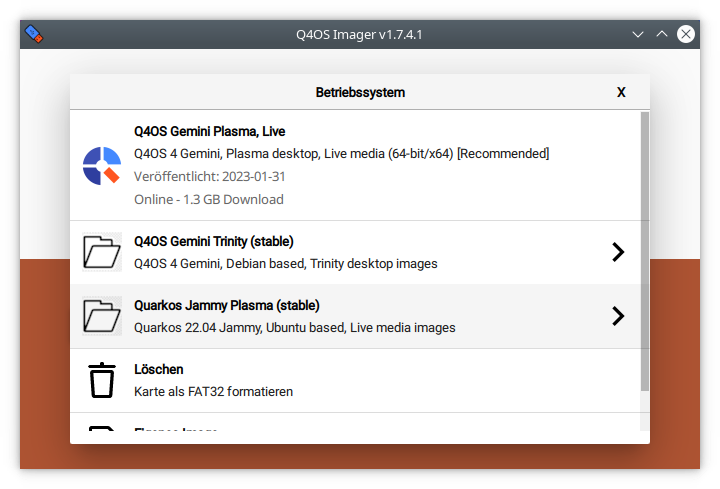
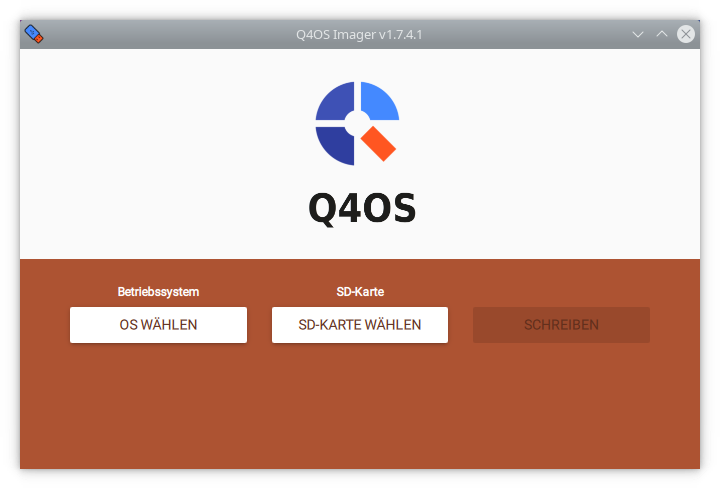
Q4OS imager, an easy way to create Q4OS Live bootable USB
Q4OS imager is a tool for creating Q4OS Live bootable USB. The application enables downloading Q4OS installation and live media images and creating bootable USB in an easy way.
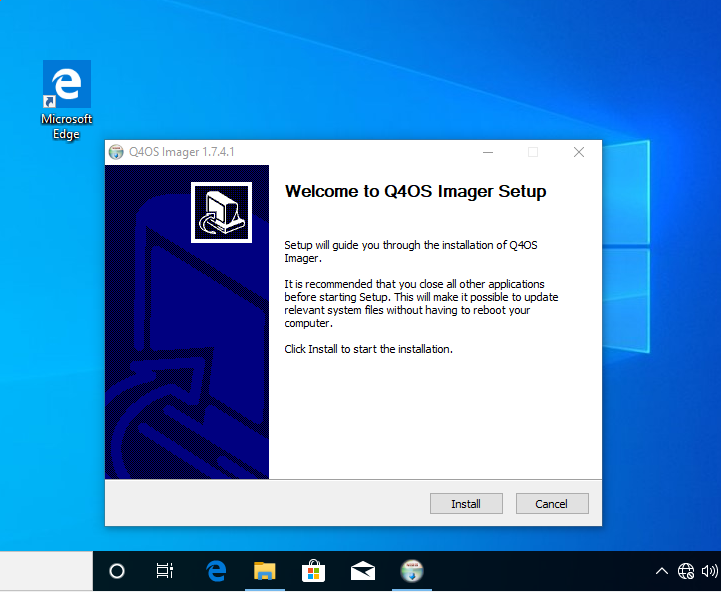
Download for Windows:
https://github.com/q4os/q4os-imager/rel … 7.5-a1.zip
Installation from repositories:
$ sudo apt install q4os-imager
Source code https://github.com/q4os/q4os-imager
Last edited by q4osteam (2026-07-22 12:42)
Offline
#2 2023-04-05 21:24
- hdwolf
- Member
- Registered: 2023-04-01
- Posts: 9
Re: Q4OS imager, an easy way to create Q4OS Live bootable USB
Very good tool. I've remarked it by testing the r4 version of Aquarius, installing the Desktop flavour. Selected the Gemini Plasma Live image with usb-stick and all goes fine. Screenshot shows german language and says "SD-Karte" (SD-card). But an usb-stick is also functional. Proposal, "SD-Karte/USB-Stick" and for the button "Medium wählen".
Offline
#3 2023-04-30 17:50
- q4osteam
- Q4OS Team
- Registered: 2015-12-06
- Posts: 6,248
- Website
Re: Q4OS imager, an easy way to create Q4OS Live bootable USB
New testing version for Windows has been released, download https://q4os.sourceforge.io/download/q4 … .7.4.1.zip
Offline
#4 2024-07-29 22:13
- q4osteam
- Q4OS Team
- Registered: 2015-12-06
- Posts: 6,248
- Website
Re: Q4OS imager, an easy way to create Q4OS Live bootable USB
We plan to sign Q4OS imager for Windows with a dedicated signature, so the application will not show security confirmation dialogues.
Offline
#5 2024-11-29 16:06
- niftyprose
- Member
- Registered: 2021-04-10
- Posts: 48
Re: Q4OS imager, an easy way to create Q4OS Live bootable USB
I tried Imager for the first time today, and got a stroppy note saying that it couldn't open /dev/sda.
I then went old-school and typed the classic command into the terminal:
sudo dd bs=4M if=/home/yrmomma/Downloads/q4os-5.7-x64.r1.iso of=/dev/sda status=progress oflag=sync
Worked first time. Readers can draw their own conclusions.
Offline
#6 2024-11-29 16:19
- q4osteam
- Q4OS Team
- Registered: 2015-12-06
- Posts: 6,248
- Website
Re: Q4OS imager, an easy way to create Q4OS Live bootable USB
What system did you run the imager on ?
I tried Imager for the first time today, and got a stroppy note saying that it couldn't open /dev/sda.
You may need to unmount the drive first.
sudo dd bs=4M if=/home/yrmomma/Downloads/q4os-5.7-x64.r1.iso of=/dev/sda status=progress oflag=sync
You can do that easier way:
$ sudo cp bootable.iso /dev/sdx
see https://www.q4os.org/dqa011.html#install.1
Don't do that on a mounted drive.
Last edited by q4osteam (2024-11-29 16:22)
Offline
#7 2024-12-25 08:30
- cdoublejj
- Member
- Registered: 2024-12-25
- Posts: 2
Re: Q4OS imager, an easy way to create Q4OS Live bootable USB
sudo apt install q4os-imager --> E: Unable to locate package q4os-imager
Offline
#8 2024-12-25 08:38
- cdoublejj
- Member
- Registered: 2024-12-25
- Posts: 2
Re: Q4OS imager, an easy way to create Q4OS Live bootable USB
* Thats on PopOs btw, not arch
Offline
#9 2025-08-27 06:10
- Taige
- Member
- Registered: 2025-08-19
- Posts: 39
Re: Q4OS imager, an easy way to create Q4OS Live bootable USB
Using different methods such as ventoy or rufus, could it cause problems when installing Q4os?
Offline
#10 2025-08-27 19:37
- crosscourt
- Banned
- Registered: 2017-05-07
- Posts: 2,706
Re: Q4OS imager, an easy way to create Q4OS Live bootable USB
I've used Rufus as well as other imagers to create a bootable drive and really haven't had any issues.
Offline
#11 2026-04-15 09:27
- alfredo
- Member
- Registered: 2026-04-15
- Posts: 4
Re: Q4OS imager, an easy way to create Q4OS Live bootable USB
It's worth mentioning that this tool is currently only x64, and would not run on a x86 (32-bit system).
Otherwise it works wonderfully on a 64-bit system. Thank you ?️
Offline
#12 2026-04-15 09:38
- q4osteam
- Q4OS Team
- Registered: 2015-12-06
- Posts: 6,248
- Website
Re: Q4OS imager, an easy way to create Q4OS Live bootable USB
Imager should work for 32bit too, so if not, it's a bug. Would you specify your 32bit sytem, so we can investigate ?
Offline
#13 2026-04-15 10:26
- alfredo
- Member
- Registered: 2026-04-15
- Posts: 4
Re: Q4OS imager, an easy way to create Q4OS Live bootable USB
Sure...
Windows 10
Version 22H2 (Buid 19045.6456)
32-bit OS, x64 CPU
I know, I know.. I didn't set up this system like this. Don't ask me why the system is 32-bit. I just want to get rid of it.
Offline
#14 2026-04-15 10:28
- alfredo
- Member
- Registered: 2026-04-15
- Posts: 4
Re: Q4OS imager, an easy way to create Q4OS Live bootable USB
When I try running the imager, a message in a wide blue box with white text says:
This app can't run on your PC
To find a version for your PC, check with the software publisher.
<Close>
Offline
#15 2026-04-15 10:41
- q4osteam
- Q4OS Team
- Registered: 2015-12-06
- Posts: 6,248
- Website
Re: Q4OS imager, an easy way to create Q4OS Live bootable USB
Thanks we will investigate.
Offline
#16 2026-04-15 14:34
- alfredo
- Member
- Registered: 2026-04-15
- Posts: 4
Re: Q4OS imager, an easy way to create Q4OS Live bootable USB
Kindly note that the installer did not create a program shortcut in the Start menu. I had to find it under a path like "C:\Program Files\Q4OS\imager.exe", and run it from there. (I'm not sure about the exe file name, I'm recalling it from my memory). There was also a "cli" exe, but I didn't try it.
Offline
#17 2026-04-15 14:59
- q4osteam
- Q4OS Team
- Registered: 2015-12-06
- Posts: 6,248
- Website
Re: Q4OS imager, an easy way to create Q4OS Live bootable USB
Kindly note that the installer did not create a program shortcut in the Start menu.
Yes, that's a known glitch, however it appears only if you install the program as a substituted user. If you install as a user with administrator permissions, it will create the shortcut for that user in start menu properly. In anyway thanks for the report 
Offline
#18 2026-07-17 16:28
- q4osteam
- Q4OS Team
- Registered: 2015-12-06
- Posts: 6,248
- Website
Re: Q4OS imager, an easy way to create Q4OS Live bootable USB
Source code is public https://github.com/q4os/q4os-imager , everyone is welcome to create issues https://github.com/q4os/q4os-imager/issues
Offline
#19 2026-07-20 18:23
- Midas
- Member

- Registered: 2017-12-15
- Posts: 266
Re: Q4OS imager, an easy way to create Q4OS Live bootable USB
Great tool, especially because it allows for all-in-one access to every Q4OS installation media under Windows. 
Here's an additional finding: I extracted the installer to a folder in my Windows desktop (with an app called Universal Extractor or UniExtract) and it still ran fine (didn't test the actual downloading, though).
May I suggest that you make this an option when running Q4OS Imager installer, so it could claim so-called Windows portability?
( Rufus has it, BTW; for further info, check https://www.portablefreeware.com/faq.php )
Last edited by Midas (2026-07-20 18:25)
Offline
#20 2026-07-21 12:59
- joschalbertino
- Member
- Registered: 2026-07-21
- Posts: 1
Re: Q4OS imager, an easy way to create Q4OS Live bootable USB
Where can I download the newest version of Q4OS- Imager I can`t find it on github? In witch Folder must I seek in this Source (:github.com/q4os/q4os-imager), so I had downloaded this one here (:q4os.sourceforge.io/download/q4 … -1.7.5.zip)
Can anybody help?
Offline
#21 2026-07-21 13:03
- q4osteam
- Q4OS Team
- Registered: 2015-12-06
- Posts: 6,248
- Website
Re: Q4OS imager, an easy way to create Q4OS Live bootable USB
Welcome to the forum @joschalbertino
The official download for Windows you find link in the OP https://www.q4os.org/forum/viewtopic.ph … 439#p24439
Offline
#22 2026-07-22 12:20
- q4osteam
- Q4OS Team
- Registered: 2015-12-06
- Posts: 6,248
- Website
Re: Q4OS imager, an easy way to create Q4OS Live bootable USB
We have just released new q4os-imager version 1.7.5-a1. It's immediately available for download or install from repositories.
Offline