You are not logged in.
- Topics: Active | Unanswered
Pages: 1
#1 2026-01-24 19:34
- Totone
- Member
- Registered: 2026-01-20
- Posts: 41
Directory / not access
Hello,
From Dolphin, I no longer have access to
the / directory. All other directories are present
.
But in recent locations, / is missing.
I restored the timeshift, but it's still the same.
Do you have any idea how this happened,
How to fix it, or what to do to remedy the situation?
Regards,
Last edited by Totone (2026-02-02 11:06)
Offline
#2 2026-01-25 12:19
- hchiper
- Member

- From: Belgium
- Registered: 2020-07-28
- Posts: 788
Re: Directory / not access
Type just a slash in Dolphin's address bar and hit Enter.
You can also open a Terminal and type `$ dolphin "/"`.
Note that you will never see the root of the file system "/" in Dolphin right panel.
Most probably you'll see it in Dolphin's "Devices" section rather than "Recent locations".
Q4OS machine: Samsung R519 - Pentium T4200 2.0 GHz - 4 GB RAM - 500 GB SSD
Offline
#3 2026-01-25 16:14
- Totone
- Member
- Registered: 2026-01-20
- Posts: 41
Re: Directory / not access
Hello,
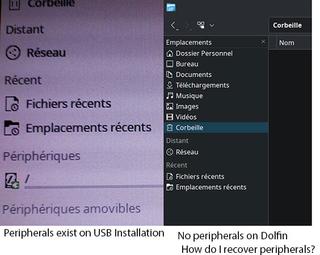
Thanks for the reply, I was wrong, but it's the "Devices" tab that's no longer displayed on the left in Dolphin.
I do have "Recent Files" and "Recent Locations," and I don't know how to get the "Devices" tab back.
Regards
Offline
#4 2026-01-25 18:15
- hchiper
- Member
- From: Belgium
- Registered: 2020-07-28
- Posts: 788
Re: Directory / not access
I think you can right-click somewhere in the left panel and select to display everything.
Very user unfriendly...
Q4OS machine: Samsung R519 - Pentium T4200 2.0 GHz - 4 GB RAM - 500 GB SSD
Offline
#5 2026-01-26 16:22
- Totone
- Member
- Registered: 2026-01-20
- Posts: 41
Re: Directory / not access
Excuse me, but why is it "Very user unfriendly"?
Excusez-moi mais en quoi ai-je été "Très peu convivial".
Offline
#6 2026-01-26 16:57
- hchiper
- Member
- From: Belgium
- Registered: 2020-07-28
- Posts: 788
Re: Directory / not access
I meant that the way one have to find how to display devices is unfriendly (one would expect to have a parameter in the settings, but there is none).
Q4OS machine: Samsung R519 - Pentium T4200 2.0 GHz - 4 GB RAM - 500 GB SSD
Offline
#7 2026-01-26 18:12
- Totone
- Member
- Registered: 2026-01-20
- Posts: 41
Re: Directory / not access

Offline
#8 2026-01-26 22:27
- hchiper
- Member
- From: Belgium
- Registered: 2020-07-28
- Posts: 788
Re: Directory / not access
Have you read the first line in post #4 or does it not work?
Q4OS machine: Samsung R519 - Pentium T4200 2.0 GHz - 4 GB RAM - 500 GB SSD
Offline
#9 2026-01-28 17:54
- Totone
- Member
- Registered: 2026-01-20
- Posts: 41
Re: Directory / not access
Yes, I read it, and right-clicking doesn't work.
I'm considering reinstalling everything.
Thank you for your help.
Offline
#10 2026-01-28 21:35
- hchiper
- Member
- From: Belgium
- Registered: 2020-07-28
- Posts: 788
Re: Directory / not access
No contextual menu on right-click? Or no option to enable/activate?
Q4OS machine: Samsung R519 - Pentium T4200 2.0 GHz - 4 GB RAM - 500 GB SSD
Offline
Pages: 1