You are not logged in.
- Topics: Active | Unanswered
Pages: 1
#1 2026-01-24 19:34
- Totone
- Member
- Registered: 2026-01-20
- Posts: 64
[Resolved] Directory / not access
Hello,
From Dolphin, I no longer have access to
the / directory. All other directories are present
.
But in recent locations, / is missing.
I restored the timeshift, but it's still the same.
Do you have any idea how this happened,
How to fix it, or what to do to remedy the situation?
Regards,
[Resolved]
Last edited by Totone (2026-07-23 10:56)
Offline
#2 2026-01-25 12:19
- hchiper
- Member

- From: Belgium
- Registered: 2020-07-28
- Posts: 821
Re: [Resolved] Directory / not access
Type just a slash in Dolphin's address bar and hit Enter.
You can also open a Terminal and type `$ dolphin "/"`.
Note that you will never see the root of the file system "/" in Dolphin right panel.
Most probably you'll see it in Dolphin's "Devices" section rather than "Recent locations".
Q4OS machine: Samsung R519 - Pentium T4200 2.0 GHz - 4 GB RAM - 500 GB SSD
Offline
#3 2026-01-25 16:14
- Totone
- Member
- Registered: 2026-01-20
- Posts: 64
Re: [Resolved] Directory / not access
Hello,
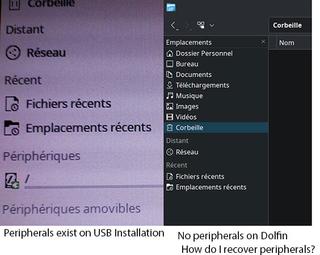
Thanks for the reply, I was wrong, but it's the "Devices" tab that's no longer displayed on the left in Dolphin.
I do have "Recent Files" and "Recent Locations," and I don't know how to get the "Devices" tab back.
Regards
Offline
#4 2026-01-25 18:15
- hchiper
- Member
- From: Belgium
- Registered: 2020-07-28
- Posts: 821
Re: [Resolved] Directory / not access
I think you can right-click somewhere in the left panel and select to display everything.
Very user unfriendly...
Q4OS machine: Samsung R519 - Pentium T4200 2.0 GHz - 4 GB RAM - 500 GB SSD
Offline
#5 2026-01-26 16:22
- Totone
- Member
- Registered: 2026-01-20
- Posts: 64
Re: [Resolved] Directory / not access
Excuse me, but why is it "Very user unfriendly"?
Excusez-moi mais en quoi ai-je été "Très peu convivial".
Offline
#6 2026-01-26 16:57
- hchiper
- Member
- From: Belgium
- Registered: 2020-07-28
- Posts: 821
Re: [Resolved] Directory / not access
I meant that the way one have to find how to display devices is unfriendly (one would expect to have a parameter in the settings, but there is none).
Q4OS machine: Samsung R519 - Pentium T4200 2.0 GHz - 4 GB RAM - 500 GB SSD
Offline
#7 2026-01-26 18:12
- Totone
- Member
- Registered: 2026-01-20
- Posts: 64
Re: [Resolved] Directory / not access

Offline
#8 2026-01-26 22:27
- hchiper
- Member
- From: Belgium
- Registered: 2020-07-28
- Posts: 821
Re: [Resolved] Directory / not access
Have you read the first line in post #4 or does it not work?
Q4OS machine: Samsung R519 - Pentium T4200 2.0 GHz - 4 GB RAM - 500 GB SSD
Offline
#9 2026-01-28 17:54
- Totone
- Member
- Registered: 2026-01-20
- Posts: 64
Re: [Resolved] Directory / not access
Yes, I read it, and right-clicking doesn't work.
I'm considering reinstalling everything.
Thank you for your help.
Offline
#10 2026-01-28 21:35
- hchiper
- Member
- From: Belgium
- Registered: 2020-07-28
- Posts: 821
Re: [Resolved] Directory / not access
No contextual menu on right-click? Or no option to enable/activate?
Q4OS machine: Samsung R519 - Pentium T4200 2.0 GHz - 4 GB RAM - 500 GB SSD
Offline
Pages: 1
- Registered users online in this topic: 0, guests: 1