You are not logged in.
- Topics: Active | Unanswered
#1 2025-08-03 21:58
- theasmitkid
- Member
- From: NCT of Delhi
- Registered: 2025-01-26
- Posts: 357
Trinity Bugs and Issues
KICKER ISSUES
BLOCK_1
this green line, turns orange if i change Active Title Bar color to something random
this line in itself is weird, cant find a way to remove it or theme it manually
the "shadow" above the line can not be removed/changed
the lock and power off buttons' background and the background of username/image above the line is the same as Active Title Bar, hence cannot be themed properly
BONUS: Sometimes dropdown of Widget Color (or other trinity apps' dropdowns) have white borders, even when dark theme is on


.
BLOCK_2
The text color of hovered item's Name doesnt fit with dark theme, renders unreadable
BONUS: Tooltips are not themable

.
BLOCK_3
On clicking the Apps button, the left panel's width increases and right panel's items become only partially visible

.
BLOCK_4
theasmitkid wrote:the reason might be the huge lengths of
RecentAppsStat= (10901 characters)
...
FirstSeenApps= (5873 characters)
inside file
~/.trinity/share/config/kickerrcis there a way to reduce/clear it?
.
BLOCK_5
Sometimes when trying to open menu but it doesn't open on the first try so you click the button repeatedly and then when it shows up and you close it OR it just opens and closes repeatedly and closes, keyboard stops working, I can no longer register keypresses.
To fix it you need to open and close menu one more time, after that i can input keyboard stokes as normal
.
COMPTON-TDE ISSUES
BLOCK_1: Partially Fixed (it's white now)!
KColorEdit renders background inside its window somehow

.
TDEIO ISSUES
BLOCK_1
Trash icon showing empty if item was deleted via gvfs (thunar), but opening tdeio's trash (konqueror) shows there's trash inside
tdeio and gvfs(gio) dont share their trash between various partitions

.
BLOCK_2
tdeio (konqueror) cannot access smb while gvfs (Thunar) can, meanwhile both can access ftp


.
THEMING ISSUES
BLOCK_1
While selecting shortcut and in advanced more, the shortcut text is not themed correctly, rendering it unreadable (similar to BLOCK_4, BLOCK_7 and BLOCK_9)

.
BLOCK_2
The hovered dropdown arrow key for trinity programs dont have proper icon for dark theme, making it hard to see

.
BLOCK_3
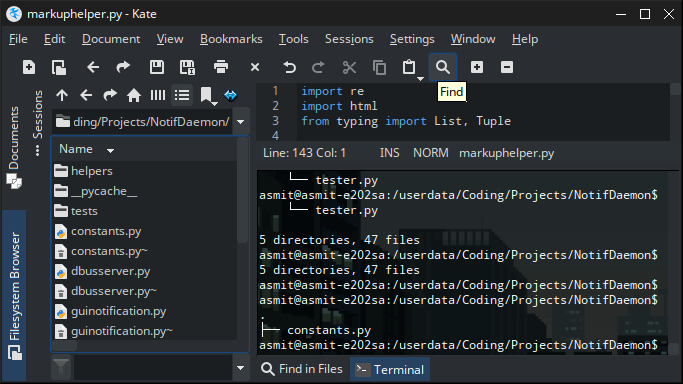
Icons in kate's sidebar is not rendered properly, maybe missing icons

.
BLOCK_4: FIXED!
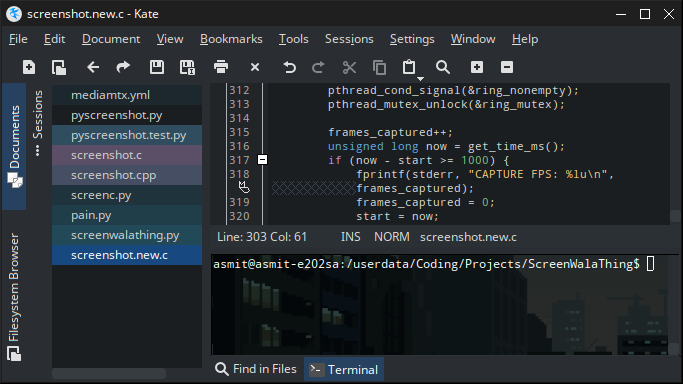
no theming for kate's konsole (similar to BLOCK_1, BLOCK_7 and BLOCK_9)
right click on kate's console, go to Settings, check Use Konsole's Settings

.
BLOCK_5
Example Text not themed in Control Panel/Country/Region & Language

.
BLOCK_6
Disabled buttons not themed in konqueror

.
BLOCK_7
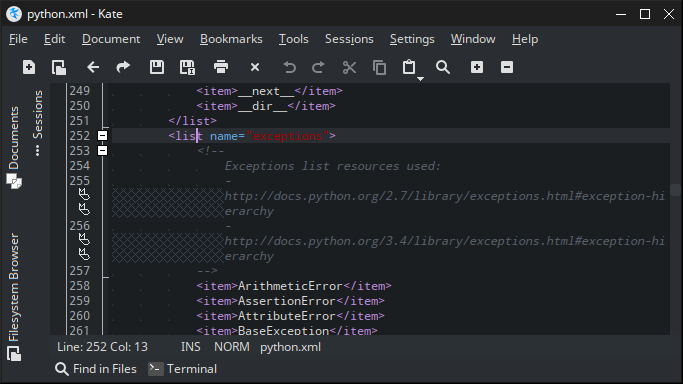
Code "blocks" icon not themed (the '-' in the yellow box) (similar to BLOCK_1, BLOCK_4 and BLOCK_9)
.
BLOCK_8
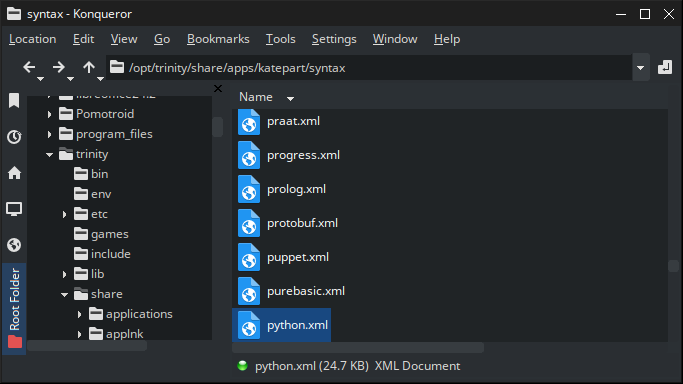
Close Buttons in Konqueror's sidebar is not themed when multiple view is enabled
.
BLOCK_9: FIXED!
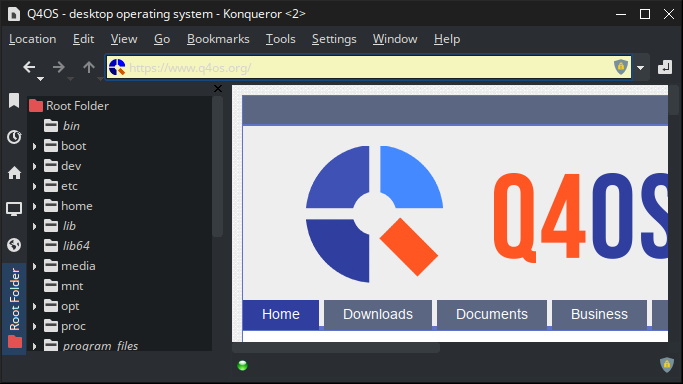
Konqueror Location bar's background not themed when visiting websites (similar to BLOCK_1, BLOCK_4 and BLOCK_7)
.
BLOCK_10
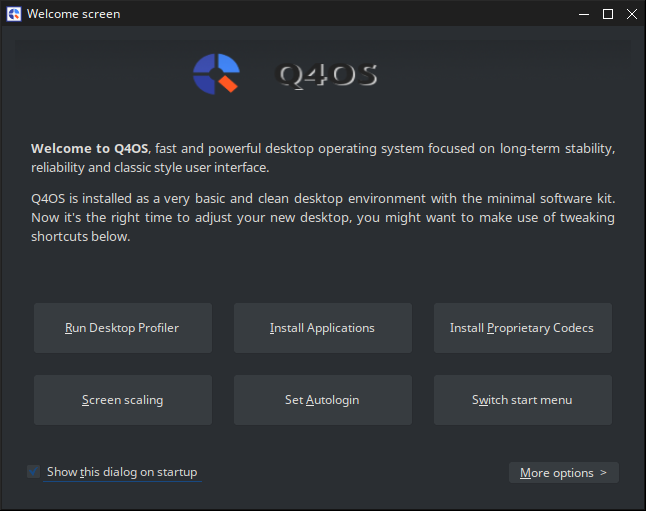
Q4OS Icon is not themed
.
BLOCK_11: FIXABLE!
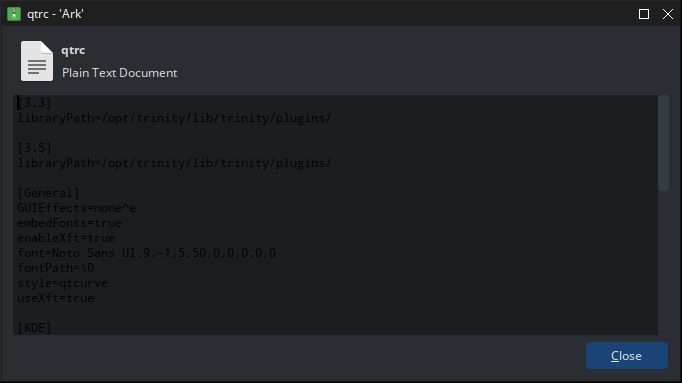
Ark's embedded advanced text viewer not themed
Will be fixed if using themes which support Kate theming like Timir
.
KATE ISSUES
BLOCK_1
When pressing Keyboard Shortcuts in kate's konsole sometimes executes shortcuts in kate and sometimes in konsole
.
for example, Shift+Insert (to paste clipboard content) in konsole, pastes content in kate
but just after that, pressing Ctrl+Z doesn't undo the paste in kate but it just runs Ctrl+Z in konsole
.
BLOCK_2
When there are multiple files open, suppose a, b and c. The currently open file be a, then if you right click to close file c, file a gets closed and file c opens.. I think this issue wasn't in Q4OS 5. This has led to loss of a lot of progress in my codes (especially when I have some important detail in previous state, reopening file resets undo/redo)
Last edited by theasmitkid (2025-10-16 09:14)
Coding & Robotics Enthusiast | Windows 7 x86 @ n2600 · 2GB · 320GB HDD (No graphics acceleration available in linux)
Offline
#2 2025-08-03 22:07
- q4osteam
- Q4OS Team

- Registered: 2015-12-06
- Posts: 6,440
- Website
Re: Trinity Bugs and Issues
Thanks, we will check them all.
Offline
#3 2025-08-03 22:26
- theasmitkid
- Member
- From: NCT of Delhi
- Registered: 2025-01-26
- Posts: 357
Re: Trinity Bugs and Issues
added kicker/block-4 to original post
Last edited by theasmitkid (2025-08-09 08:15)
Coding & Robotics Enthusiast | Windows 7 x86 @ n2600 · 2GB · 320GB HDD (No graphics acceleration available in linux)
Offline
#4 2025-08-05 11:32
- q4osteam
- Q4OS Team
- Registered: 2015-12-06
- Posts: 6,440
- Website
Re: Trinity Bugs and Issues
Please edit the original post and add kicker issues / block 4. We will move this topic to the bugs section soon. We will also post some replies a bit later. In anyway we are addressing issues reported, thanks.
Offline
#5 2025-08-16 11:53
- theasmitkid
- Member
- From: NCT of Delhi
- Registered: 2025-01-26
- Posts: 357
Re: Trinity Bugs and Issues
added kicker/block-5
Coding & Robotics Enthusiast | Windows 7 x86 @ n2600 · 2GB · 320GB HDD (No graphics acceleration available in linux)
Offline
#6 2025-08-17 12:42
- theasmitkid
- Member
- From: NCT of Delhi
- Registered: 2025-01-26
- Posts: 357
Re: Trinity Bugs and Issues
added THEMING ISSUES/block-7
added THEMING ISSUES/block-8
added THEMING ISSUES/block-9
Coding & Robotics Enthusiast | Windows 7 x86 @ n2600 · 2GB · 320GB HDD (No graphics acceleration available in linux)
Offline
#7 2025-08-17 22:03
- theasmitkid
- Member
- From: NCT of Delhi
- Registered: 2025-01-26
- Posts: 357
Re: Trinity Bugs and Issues
marked THEMING ISSUES/block-4 as fixed!
(gosh i wish i knew earlier.. loving kate more)
added KATE ISSUES/block-1
Coding & Robotics Enthusiast | Windows 7 x86 @ n2600 · 2GB · 320GB HDD (No graphics acceleration available in linux)
Offline
#8 2025-09-08 15:49
- theasmitkid
- Member
- From: NCT of Delhi
- Registered: 2025-01-26
- Posts: 357
Re: Trinity Bugs and Issues
added additional issue to THEMING ISSUES/block-3
Coding & Robotics Enthusiast | Windows 7 x86 @ n2600 · 2GB · 320GB HDD (No graphics acceleration available in linux)
Offline
#9 2025-09-08 15:53
- theasmitkid
- Member
- From: NCT of Delhi
- Registered: 2025-01-26
- Posts: 357
Re: Trinity Bugs and Issues
@q4osteam would these issues be fixed in the upcoming Q4OS 6 or would be released as patched packages later?
Coding & Robotics Enthusiast | Windows 7 x86 @ n2600 · 2GB · 320GB HDD (No graphics acceleration available in linux)
Offline
#10 2025-09-08 16:01
- q4osteam
- Q4OS Team
- Registered: 2015-12-06
- Posts: 6,440
- Website
Re: Trinity Bugs and Issues
First we need to sort and address the particular issues. We will come in touch here some time after Q4OS-6 release and post some replies and surveys. In anyway continue to report that way, it's helpful for us at least to make some view of user's experience.
Offline
#11 2025-09-08 16:29
- theasmitkid
- Member
- From: NCT of Delhi
- Registered: 2025-01-26
- Posts: 357
Re: Trinity Bugs and Issues
got it! thankyou~! 
Coding & Robotics Enthusiast | Windows 7 x86 @ n2600 · 2GB · 320GB HDD (No graphics acceleration available in linux)
Offline
#12 2025-09-13 11:12
- theasmitkid
- Member
- From: NCT of Delhi
- Registered: 2025-01-26
- Posts: 357
Re: Trinity Bugs and Issues
added THEMING ISSUES/block-10
Coding & Robotics Enthusiast | Windows 7 x86 @ n2600 · 2GB · 320GB HDD (No graphics acceleration available in linux)
Offline
#13 2025-09-13 11:17
- theasmitkid
- Member
- From: NCT of Delhi
- Registered: 2025-01-26
- Posts: 357
Re: Trinity Bugs and Issues
added THEMING ISSUES/block-11
Coding & Robotics Enthusiast | Windows 7 x86 @ n2600 · 2GB · 320GB HDD (No graphics acceleration available in linux)
Offline
#14 2025-09-18 04:57
- theasmitkid
- Member
- From: NCT of Delhi
- Registered: 2025-01-26
- Posts: 357
Re: Trinity Bugs and Issues
marked THEMING ISSUES/block-11 as fixable
Coding & Robotics Enthusiast | Windows 7 x86 @ n2600 · 2GB · 320GB HDD (No graphics acceleration available in linux)
Offline
#15 2025-09-26 10:51
- theasmitkid
- Member
- From: NCT of Delhi
- Registered: 2025-01-26
- Posts: 357
Re: Trinity Bugs and Issues
marked THEMING ISSUES/block-9 as fixed in R14.1.5
Last edited by theasmitkid (2025-10-16 09:14)
Coding & Robotics Enthusiast | Windows 7 x86 @ n2600 · 2GB · 320GB HDD (No graphics acceleration available in linux)
Offline
#16 2025-10-13 11:37
- q4osteam
- Q4OS Team
- Registered: 2015-12-06
- Posts: 6,440
- Website
Re: Trinity Bugs and Issues
BLOCK_1
- this green line, turns orange if i change Active Title Bar color to something random
- this line in itself is weird, cant find a way to remove it or theme it manually
- the "shadow" above the line can not be removed/changed
This is not random, but somewhat complementary highlight color. Although we don't consider this one as an issue, we may think about to add an option to hide the line.
Offline
#17 2025-10-13 15:44
- theasmitkid
- Member
- From: NCT of Delhi
- Registered: 2025-01-26
- Posts: 357
Re: Trinity Bugs and Issues
This is not random, but somewhat complementary highlight color. Although we don't consider this one as an issue, we may think about to add an option to hide the line.
An option to hide it would be much appreciated!
Coding & Robotics Enthusiast | Windows 7 x86 @ n2600 · 2GB · 320GB HDD (No graphics acceleration available in linux)
Offline
#18 2025-10-13 15:45
- theasmitkid
- Member
- From: NCT of Delhi
- Registered: 2025-01-26
- Posts: 357
Re: Trinity Bugs and Issues
marked COMPTON-TDE ISSUES/block-1 as partially fixed in R14.1.5
Coding & Robotics Enthusiast | Windows 7 x86 @ n2600 · 2GB · 320GB HDD (No graphics acceleration available in linux)
Offline
#19 2025-10-15 11:33
- q4osteam
- Q4OS Team
- Registered: 2015-12-06
- Posts: 6,440
- Website
Re: Trinity Bugs and Issues
BLOCK_2
- The text color of hovered item's Name doesnt fit with dark theme, renders unreadable
- BONUS: Tooltips are not themable
We can confirm both issues. Both are reproducible on plain Debian/Trinity with dark colors configured. So we consider them as upstream Trinity issues.
Offline
#20 2025-10-15 16:58
- theasmitkid
- Member
- From: NCT of Delhi
- Registered: 2025-01-26
- Posts: 357
Re: Trinity Bugs and Issues
added kate issues/block-2
Coding & Robotics Enthusiast | Windows 7 x86 @ n2600 · 2GB · 320GB HDD (No graphics acceleration available in linux)
Offline
#21 2025-10-16 11:01
- q4osteam
- Q4OS Team
- Registered: 2015-12-06
- Posts: 6,440
- Website
Re: Trinity Bugs and Issues
BLOCK_3 - On clicking the Apps button, the left panel's width increases and right panel's items become only partially visible
Yes, that's by design, no bug.
Offline
#22 2025-10-17 12:17
- q4osteam
- Q4OS Team
- Registered: 2015-12-06
- Posts: 6,440
- Website
Re: Trinity Bugs and Issues
BLOCK_4 - Edit 2: menu, hangs a lottt
We are not able to reproduce, please specify more precisely. What menu, what hangs exactly and when.
Offline
#23 2025-10-17 12:44
- theasmitkid
- Member
- From: NCT of Delhi
- Registered: 2025-01-26
- Posts: 357
Re: Trinity Bugs and Issues
For example when trying to search for something, there's a 2-30 sec delay when it stops responding
Coding & Robotics Enthusiast | Windows 7 x86 @ n2600 · 2GB · 320GB HDD (No graphics acceleration available in linux)
Offline
#24 2025-10-17 12:54
- q4osteam
- Q4OS Team
- Registered: 2015-12-06
- Posts: 6,440
- Website
Re: Trinity Bugs and Issues
We are unable to reproduce. Searching works fine here. Are you able to reproduce that when booting from the live media ?
Offline
#25 2025-10-17 17:27
- theasmitkid
- Member
- From: NCT of Delhi
- Registered: 2025-01-26
- Posts: 357
Re: Trinity Bugs and Issues
Umm.. no, it happens after prolonged usage, during which a lot of programs need to be installed n removed. Eventually the config file entry gets larger and causes lagging on slow/weak machine like mine
Coding & Robotics Enthusiast | Windows 7 x86 @ n2600 · 2GB · 320GB HDD (No graphics acceleration available in linux)
Offline
- Registered users online in this topic: 0, guests: 1