You are not logged in.
- Topics: Active | Unanswered
#26 2025-08-07 08:51
- q4osteam
- Q4OS Team

- Registered: 2015-12-06
- Posts: 6,437
- Website
Re: Why not use Trinity Desktop ?
... having a tool to do what Plasma can do natively is just a department of redundancy department issue, and so I specifically want to AVOID the Q4OS tools in plasma.
Yes, plain Debian is just fine. We focus on making life easier for users, so installing, configuring, and using Q4OS should be more convenient than for Debian, but still keep the OS as pure as possible. We avoid modifying the base and honor Debian approach completely. So the tools are additional, that's the point.
If you need no additional tools, it wouldn't make much sense to install Q4OS, however you could just ignore the tools and use Q4OS the same way as you are using Debian. And the question. Could you imagine any tool in Q4OS Plasma edition, that would convince you to use it ?
Last edited by q4osteam (2025-08-07 11:07)
Offline
#27 2025-08-08 05:29
- tlmiller76
- Member
- From: AZ, USA
- Registered: 2016-11-29
- Posts: 503
Re: Why not use Trinity Desktop ?
Latest version of Plasma desktop instead of the Debian repos version. THAT would earn my immediate usage on every Debian machine I have.
Q4OS Trinity machine - HP Probook 445 G11. AMD Ryzen 7 7735U, 16GB DDR5, 512GB m.2 NVMe SSD, Radeon RX780M, MediaTek MT7922 (AMD RX616) Wifi 6E + BT 5.2, 14" WUXGA 400-nit LCD.
Offline
#28 2025-08-08 18:11
- crosscourt
- Banned
- Registered: 2017-05-07
- Posts: 2,706
Re: Why not use Trinity Desktop ?
Id second that as once youve used the newer Plasma versions, its tough to go back.
Offline
#29 2025-08-09 06:05
- nathanjhill
- Member
- Registered: 2024-12-11
- Posts: 22
Re: Why not use Trinity Desktop ?
My big issue with TDE, which I use on a 2GB RAM old Chromebook, is no touchpad configurationp preferences. I much prefer the Apple style touchpad where the whole touchpad is for moving the mouse pointer. Click for left click. Two finger click for right click. I don't want weird little zones that do different things. Even after modifying the X configs, it hasn't changed.
Also, generally not a fan of any of the themes with TDE. Just seem ugly, clunky, and old.
But KDE works great, even if it weights down my other "former" Chromebook.
Offline
#30 2025-08-09 08:20
- theasmitkid
- Member
- From: NCT of Delhi
- Registered: 2025-01-26
- Posts: 357
Re: Why not use Trinity Desktop ?
My big issue with TDE, which I use on a 2GB RAM old Chromebook, is no touchpad configurationp preferences. I much prefer the Apple style touchpad where the whole touchpad is for moving the mouse pointer. Click for left click. Two finger click for right click. I don't want weird little zones that do different things. Even after modifying the X configs, it hasn't changed.
Touchpad configuration for TDE was added in R14.1.3, you might wanna check out the latest beta of Q4OS which includes these updates along with a lot of new features since Q4OS 5 which uses R14.1.1
Also, generally not a fan of any of the themes with TDE. Just seem ugly, clunky, and old.
Do check out my theme , if you're interested i would share it here
Also see my solution to some tde issues on Tips & Tricks
TDE: Configure Win Key to Allow Win+<Key> Combinations
TDE: Keyboard Binding for Window Tiling
Coding & Robotics Enthusiast | Windows 7 x86 @ n2600 · 2GB · 320GB HDD (No graphics acceleration available in linux)
Offline
#31 2025-08-09 09:09
- q4osteam
- Q4OS Team
- Registered: 2015-12-06
- Posts: 6,437
- Website
Re: Why not use Trinity Desktop ?
@nathanjhill
Thanks for the specific issue input. Yes, some sort of TDE touchpad configurationmodule is available in Q4OS 6.
Offline
#32 2025-08-09 12:33
- bugmenot
- Member
- Registered: 2021-09-28
- Posts: 21
Re: Why not use Trinity Desktop ?
almost everything in trinty has a solution, touchpad i installed synaptics driver and add two finger scrolling and edge scrolling at once
also two finger tap for right click three finger tap for middle click, all is just working
Offline
#33 2025-08-12 20:32
- FunnyBoat
- Member
- Registered: 2025-08-12
- Posts: 8
Re: Why not use Trinity Desktop ?
Thanks for the input, we need to get specific issues here to be able to address them, not so general ones.
Hello and thanks for great OS! I love Q4OS very much!
Now about your question.
First - it's Main Menu in "WinXP/Win7 like" themes (Spring/Slide/etc.). I know in original Windows 7 it open like in Q4OS "WinXP/Win7 like" themes, but I like then it open new tree/panel left from Main Menu and then again and agian. Can you do some version "WinXP/Win7 like" themes with this Main Menu kind?
p.S. For original Win7 (wich I still use) I use "Classic Shell 4.3.1 -> Classic Start Menu" program to get Main Menu I want to have. Here www_classicshell_net/features/ it called "Two columns".
p.p.S. In "Win98 like" Wine_classic theme Main Menu works like "Classic".
So just add choise of themes with different Main Menu versions, something as "Spring with Classic menu", "Spring with Two columns menu", "Slide with Classic menu", "Slide with Two columns menu", "Debonaire with Classic menu", "Debonaire with Two columns menu" and so on.
Second (and it's REAL PROBLEM for me) - Internet connection. My ISP use PPTP VPN and I simply don't know how to connect from Trinity (I even simply can't make connection!). And in KDE Plasma it works perfect "from box" (PPTP VPN connection making, connection settings change, changing MAC-address and etc.). So i'm just FORCED to use KDE because of this Trinity BIG PROBLEM.
Sorry for my bad english and I hope you can solve this problems (especially Second one!).
Offline
#34 2025-08-13 00:33
- seb3773
- Member

- From: France
- Registered: 2023-11-01
- Posts: 285
Re: Why not use Trinity Desktop ?
almost everything in trinty has a solution, touchpad i installed synaptics driver and add two finger scrolling and edge scrolling at once
also two finger tap for right click three finger tap for middle click, all is just working
For the two finger scrolling, you just need to edit libinput config file (/etc/X11/xorg.conf.d/60-libinput.conf) like this:
Section "InputClass"
Identifier "libinput touchpad catchall"
MatchIsTouchpad "on"
MatchDevicePath "/dev/input/event*"
Driver "libinput"
Option "Tapping" "true"
Option "ScrollMethod" "two-finger"
Option "ButtonMapping" "1 1 3 4 5 6 7"
#Option "AccelSpeed" "0"
#for other options see 'man libinput'
EndSection
and it works well 
note this line: Option "ButtonMapping" "1 1 3 4 5 6 7"
this is because I have a rather large touchpad on my laptop, and I don't want the middleclick function, it's just anoying to have a "paste function" instead of the left click when I click too much near the center of the pad, so I just want it to be like a left click.
Debian & Q4OS (TDE!!), low-level C, ASM (z80/68k/x86/ARM64), embedded systems, CPU architectures (RISC-V, binary formats, assembly), retro-computing, metal music, guitar and sci-fi.
Offline
#35 2025-08-13 15:47
- Hatake
- Member
- From: https://cocmod.net/
- Registered: 2025-08-13
- Posts: 2
Re: Why not use Trinity Desktop ?
Touchpad configuration for TDE was added in R14.1.3, you might wanna check out the latest beta of Q4OS which includes these updates along with a lot of new features since Q4OS 5 which uses R14.1.1
Is this a graphical tool, or does it still require manual configuration through a terminal?
Offline
#36 2025-08-13 16:48
- bin
- Member

- From: U.K.
- Registered: 2016-01-28
- Posts: 1,610
Re: Why not use Trinity Desktop ?
Returning to the original topic....thank you for asking the question.
Something I find a bit annoying is the need to run kcmodules --unlock to get to all the settings. It may have had a purpose once upon a time, but surely those days have passed? OK I install/reinstall a lot so maybe others don't notice.
The classic menu is my preference, but it does seem to have too many layers. Could you consider re-arranging it so that when you go to Start>Programs the next flyout is the normal major divisions:-
Accessories
Games
Graphics
Internet
etc etc
That way one is only steps from the program rather than Start>Programs>Accessories>Utilities>Editors>Kwrite for example.
Start>Programs>Accessories>Kwrite would be much nicer.
I know one can get back to the standard Trinity Menu stucture but the Q4OS interpretation of the classic menu is just somehow nicer.
Printing - please use system-config-printer. Anyone who has used any linux will be familiar with it and it is so much better with wireless printers. Yes I know it is GTK but it's the right tool for the job.
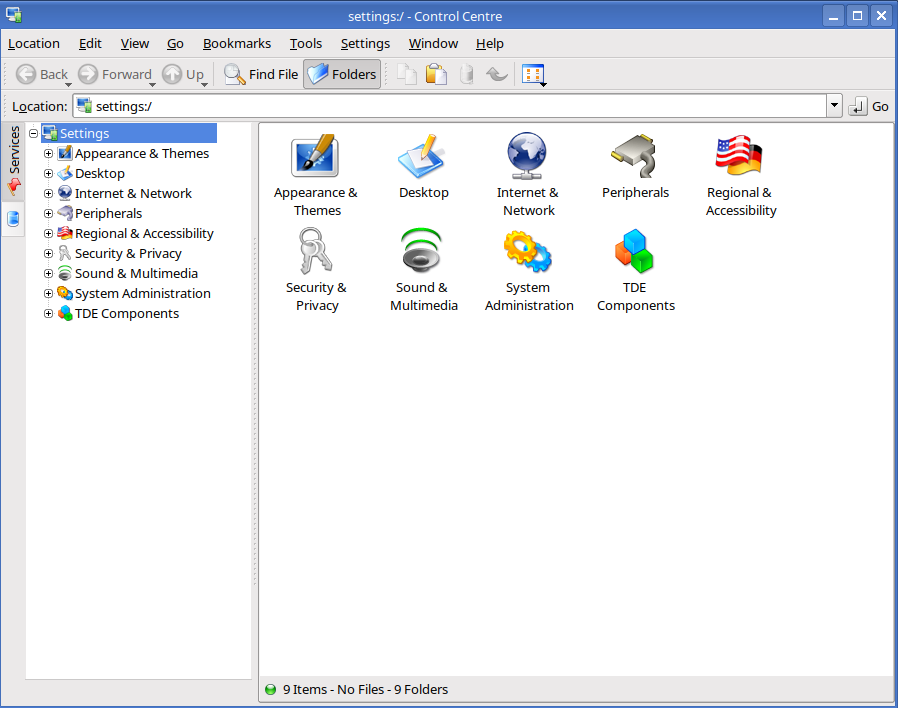
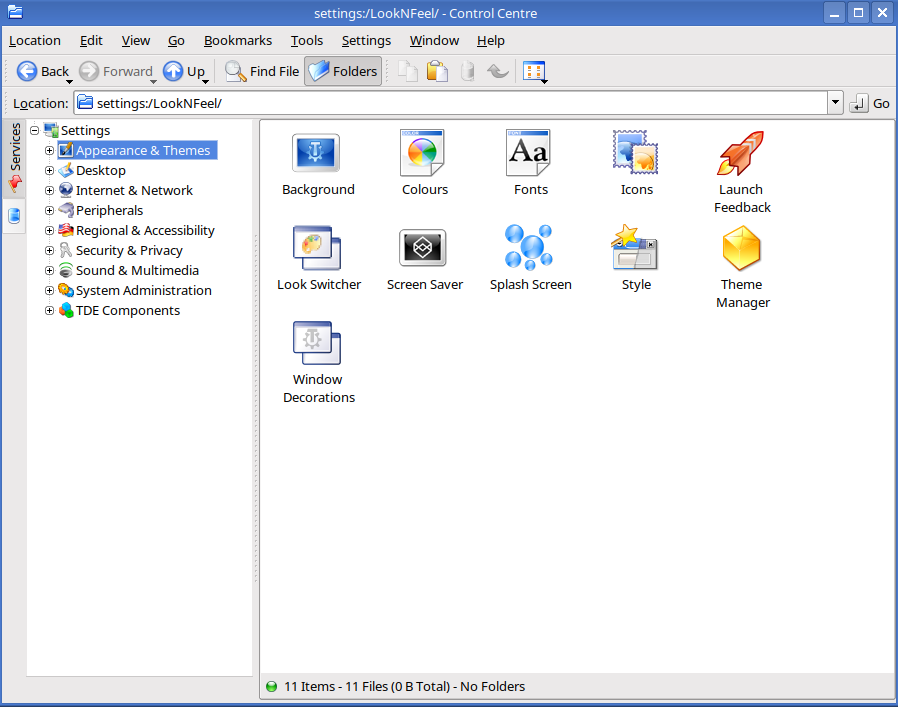
Control Panel - I have tweaked mine a little to resemble the standard Trinity Control panel which Q4OS also used to have. Possible?
It would be so good if there was a way for pdfs to display thumbnails. It can be done using Thunar but I don't really want to use a different file manager just for one thing.
Nothing major - just a few niggles really. Keep up the good work please.
Last edited by bin (2025-08-13 16:50)
Offline
#37 2025-08-13 17:11
- theasmitkid
- Member
- From: NCT of Delhi
- Registered: 2025-01-26
- Posts: 357
Re: Why not use Trinity Desktop ?
theasmitkid wrote:Touchpad configuration for TDE was added in R14.1.3, you might wanna check out the latest beta of Q4OS which includes these updates along with a lot of new features since Q4OS 5 which uses R14.1.1
Is this a graphical tool, or does it still require manual configuration through a terminal?
A graphical tool

Source: https://wiki.trinitydesktop.org/Release … or_R14.1.3
Coding & Robotics Enthusiast | Windows 7 x86 @ n2600 · 2GB · 320GB HDD (No graphics acceleration available in linux)
Offline
#38 2025-08-14 15:29
- BrJPedro
- Member
- From: Monte
- Registered: 2018-03-20
- Posts: 100
Re: Why not use Trinity Desktop ?
@q4osteam
Improve multi-screens experience 
Specifically, tiling a window to the border without moving to the next screen. Like other DE handles it, maybe a grace area for snapping the window without moving to the next monitor outright.
Offline
#39 2025-08-14 15:30
- q4osteam
- Q4OS Team
- Registered: 2015-12-06
- Posts: 6,437
- Website
Re: Why not use Trinity Desktop ?
@bin, @BrJPedro
Thanks for that input.
Offline
#40 2025-08-19 12:04
- josek
- Member
- Registered: 2025-02-23
- Posts: 91
Re: Why not use Trinity Desktop ?
bugmenot wrote:almost everything in trinty has a solution, touchpad i installed synaptics driver and add two finger scrolling and edge scrolling at once
also two finger tap for right click three finger tap for middle click, all is just workingFor the two finger scrolling, you just need to edit libinput config file (/etc/X11/xorg.conf.d/60-libinput.conf) like this:
Section "InputClass"
Identifier "libinput touchpad catchall"
MatchIsTouchpad "on"
MatchDevicePath "/dev/input/event*"
Driver "libinput"
Option "Tapping" "true"
Option "ScrollMethod" "two-finger"
Option "ButtonMapping" "1 1 3 4 5 6 7"
#Option "AccelSpeed" "0"
#for other options see 'man libinput'
EndSectionand it works well
note this line: Option "ButtonMapping" "1 1 3 4 5 6 7"
this is because I have a rather large touchpad on my laptop, and I don't want the middleclick function, it's just anoying to have a "paste function" instead of the left click when I click too much near the center of the pad, so I just want it to be like a left click.
Thanks @seb3773
That tip worked well for me.
Offline
#41 2025-09-16 15:16
- theasmitkid
- Member
- From: NCT of Delhi
- Registered: 2025-01-26
- Posts: 357
Re: Why not use Trinity Desktop ?
@q4osteam maybe if tdebluez (bluetooth manager) had as much features as blueman applet and/or plasma's..
Also making the search in konqueror being able to search files even when complete filename if not provided
Coding & Robotics Enthusiast | Windows 7 x86 @ n2600 · 2GB · 320GB HDD (No graphics acceleration available in linux)
Offline
#42 2025-09-19 12:16
- thunder-key-exchange
- Member
- From: United States
- Registered: 2025-08-05
- Posts: 4
Re: Why not use Trinity Desktop ?
I have been using the x64 based Trinity Desktop (Aquarius) for over a month. It is a versatile and classically textured environment that I enjoy seeing and interacting with whenever I login to my dual boot drive. I have not used Konquerer much, so I do not have much of an opinion on its web browsing efficacy or usability. However, regarding how Trinity might better service users, I have noticed that I cannot connect with WPA3 when using a wireless internet connection. I am not sure if this is a feature of Trinity or Q4OS, as the highest option appears to be WPA2 under Expert Settings within Edit Connections. If the latter part of my post about WPA3 as a Wi-Fi security option might be more suitable in a different forum heading than General discussion, then I can post it elsewhere. In the end, I would definitely recommend Trinity to anyone searching for a simple and fast Q4OS desktop face.
Offline
#43 2025-09-19 12:30
- theasmitkid
- Member
- From: NCT of Delhi
- Registered: 2025-01-26
- Posts: 357
Re: Why not use Trinity Desktop ?
I have noticed that I cannot connect with WPA3 when using a wireless internet connection. I am not sure if this is a feature of Trinity or Q4OS, as the highest option appears to be WPA2 under Expert Settings within Edit Connections. If the latter part of my post about WPA3 as a Wi-Fi security option might be more suitable in a different forum heading than General discussion, then I can post it elsewhere.
You should post it as an issue in the Support section, and maybe on https://mirror.git.trinitydesktop.org/gitea/TDE too
Coding & Robotics Enthusiast | Windows 7 x86 @ n2600 · 2GB · 320GB HDD (No graphics acceleration available in linux)
Offline
#44 2025-09-19 12:49
- thunder-key-exchange
- Member
- From: United States
- Registered: 2025-08-05
- Posts: 4
Re: Why not use Trinity Desktop ?
"You should post it as an issue in the Support section, and maybe on . . ."
Thanks for the help and quick reply! I'll repost it there.
Offline
#45 2025-09-20 18:01
- rbc
- Member
- Registered: 2025-09-06
- Posts: 13
Re: Why not use Trinity Desktop ?
For me it's my limited tastes that have drawn me to Trinity. I'm kind of stuck in the 90s in the way I use computers. My primary communications medium is email, with some use of IRC and USENET. I tend to use the web browser for everything else, for now Falkon, Firefox, and Chromium. I'm not really a big fan of hamburger menus, being more of a keyboard and pointer person. Trackballs are my favorite. I've tried all kinds of things when it comes to PIM solutions. For a while, I was using GNU Emacs Rmail, the diary, and bbdb for my PIM solution. Since then, I've tried claws-mail, Thunderbird, Seamonkey, Evolution, and the modern Kontact suite. So far, I've liked the KDE Kontact suite the best. I run a simple POP3 server for email.
I sat down and imported my contacts, calendar, email, and RSS feeds into the Trinity Kontact suite. Overall, it actually seems a little more robust feeling than the Akonadi based Kontact suite. The primary hangup was Kleopatra. I still use S/MIME. I haven't figured out how to get Kleopatra to work consistantly. I managed to import my p12 file, but when I try to decrypt inbound files, I can't unprotect the private key for some reason. There might be an obvious problem, but I haven't blundered into it yet. I started a Trinity Gitea ticket on this issue:
https://mirror.git.trinitydesktop.org/g … issues/169
I'm trying to get a more complete explanation of the Kleopatra issues together.
As for the "Office" side of things, KOffice runs at lightning speed compared to Libreoffice. I really appriciate that. I realize that KOffice is missing all kinds of features compared to Libreoffice, but this doesn't matter for documents that I create, because they are kind of simple to begin with. I can always launch Libreoffice to deal with documents sent by someone else.
As for Konqueror, I'm neutral on it's capabilities. Chromium and Firefox can be used to deal with the "modern" Internet when required.
So that's my thoughts so far, based on a comple of weeks of experimentation. I think Trinity is pretty slick, and Q4OS provides a supported base to run it on. It's great stuff.
Last edited by rbc (2025-09-20 18:03)
Offline
#46 2025-10-11 00:44
- FRW74
- Member
- Registered: 2025-10-11
- Posts: 3
Re: Why not use Trinity Desktop ?
Hello, new user here, testing Q4OS and TDE. Here are some of my comments regarding the things I see "weird" with TDE:
1. Lack of basic shortcuts (Ctrl + alt + T, the most basic from all shortcuts to open a terminal, is missing). Also trying to find the way of adding the shortcut was a bit tricky
2. Slowness when searching on the TDE Menu. Looking for a keyword takes 3 seconds (not happening with other desktop environments).
3. The "search the internet" option on the TDE Menu is also a weird feature, I don't find it useful to make it open Konqueror and search for something when I misstype a word and hit the Enter button.
4. Konqueror, just, why?
5. Kickoff Menu style in "dropdown" mode does not provide a seamless interaction with it. It's like navigating down 3 levels to get to an application, and if I accidentally missclicked level 2, I need to go back again, and click one more time. Too many clicks just to get to an app.
6. Documents viewer lacks basic functionality. I open it and there is no left panel with Favorites, or most used folders.
I'm an XFCE user, but wanted to try TDE as it's also described as resource friendly. Just sharing my first experience with it.
Will continue using it for a while as I also want to try this distro after I saw it on distrowatch. I'll try to provide more updates after that.
Thanks for your hard work.
Offline
#47 2025-10-11 07:07
- theasmitkid
- Member
- From: NCT of Delhi
- Registered: 2025-01-26
- Posts: 357
Re: Why not use Trinity Desktop ?
1. Lack of basic shortcuts (Ctrl + alt + T, the most basic from all shortcuts to open a terminal, is missing). Also trying to find the way of adding the shortcut was a bit tricky
2. Slowness when searching on the TDE Menu. Looking for a keyword takes 3 seconds (not happening with other desktop environments).
Yeah it is quite slow.. try using tastymenu instead of tmenu, maybe it'd work better. Both of them are kicker applets. There's also kbfx which is alternative to tmenu
edit: also see https://www.q4os.org/forum/viewtopic.ph … 067#p31067
3. The "search the internet" option on the TDE Menu is also a weird feature, I don't find it useful to make it open Konqueror and search for something when I misstype a word and hit the Enter button.
You need to configure the default browser to chrome, etc. well tbh I also don't find this search the internet feature useful either
4. Konqueror, just, why?
It's a pretty cool universal file opener 
5. Kickoff Menu style in "dropdown" mode does not provide a seamless interaction with it. It's like navigating down 3 levels to get to an application, and if I accidentally missclicked level 2, I need to go back again, and click one more time. Too many clicks just to get to an app.
You should configure the menu style to "categories" instead of "Q4OS" (see option in the Q4OS startup splash)
6. Documents viewer lacks basic functionality. I open it and there is no left panel with Favorites, or most used folders.
There are couple alternatives like the koffice suite, kpdf, kghostview, okular.. try using them~ (there are Trinity version as well as modern kde version with quite similar name so make sure you install the proper package)
I'm an XFCE user, but wanted to try TDE as it's also described as resource friendly. Just sharing my first experience with it.
Yup tde is really resource friendly and q4os does a great job preconfiguring various components, there are a lot of apps written in tqt for Trinity which are the lightest and fastest in tde, you just might need to configure couple of them as per your requirement.
There are some users including myself and @seb3773 who like developing apps for TDE.
TDE: Keyboard Binding for Window Tiling
TDE: Configure Win Key to Allow Win+<Key> Combinations
TDE: Timir Theme for Q4OS (not ready yet, might break components)
Post here if you have some ideas related to TDE, I'll consider them in my future developments 
Last edited by theasmitkid (2025-10-12 11:23)
Coding & Robotics Enthusiast | Windows 7 x86 @ n2600 · 2GB · 320GB HDD (No graphics acceleration available in linux)
Offline
#48 2025-10-25 16:35
- Kippykip
- Member

- From: https://kippykip.com
- Registered: 2025-10-25
- Posts: 4
Re: Why not use Trinity Desktop ?
I have been distro hopping for a while in VMs, but holy smokes I just discovered Q4OS Trinity and FINALLY.
A default layout I really like with working SMB support out of the box and a decent file UI.
I never even knew about KDE 3.5 or TDE until now, but this is fantastic from a usability and resource perspective. I used KDE Plasma but tbh other than the file picker thumbnails, I wasn't really a fan and none of the theme options worked. They'd just spit errors.
The installer dialog for .deb files and .qsi files is a nice touch, I really like the familar wizards
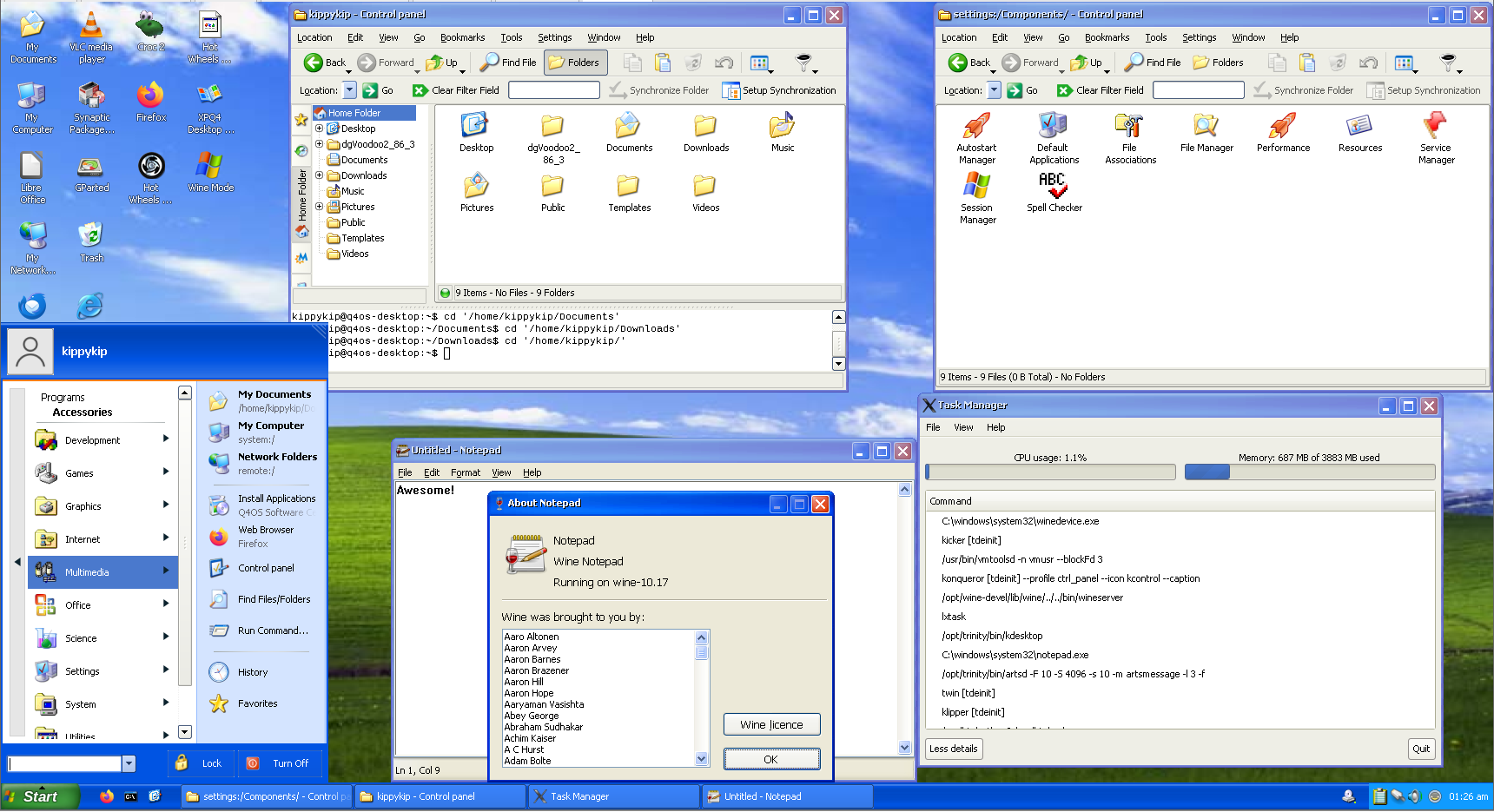
I found a nice XP theme that was incredibly easy to install with the .qsi file, normally installing themes is such a stuff around requiring me to go in the terminal, opening dolphin as root or something sheesh. But no it just worked here, double click and yay.
Anyway this is great! I've been looking at light alternatives as Windows 11 is a mess in it's current state.
One suggestion I have, extracting zips didn't have a context menu for quick actions.
I found a workaround though:
sudo apt install konq-plugins-trinityI feel this should be the default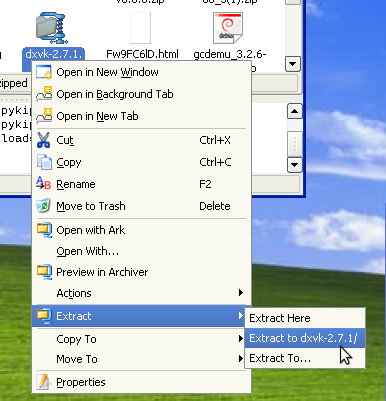
Thanks guys!
Offline
#49 2025-10-25 17:47
- theasmitkid
- Member
- From: NCT of Delhi
- Registered: 2025-01-26
- Posts: 357
Re: Why not use Trinity Desktop ?
One suggestion I have, extracting zips didn't have a context menu for quick actions.
I found a workaround though:sudo apt install konq-plugins-trinity
Wait this exists!?? Thankyouu!!
Coding & Robotics Enthusiast | Windows 7 x86 @ n2600 · 2GB · 320GB HDD (No graphics acceleration available in linux)
Offline
#50 2025-10-26 05:37
- Kippykip
- Member
- From: https://kippykip.com
- Registered: 2025-10-25
- Posts: 4
Re: Why not use Trinity Desktop ?
Kippykip wrote:One suggestion I have, extracting zips didn't have a context menu for quick actions.
I found a workaround though:sudo apt install konq-plugins-trinityWait this exists!?? Thankyouu!!
np, Grok told me ?
Offline
- Registered users online in this topic: 0, guests: 1