You are not logged in.
- Topics: Active | Unanswered
#1 2026-05-25 21:51
- Lilith
- Member
- Registered: 2026-05-15
- Posts: 14
Testing the Q4OS Windows Installer on Win10 & Win11 Home
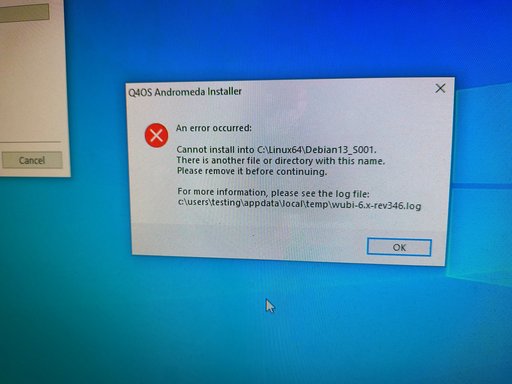
I’ve tested the Windows installer on a licensed Windows 10 Home PC (Dell Inspiron 20 Model 3034 Desktop) I did a fresh clean install of the OS from unallocated space, not signed into a Microsoft account and OneDrive completely disabled I was getting the error code “Cannot install into C:/Linux64/Debian13_S001. There is another file or directory with this name please remove it before continuing” Because the OS is 100% fresh the issue is likely coming from the installer itself.
I Tested the Windows installer on a HP Laptop (Model 14-cf2112wm) I completely formatted the eMMC to remove the OEM version of the OS and installed a clean official Windows 11 Home edition, fully updated and passing a sfc /scannow however, I got an error after installing and rebooting, “Boot chainload, phase 1 … unmount: can’t unmount /host1: Invalid argument Host filesystem not found, make Windows partition accessible. Press [Enter] to reboot” I have secure boot off, I disabled the bitlocker service, I ran manage-bde -status I’m at 0.0% encrypted, I have hibernation disabled therefore my partition should be wide open.
Because the environment is entirely sterile, this is a confirmed installer bug.
Last edited by Lilith (2026-05-25 23:53)
Offline
#2 2026-05-25 22:07
- q4osteam
- Q4OS Team

- Registered: 2015-12-06
- Posts: 6,376
- Website
Re: Testing the Q4OS Windows Installer on Win10 & Win11 Home
Thanks for the valuable testing and reporting.
... I did a fresh clean install of the OS from unallocated space ...
We don’t fully understand what you mean. Do you mean that you installed it on the C:\ drive ? Also, what disk size did you select ?
Cannot install into C:/Linux64/Debian13_S001. There is another file or directory with this name please remove it before continuing
This message is unknown to us, would you attach a screenshot please ?
I Tested the Windows installer on a HP Laptop (Model 14-cf2112wm) I completely formatted the eMMC to remove the OEM version of the OS and installed a clean official Windows 11 Home edition, fully updated and passing a sfc /scannow however, I got an error after installing and rebooting, “Boot chainload, phase 1 … unmount: can’t unmount /host1: Invalid argument Host filesystem not found, make Windows partition accessible. Press [Enter] to reboot”
Please attach the installer logfile c:\users\<username>\appdata\local\temp\wubi-6.x-rev346.log for us to analyze.
Because the environment is entirely sterile, this is a confirmed installer bug.
Yes, that does seem to be the case. However, it could still be related to an incompatibility with the Linux eMMC drivers.
Offline
#3 2026-05-26 00:03
- Lilith
- Member
- Registered: 2026-05-15
- Posts: 14
Re: Testing the Q4OS Windows Installer on Win10 & Win11 Home
Yes, it is installed on the C:\ drive.
I wiped the entire physical hard drive so it was completely blank unallocated space, and let the Windows installer format it. This automatically created a fresh C:\ drive using the full capacity of the drive (which is a HDD on this Dell).
Essentially, it’s a 100% clean, factory reset Windows 10 environment with no third-party software or old files remaining. I will get back later with the logs concerning the Windows 11 PC
Offline
#4 2026-05-26 10:48
- q4osteam
- Q4OS Team
- Registered: 2015-12-06
- Posts: 6,376
- Website
Re: Testing the Q4OS Windows Installer on Win10 & Win11 Home
Cannot install into C:/Linux64/Debian13_S001. There is another file or directory with this name please remove it before continuing ... Because the OS is 100% fresh the issue is likely coming from the installer itself.
Now we can see the screenshot attached. Yes the message is coming from the Q4OS installer. However we can't reproduce it in anyway. Does the "testing" user have admin permissions ?
Offline
#5 2026-05-26 19:39
- Lilith
- Member
- Registered: 2026-05-15
- Posts: 14
Re: Testing the Q4OS Windows Installer on Win10 & Win11 Home
Yes the user "testing" is the main administrator account on this PC.
Offline
#6 2026-05-27 07:45
- q4osteam
- Q4OS Team
- Registered: 2015-12-06
- Posts: 6,376
- Website
Re: Testing the Q4OS Windows Installer on Win10 & Win11 Home
Well, we will perform related investigation and post back here.
Offline
#7 2026-05-27 08:28
- q4osteam
- Q4OS Team
- Registered: 2015-12-06
- Posts: 6,376
- Website
Re: Testing the Q4OS Windows Installer on Win10 & Win11 Home
Cannot install into C:/Linux64/Debian13_S001. There is another file or directory with this name please remove it before continuing
Would it be possible to delete the "C:/Linux64/Debian13_S001" folder, reboot PC, run the q4os-winsetup.exe again and post back the result ? The logfile c:\users\<username>\appdata\local\temp\wubi-6.x-rev346.log would be also helpful - if possible, ship it via e-mail.
Offline
#8 2026-05-27 22:21
- Lilith
- Member
- Registered: 2026-05-15
- Posts: 14
Re: Testing the Q4OS Windows Installer on Win10 & Win11 Home
I wanted to report something very strange at first I tried to using the Q4OS Windows installer on a completely fresh, clean install of Windows 10. The hard drive had over 400GB of free space. Every time I ran the installer and several reboots possibly 5 or 6 times it would throw me the same error. I even tried making a fresh clean secondary admin account to try it on but had the same results. But after I installed Quarkos Resolute alongside Windows 10 I actually shrunk the Windows partition down to 32GB and left the rest for Quarkos I went back in Windows 10 deleted everything you asked including the installer emptied the recycling bin re downloaded the installer again and tried it out now it works! I now am running Q4OS with Windows successfully. It seems like the installer really dislikes large, fresh Windows partitions like 400GB+ but shrinking the partition down completely fixes the issue and lets it run.
Offline
#9 2026-05-28 08:00
- q4osteam
- Q4OS Team
- Registered: 2015-12-06
- Posts: 6,376
- Website
Re: Testing the Q4OS Windows Installer on Win10 & Win11 Home
Well, that's really strange. We can successfully proceed and install Q4OS for Windows installer on Win11 machines with 500GB and even more of free space on c:\ drive. Secure boot enabled, all works fine. We would need to get logfile "c:\users\<username>\appdata\local\temp\wubi-6.x-rev346.log" to be able to investigate more.
What disk size did you choose for Q4OS ?
We are now preparing new updated installer with more recent SSD drivers and possible fixes. We will release a testing version soon so if you are willing to perform testing, it would be great.
Offline
#10 2026-05-28 10:45
- theasmitkid
- Member
- From: NCT of Delhi
- Registered: 2025-01-26
- Posts: 357
Re: Testing the Q4OS Windows Installer on Win10 & Win11 Home
Could it be because of disk fragmentation?
Coding & Robotics Enthusiast | Windows 7 x86 @ n2600 · 2GB · 320GB HDD (No graphics acceleration available in linux)
Offline
#11 2026-05-28 10:47
- q4osteam
- Q4OS Team
- Registered: 2015-12-06
- Posts: 6,376
- Website
Re: Testing the Q4OS Windows Installer on Win10 & Win11 Home
Could it be because of disk fragmentation?
No
Offline
- Registered users online in this topic: 0, guests: 1