You are not logged in.
- Topics: Active | Unanswered
Pages: 1
#1 2025-10-12 16:37
- Rademes
- Member

- From: Latvia
- Registered: 2015-12-13
- Posts: 681
[Solved] Where is Network Manager
Good day!
I have installed Q4OS 6.1 Andromeda Trinity on my old PC today.
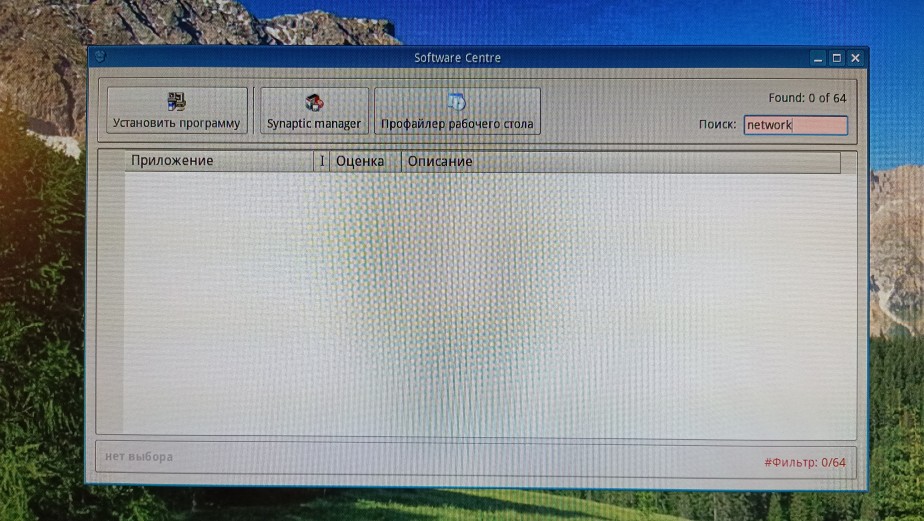
When I tried to install Network Manager from Q4OS Software centre, I was unable to find it. Where it is? It is extremely important program for me. Without it, I am unable to configure my internet connection properly (DNS servers, IPv6), but my wireless network does not working at all without it.
Last edited by Rademes (2025-10-14 10:21)
Before asking for help please read this topic: https://www.q4os.org/forum/viewtopic.php?id=3502
Offline
#2 2025-10-12 16:54
- q4osteam
- Q4OS Team

- Registered: 2015-12-06
- Posts: 6,351
- Website
Re: [Solved] Where is Network Manager
The installer has been temporarily removed from the Q4OS-6 Software center. Applet doesn't start automatically due to a bug in Trinity desktop versions greater than 14.1.1 . We are working on a fix.
In anyway you can workaround the issue safely.
- Install from repositories:
$ sudo apt install network-manager-applet
- Reboot
- Run:
$ nm-applet
Offline
#3 2025-10-14 10:21
- Rademes
- Member
- From: Latvia
- Registered: 2015-12-13
- Posts: 681
Re: [Solved] Where is Network Manager
Thank you!
I was afraid, that the Network Manager was completely removed from Q4OS.
Autostart issue is not a problem for me, since I use the Network manager applet for configuring my network connections, especially wireless networks.
Good luck with fixing this issue!
Before asking for help please read this topic: https://www.q4os.org/forum/viewtopic.php?id=3502
Offline
#4 2025-12-05 06:36
- EBAL
- Member
- Registered: 2024-02-13
- Posts: 27
Re: [Solved] Where is Network Manager
Is this issue fixed? I had to install the applet manually for now.
Now that network-manager is also auto-starting, how do I remove tdenetworkmanager from auto-starting? tdenetworkmanager is not listed in the autostart applet or service manager applet.
Thanks.
Offline
#5 2025-12-05 08:26
- q4osteam
- Q4OS Team
- Registered: 2015-12-06
- Posts: 6,351
- Website
Re: [Solved] Where is Network Manager
Is this issue fixed?
Not yet.
Now that network-manager is also auto-starting, how do I remove tdenetworkmanager from auto-starting?
Remove it:
$ sudo apt autoremove network-manager-tde
or disable it in:
"/opt/trinity/share/autostart/tdenetworkmanager.desktop"
Offline
#6 2025-12-05 08:36
- q4osteam
- Q4OS Team
- Registered: 2015-12-06
- Posts: 6,351
- Website
Re: [Solved] Where is Network Manager
It's also possible to use more lightweight Qt based "nm-tray" applet instead of network-manager-applet, just install it:
$ sudo apt install nm-tray
Offline
Pages: 1
- Registered users online in this topic: 0, guests: 1