You are not logged in.
- Topics: Active | Unanswered
#1 2023-11-22 22:30
- Russell_T
- Member

- From: Santos-SP
- Registered: 2023-05-28
- Posts: 22
- Website
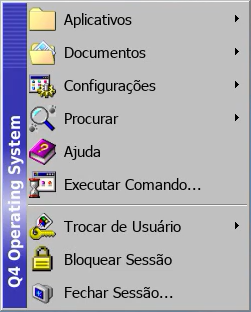
How to replace the "Q4 Operating System" banner??
Where is located his PNG?
I use Trinity Classic Menu
Last edited by Russell_T (2023-12-20 14:16)
I'm a animal!
Offline
#2 2023-11-22 23:15
- seb3773
- Member

- From: France
- Registered: 2023-11-01
- Posts: 229
Re: How to replace the "Q4 Operating System" banner??
It's here: /opt/trinity/share/apps/kicker/pics/kside.png & /opt/trinity/share/apps/kicker/pics/kside_tile.png
Debian & Q4OS (TDE!!), low-level C, ASM (z80/68k/x86/ARM64), embedded systems, CPU architectures (RISC-V, binary formats, assembly), retro-computing, metal music, guitar and sci-fi.
Online
#3 2023-12-20 17:30
- Russell_T
- Member
- From: Santos-SP
- Registered: 2023-05-28
- Posts: 22
- Website
Re: How to replace the "Q4 Operating System" banner??
Thanks, I found the files I need to modify in exactly this location. I use XPQ4 so the files are
/opt/trinity/share/apps/kicker/pics/kside_xpq4.png
/opt/trinity/share/apps/kicker/pics/kside_tile_xpq4.png
I just didn't quite understand how the color conversion system works from grayscale to shades of blue, I tried to imitate the Windows 98 Start Menu banner but I only managed to come close.

I'm a animal!
Offline
#4 2023-12-27 15:47
- seb3773
- Member
- From: France
- Registered: 2023-11-01
- Posts: 229
Re: How to replace the "Q4 Operating System" banner??
For now, the image you provide is converted to grey scale (with brightness ajustement if too dark or too bright) and colorized depending for example of the windows titlebar colors (activeBackground / inactiveBackground).
The Q4OS Team had worked on a feature to use the image 'as is' without greyscale and colorizing, just wait for it
Debian & Q4OS (TDE!!), low-level C, ASM (z80/68k/x86/ARM64), embedded systems, CPU architectures (RISC-V, binary formats, assembly), retro-computing, metal music, guitar and sci-fi.
Online