You are not logged in.
- Topics: Active | Unanswered
Pages: 1
#1 2026-11-03 00:36
- blusea
- Member
- Registered: 2026-10-05
- Posts: 6
Wine Dependencies Errors
Hi, I Installed Wine from Synaptic but getting the below errors when I try and use it.
Don't really understand most of that output.
Operating System: Debian GNU/Linux 13
KDE Plasma Version: 6.3.6
KDE Frameworks Version: 6.13.0
Qt Version: 6.8.2
Kernel Version: 7.2.11+deb13-amd64 (64-bit)
Graphics Platform: Wayland
Processors: 32 × AMD Ryzen 9 5950X 16-Core Processor
Memory: 64 GiB of RAM (62.7 GiB usable)
Graphics Processor: AMD Radeon RX 7600 XT
user101@Q4Machina:~/Downloads/WIN_STUFF$ wine iview475_setup.exe
it looks like wine32 is missing, you should install it.
as root, please execute "apt-get install wine32:i386"
0128:err:environ:init_peb starting L"Z:\\home\\user101\\Downloads\\WIN_STUFF\\iview475_setup.exe" in experimental wow64 mode
wine: failed to load L"\\??\\C:\\windows\\syswow64\\ntdll.dll" error c0000135
Application could not be started, or no application associated with the specified file.
ShellExecuteEx failed: 0024:err:start:fatal_error FormatMessage failed
user101@Q4Machina:~/Downloads/WIN_STUFF$ sudo apt-get install wine32:i386
Reading package lists... Done
Building dependency tree... Done
Reading state information... Done
Solving dependencies... Error!
Some packages could not be installed. This may mean that you have
requested an impossible situation or if you are using the unstable
distribution that some required packages have not yet been created
or been moved out of Incoming.
The following information may help to resolve the situation:
The following packages have unmet dependencies:
libcurl4t64:i386 : Depends: libnghttp3-9:i386 (>= 0.15.0) but it is not going to be installed
libwine:i386 : Depends: libasound2t64:i386 (>= 1.0.16) but it is not going to be installed
Depends: libxkbcommon0:i386 (>= 0.5.0) but it is not going to be installed
Depends: libxkbregistry0:i386 (>= 1.0.0) but it is not going to be installed
Recommends: libegl1:i386 but it is not installable
Recommends: libgl1:i386 but it is not installable
Recommends: libsdl2-2.0-0:i386 (>= 2.0.12)
Recommends: libgl1-mesa-dri:i386 but it is not going to be installed
Recommends: libasound2-plugins:i386 but it is not installable
Recommends: gstreamer1.0-plugins-good:i386 but it is not installable
E: Unable to correct problems, you have held broken packages.
E: The following information from --solver 3.0 may provide additional context:
Unable to satisfy dependencies. Reached two conflicting decisions:
1. libasound2t64:amd64 is selected for install because:
1. q4os-desktop:amd64 is selected for install
2. q4os-desktop:amd64 Depends q4os-desktop-plasma | q4os-desktop-trinity
3. q4os-desktop-plasma:amd64 PreDepends plasma-workspace
4. plasma-workspace:amd64 Depends libcanberra0 (>= 0.2)
5. libcanberra0:amd64 Depends libasound2t64 (>= 1.0.16)
2. libasound2t64:amd64 is available in versions 1.2.16.1-1~bpo13+1, 1.2.14-1+deb13u1
but none of the choices are installable:
- libasound2t64:amd64=1.2.16.1-1~bpo13+1 is not selected for install because:
1. wine32:i386=10.0~repack-6 is selected for install
2. wine32:i386 Depends libwine:i386 (= 10.0~repack-6)
3. libwine:i386 Depends libasound2t64:i386 (>= 1.0.16)
4. libasound2t64:i386 is available in versions 1.2.14-1+deb13u1, 1.2.16.1-1~bpo13+1
[selected libasound2t64:i386=1.2.14-1+deb13u1 for install]
5. libasound2t64:i386=1.2.14-1+deb13u1 Breaks libasound2t64 (!= 1.2.14-1+deb13u1)
For context, additional choices that could not be installed:
* In libasound2t64:i386 is available in versions 1.2.14-1+deb13u1, 1.2.16.1-1~bpo13+1:
- libasound2t64:i386=1.2.16.1-1~bpo13+1 is not selected for install
- libasound2t64:amd64=1.2.14-1+deb13u1 is not selected for installOffline
#2 2026-11-03 09:44
- hchiper
- Member

- From: Belgium
- Registered: 2020-07-28
- Posts: 839
Re: Wine Dependencies Errors
You got an error massage starting with
it looks like wine32 is missing, you should install it.
as root, please execute "apt-get install wine32:i386"So it looks like you have selected the wine64 package in Synaptic for install, instead of wine.
As I understand, wine64 is needed to run 64 bit .exe and wine32 is needed to run 32 bit .exe.
So I think you have downloaded the 32 bit version of Irfanview (iview) and trying to install it without wine32.
In that case, download rather the 64 bit version of Irfanview.
Note that if you install wine32, a lot of win32 libraries will be installed too, and you'll need to configure multi-architecture to use 32 bit libraries on a 64 bit system.
Q4OS machine: Samsung R519 - Pentium T4200 2.0 GHz - 4 GB RAM - 500 GB SSD
Offline
#3 2026-11-03 10:51
- blusea
- Member
- Registered: 2026-10-05
- Posts: 6
Re: Wine Dependencies Errors
it looks like wine32 is missing, you should install it.
as root, please execute "apt-get install wine32:i386"
Thx, but I ran that in the above output.
user101@Q4Machina:~/Downloads/WIN_STUFF$ sudo apt-get install wine32:i386
Reading package lists... Done
Building dependency tree... Done
Reading state information... Done
Solving dependencies... Error!
Opened Synaptic and clicked on "Fix Broken Packages" but that didn't seem to help.
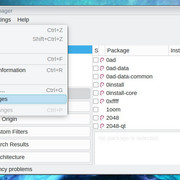
Added later 48 min 34 s:
So I Iooked in
usr/bin/wineand seen this...
usr/bin/wine =

wine32=/usr/lib/wine/wine
wine64=/usr/lib/wine/wine64

wine32_hint () {
    echo "it looks like wine32 is missing, you should install it."
    if [ "$(dpkg --print-architecture)" = "amd64" ] && ! dpkg --print-foreign-architectures | grep -qx "i386"; then
        echo "multiarch needs to be enabled first.  as root, please"
        echo "execute \"dpkg --add-architecture i386 && apt-get update &&"
        echo "apt-get install wine32:i386\""
    else
        echo "as root, please execute \"apt-get install wine32:i386\""
    fi
}

if test -x $wine32; then
    wine=$wine32
elif test -x $wine64; then
    wine=$wine64
    if test -z "$WINELOADER"; then
        export WINELOADER=$wine64
    fi
    case "x$WINEDEBUG" in
        x-all*|x*,-all*|x*err-all*)
            ;;
        *)
            wine32_hint >&2
            ;;
    esac
else
    echo "error: unable to find wine executable.  this shouldn't happen." >&2
    exit 1
fi

if test -z "$WINEDEBUG"; then
    export WINEDEBUG=fixme-all
fi

exec $wine "$@"
Ran
user101@Q4Machina:~$ sudo dpkg --add-architecture i386 && apt-get update && sudo apt-get install wine32:i386\ and got this ouput...
Reading package lists... Done
E: Could not open lock file /var/lib/apt/lists/lock - open (13: Permission denied)
E: Unable to lock directory /var/lib/apt/lists/
W: Problem unlinking the file /var/cache/apt/pkgcache.bin - RemoveCaches (13: Permission denied)
W: Problem unlinking the file /var/cache/apt/srcpkgcache.bin - RemoveCaches (13: Permission denied)
Last edited by blusea (2026-11-03 11:15)
Offline
#4 2026-11-03 13:14
- hchiper
- Member
- From: Belgium
- Registered: 2020-07-28
- Posts: 839
Re: Wine Dependencies Errors
You had the message "you have held broken packages" and unfortunately Synaptic was not able to fix it.
I don't use Synaptic anymore for years, since the time I broke my system because I tried and guessed in the GUI without knowing what I was doing, so I can't give any advice on this.
Of course, it is worth to fix the problems, but it's another topic.
My advice remains to install Irfanview 64-bit (see https://www.irfanview.com/) in the case you are tying to install the 32-bit version, unless you have a reason to stick to 32-bit.
And, yes, Irfanview is a wonderful application. I have installed it under Wine on my Q4OS system and runs very well.
Q4OS machine: Samsung R519 - Pentium T4200 2.0 GHz - 4 GB RAM - 500 GB SSD
Offline
#5 2026-11-03 13:22
- blusea
- Member
- Registered: 2026-10-05
- Posts: 6
Re: Wine Dependencies Errors
You had the message "you have held broken packages" and unfortunately Synaptic was not able to fix it.
In the screenshot above, after running fix broken packages, Synaptic shows "Successfully fixed dependencies problem".
This looks like there is some kind of conflict between 32bit and 64, and it doesn't look like Wine really installed yet?
user101@Q4Machina:~$ wine --version
it looks like wine32 is missing, you should install it.
as root, please execute "apt-get install wine32:i386"
wine-10.0 (Debian 10.0~repack-6)
user101@Q4Machina:~$
WineTricks errors
Offline
#6 2026-11-03 13:26
- q4osteam
- Q4OS Team

- Registered: 2015-12-06
- Posts: 6,476
- Website
Re: Wine Dependencies Errors
Welcome to the formu @blusea 
Please run the command line:
$ sudo dpkg --add-architecture i386 && sudo apt-get update && sudo apt-get install wine32:i386
and post back the output.
Offline
#7 2026-11-03 14:05
- blusea
- Member
- Registered: 2026-10-05
- Posts: 6
Re: Wine Dependencies Errors
Please run the command line:
$ sudo dpkg --add-architecture i386 && sudo apt-get update && sudo apt-get install wine32:i386
and post back the output.
Hi, looks like the same errors in the first post?
user101@Q4Machina:~$ sudo dpkg --add-architecture i386 && sudo apt-get update && sudo apt-get install wine32:i386
[sudo] password for user101:
Hit:1 http://deb.debian.org/debian trixie InRelease
Get:2 http://security.debian.org trixie-security InRelease [43.4 kB]
Hit:3 https://repo.protonvpn.com/debian stable InRelease
Hit:4 http://deb.debian.org/debian trixie-updates InRelease
Hit:5 https://q4os.sourceforge.io/qexarepo/s4-snapshot trixie-s4-snapshot-cn InRelease
Hit:7 http://deb.debian.org/debian trixie-backports InRelease
Hit:8 https://q4os.sourceforge.io/qexarepo/mxtools trixie-mxtools-cn InRelease
Hit:9 https://ramses.hjramses.com/deb/makemkv trixie InRelease
Hit:11 http://mirrors.rit.edu/mxlinux/mx-packages/mx/repo trixie InRelease
Hit:6 https://q4os.org/q4repo q4os-6-0-cn InRelease
Get:12 https://packages.mozilla.org/apt mozilla InRelease [1,357 B]
Hit:10 https://q4os.org/qexarepo/firefox trixie-firefox-cn InRelease
Get:13 https://packages.mozilla.org/apt mozilla/main all Packages [5,619 kB]
Hit:14 https://repository.mullvad.net/deb/stable stable InRelease
Get:15 https://repo.librewolf.net librewolf InRelease [5,653 B]
Get:16 https://packages.mozilla.org/apt mozilla/main amd64 Packages [118 kB]
Fetched 5,788 kB in 3s (1,716 kB/s)
Reading package lists... Done
N: Skipping acquire of configured file 'main/binary-i386/Packages' as repository 'https://packages.mozilla.org/apt mozilla InRelease' doesn't support architecture 'i386'
Reading package lists... Done
Building dependency tree... Done
Reading state information... Done
Solving dependencies... Error!
Some packages could not be installed. This may mean that you have
requested an impossible situation or if you are using the unstable
distribution that some required packages have not yet been created
or been moved out of Incoming.
The following information may help to resolve the situation:

The following packages have unmet dependencies:
 libcurl4t64:i386 : Depends: libnghttp3-9:i386 (>= 0.15.0) but it is not going to be installed
 libwine:i386 : Depends: libasound2t64:i386 (>= 1.0.16) but it is not going to be installed
                Depends: libxkbcommon0:i386 (>= 0.5.0) but it is not going to be installed
                Depends: libxkbregistry0:i386 (>= 1.0.0) but it is not going to be installed
                Recommends: libegl1:i386 but it is not installable
                Recommends: libgl1:i386 but it is not installable
                Recommends: libsdl2-2.0-0:i386 (>= 2.0.12)
                Recommends: libgl1-mesa-dri:i386 but it is not going to be installed
                Recommends: libasound2-plugins:i386 but it is not installable
                Recommends: gstreamer1.0-plugins-good:i386 but it is not installable
E: Unable to correct problems, you have held broken packages.
E: The following information from --solver 3.0 may provide additional context:
   Unable to satisfy dependencies. Reached two conflicting decisions:
   1. libasound2t64:amd64 is selected for install because:
      1. q4os-desktop:amd64 is selected for install
      2. q4os-desktop:amd64 Depends q4os-desktop-plasma | q4os-desktop-trinity
      3. q4os-desktop-plasma:amd64 PreDepends plasma-workspace
      4. plasma-workspace:amd64 Depends libcanberra0 (>= 0.2)
      5. libcanberra0:amd64 Depends libasound2t64 (>= 1.0.16)
   2. libasound2t64:amd64 is available in versions 1.2.16.1-1~bpo13+1, 1.2.14-1+deb13u1
      but none of the choices are installable:
      - libasound2t64:amd64=1.2.16.1-1~bpo13+1 is not selected for install because:
        1. wine32:i386=10.0~repack-6 is selected for install
        2. wine32:i386 Depends libwine:i386 (= 10.0~repack-6)
        3. libwine:i386 Depends libasound2t64:i386 (>= 1.0.16)
        4. libasound2t64:i386 is available in versions 1.2.14-1+deb13u1, 1.2.16.1-1~bpo13+1
           [selected libasound2t64:i386=1.2.14-1+deb13u1 for install]
        5. libasound2t64:i386=1.2.14-1+deb13u1 Breaks libasound2t64 (!= 1.2.14-1+deb13u1)
        For context, additional choices that could not be installed:
        * In libasound2t64:i386 is available in versions 1.2.14-1+deb13u1, 1.2.16.1-1~bpo13+1:
          - libasound2t64:i386=1.2.16.1-1~bpo13+1 is not selected for install
      - libasound2t64:amd64=1.2.14-1+deb13u1 is not selected for install
Offline
#8 2026-11-03 14:29
- q4osteam
- Q4OS Team
- Registered: 2015-12-06
- Posts: 6,476
- Website
Re: Wine Dependencies Errors
Well now run:
$ qrepolist
$ apt policy libasound2t64
and post the output
Offline
#9 2026-11-03 16:11
- blusea
- Member
- Registered: 2026-10-05
- Posts: 6
Re: Wine Dependencies Errors
Well now run:
$ qrepolist
$ apt policy libasound2t64
and post the output
user101@Q4Machina:~$ qrepolist
deb http://q4os.org/q4repo/ q4os-6-0-cn main
deb http://deb.debian.org/debian/ trixie main contrib non-free non-free-firmware
deb http://security.debian.org/ trixie-security main contrib non-free non-free-firmware
deb http://deb.debian.org/debian/ trixie-updates main contrib non-free non-free-firmware
deb http://q4os.org/qexarepo/firefox/ trixie-firefox-cn main
deb https://packages.mozilla.org/apt/ mozilla main
deb https://q4os.sourceforge.io/qexarepo/s4-snapshot/ trixie-s4-snapshot-cn main
deb http://deb.debian.org/debian/ trixie-backports main contrib non-free-firmware
deb https://repo.librewolf.net/ librewolf main
deb https://ramses.hjramses.com/deb/makemkv/ trixie main
deb https://repository.mullvad.net/deb/stable/ stable main
deb http://mirrors.rit.edu/mxlinux/mx-packages/mx/repo/ trixie main non-free ahs
deb https://q4os.sourceforge.io/qexarepo/mxtools/ trixie-mxtools-cn main
deb https://repo.protonvpn.com/debian/ stable main
user101@Q4Machina:~$ apt policy libasound2t64
libasound2t64:
  Installed: 1.2.16.1-1~bpo13+1
  Candidate: 1.2.16.1-1~bpo13+1
  Version table:
 *** 1.2.16.1-1~bpo13+1 100
        100 http://deb.debian.org/debian trixie-backports/main amd64 Packages
        100 /var/lib/dpkg/status
     1.2.14-1+deb13u1 500
        500 http://deb.debian.org/debian trixie/main amd64 Packages
Offline
#10 2026-11-03 19:45
- q4osteam
- Q4OS Team
- Registered: 2015-12-06
- Posts: 6,476
- Website
Re: Wine Dependencies Errors
We can see, you have added some third-party repositories. It may lead to broken packages dependencies. Try to disable or remove unsupported repositories and run "apt update && apt install..." commands again.
Offline
#11 2026-11-04 15:33
- blusea
- Member
- Registered: 2026-10-05
- Posts: 6
Re: Wine Dependencies Errors
We can see, you have added some third-party repositories. It may lead to broken packages dependencies. Try to disable or remove unsupported repositories and run "apt update && apt install..." commands again.
Thx but got it working by following the instructions on this website (https://linuxcapable.com/how-to-install … ian-linux/) and adding the WineHQ Repository and installing the latest version.
Didn't have to disable or uninstall any other repositories.
Offline
Pages: 1
- Registered users online in this topic: 0, guests: 1