You are not logged in.
- Topics: Active | Unanswered
#1 2026-05-27 02:32
- Lilith
- Member
- Registered: 2026-05-15
- Posts: 14
Testing Quarkos 26.04 Stable (Dell Inspiron 20)
Testing Quarkos Resolute Trinity Basic installation alongside my Windows 10 install on a Dell Inspiron 20 Model 3034 Desktop, installation was a success.
I then went to the Software Centre and installed Firefox, GParted, Falkon, BleachBit, VLC, Q4OS Imager & Synaptic Package Manager all installed great and all opened no errors and were fully functional. However the only issue was Firefox was the only one that didn’t show up in New Applications area, but did show up in the Internet section of the menu.
I moved to the Desktop Profiler to switch to Ultimately minimal desktop and I unchecked Remove superfluous packages it successfully changed and kept all my packages I had previously installed and WiFi was still auto connecting. Then I moved back to Basic with Remove superfluous packages checked it was successfully changed and no applications were carried to the profile. Then I chose Full it was successful with all its applications installed I opened a few of the preinstalled applications didn’t see any errors. Now finally went back to Basic to run the next few tests because Full is too heavy for this older hardware and HDD.
Once I was back in the Basic profile I went ahead to Desktop Profiler, Alliterative Desktop Environments to install the Plasma desktop, after it installed and a reboot was needed it got caught on a black screen with white letter and number codes some referencing my hardware and bios version. I had to do a cold shutdown. It booted back up fine after to the login screen allowing me to choose what desktop to login, I logged into the new Plasma desktop, WiFi was still connected opened some applications it worked without any issues or errors just a little slow for my hardware but seems fine.
Then back in TDE I ran sudo apt-get check it returned without any errors.
I then tested some Q4OS application installers. Chrome was first ran very nicely and clean no errors. Then I tried opera but got a “this script doesn’t support resolute” pop up error. The opera setup script is likely trying to fetch from an upstream repository URL built dynamically using the resolute codename. Because the OS is brand new, that directory doesn't exist yet on opera's servers (out of date/missing upstream repo), causing the script to abort. I ran into the same issue with VirtualBox installer throwing “Could not initialize, incorrect data header !” pop up error.
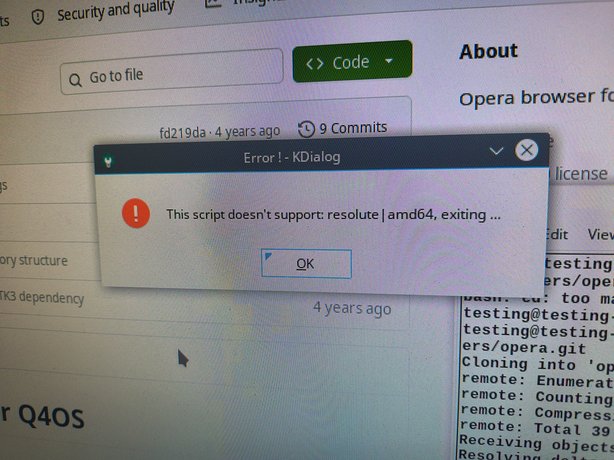

Last edited by Lilith (2026-05-27 02:33)
Offline
#2 2026-05-27 07:56
- q4osteam
- Q4OS Team

- Registered: 2015-12-06
- Posts: 6,376
- Website
Re: Testing Quarkos 26.04 Stable (Dell Inspiron 20)
I moved to the Desktop Profiler to switch to Ultimately minimal desktop and I unchecked Remove superfluous packages it successfully changed and kept all my packages I had previously installed and WiFi was still auto connecting. Then I moved back to Basic with Remove superfluous packages checked it was successfully changed and no applications were carried to the profile. Then I chose Full it was successful with all its applications installed I opened a few of the preinstalled applications didn’t see any errors. Now finally went back to Basic to run the next few tests because Full is too heavy for this older hardware and HDD.
Great testing, as we really need to prove profiles work as expected  You could also perform "custom profiles" feature https://www.q4os.org/dqa016.html#boome
... Plasma desktop, after it installed and a reboot was needed it got caught on a black screen ...
Seems to be a one-time glitch due to significant system changes.
... Then I tried opera but got a “this script doesn’t support resolute” pop up error. The opera setup script is likely trying to fetch from an upstream repository URL built dynamically using the resolute codename. Because the OS is brand new, that directory doesn't exist yet on opera's servers (out of date/missing upstream repo), causing the script to abort. I ran into the same issue with VirtualBox installer throwing “Could not initialize, incorrect data header !” pop up error.
First we would mention Opera and Virtualbox installers are testing at the moment, moreover they are designed for Q4OS primarily. The production installers are present in Software center, they are supposed to work fine. In anyway we can confirm the issues reported, se we will put some effort to make these installers more friendly for Quarkos too.
All in all great and valuable testing, thanks
Offline
#3 2026-05-27 08:12
- q4osteam
- Q4OS Team
- Registered: 2015-12-06
- Posts: 6,376
- Website
Re: Testing Quarkos 26.04 Stable (Dell Inspiron 20)
A question, how did you run Opera and Virtualbox installers ? Clicking from Dolphin, Browser, from terminal, or some other way ?
Would you try to run them just clicking from KDE Dolphin or TDE Konqueror file manager and post back the results ?
Offline
#4 2026-05-27 22:51
- Lilith
- Member
- Registered: 2026-05-15
- Posts: 14
Re: Testing Quarkos 26.04 Stable (Dell Inspiron 20)
I ran the installers from the terminal using the files from the GitHub repositories the same way I successfully did for Chrome
Offline
#5 2026-05-28 08:02
- q4osteam
- Q4OS Team
- Registered: 2015-12-06
- Posts: 6,376
- Website
Re: Testing Quarkos 26.04 Stable (Dell Inspiron 20)
Thanks
Offline
- Registered users online in this topic: 0, guests: 1