You are not logged in.
- Topics: Active | Unanswered
Pages: 1
#1 2025-11-26 09:14
- nirick
- Member
- From: Italy
- Registered: 2025-11-23
- Posts: 24
Install CD 32bit Aquarius Trinity
Hi everyone,
I have an old 2010 netbook that I restored to the original Windows 7 Starter 32-bit operating system. I'd like to dual-boot Aquarius Trinity 32-bit. The netbook only has 2GB of RAM, which isn't expandable, and even though it has a 64-bit processor, I'd like to stick with the 32-bit operating system.
Last night I created a bootable USB stick from the ISO CD and tried installing. Everything seems to be working fine, but I have a computer literacy problem, and when I get to the partition preview, I have to stop because I don't know how to proceed to ensure that the dual boot will be installed and the entire disk won't be erased.
Can you help me get past that step, overcoming my doubts due to my lack of experience? Is there a step-by-step tutorial on this?
Thanks in advance.
Q4OS 6.6-deb13u1 (Andromeda) Trinity Desktop (XPQ4 Windows7)
Offline
#2 2025-11-26 10:53
- q4osteam
- Q4OS Team

- Registered: 2015-12-06
- Posts: 6,442
- Website
Re: Install CD 32bit Aquarius Trinity
In anyway, we strongly recommend you to backup your data before you start partitioning the disk. Maybe this guide would help https://www.youtube.com/watch?v=ZsP5t32MlU8 ?
Offline
#3 2025-11-27 15:35
- nirick
- Member
- From: Italy
- Registered: 2025-11-23
- Posts: 24
Re: Install CD 32bit Aquarius Trinity
Good afternoon,
Meanwhile, I've resolved my doubts about the procedure by installing Aquarium 32-bit on my other old laptop (4GB RAM notebook) that was giving me problems dual-booting with Win 10.
Now I'll certainly do the same thing on this mini-PC (netbook) with 2GB RAM mentioned in this thread, but not before copying the system image, including the original recovery partition still present on the HDD.
Thanks so much, see you soon!
Q4OS 6.6-deb13u1 (Andromeda) Trinity Desktop (XPQ4 Windows7)
Offline
#4 2025-11-27 16:11
- q4osteam
- Q4OS Team
- Registered: 2015-12-06
- Posts: 6,442
- Website
Re: Install CD 32bit Aquarius Trinity
Thanks for the feedback 
Offline
#5 2025-11-29 10:41
- nirick
- Member
- From: Italy
- Registered: 2025-11-23
- Posts: 24
Re: Install CD 32bit Aquarius Trinity
Good morning everyone,
Regarding my Q4OS Aquarius 5.8.1-n1 with Trinity Base desktop, I need to know how to monitor and manage updates.
I currently only have Update Manager installed. Is that enough, or should I also install Synaptic Manager? I'd like to keep the system as lightweight as possible.
Is there already a beginner's topic about updates?
Thanks in advance!
Q4OS 6.6-deb13u1 (Andromeda) Trinity Desktop (XPQ4 Windows7)
Offline
#6 2025-11-29 12:17
- q4osteam
- Q4OS Team
- Registered: 2015-12-06
- Posts: 6,442
- Website
Re: Install CD 32bit Aquarius Trinity
I currently only have Update Manager installed. Is that enough ...
Yes, enough. Update manager shows updates in the system tray as soon as they are available. However you could still go even without update manager and perform upgrades manually using built-in apt commands.
Offline
#7 2025-12-08 22:03
- nirick
- Member
- From: Italy
- Registered: 2025-11-23
- Posts: 24
Re: Install CD 32bit Aquarius Trinity
Dear Q4OS friends, I've learned to use the terminal to update packages and install apps.
Q4OS seems like it was made for me; with Trinity, I'm reliving the operating system I'm most fond of, so I feel right at home.
And then there's even a desktop wallpaper dedicated to the Dolomites, a magical place in northeastern Italy, a ski paradise in the winter and a wonderful summer destination for those who love mountain hiking.
I'm really happy I discovered Q4OS!!
Q4OS 6.6-deb13u1 (Andromeda) Trinity Desktop (XPQ4 Windows7)
Offline
#8 2025-12-08 22:24
- q4osteam
- Q4OS Team
- Registered: 2015-12-06
- Posts: 6,442
- Website
Re: Install CD 32bit Aquarius Trinity
Enjoy Q4OS and thanks for the feedback
Offline
#9 2025-12-10 04:16
- schip
- Member
- Registered: 2025-12-10
- Posts: 14
Re: Install CD 32bit Aquarius Trinity
Hi nirick .. you may be interested to know - I too am using Q4os on a netbook - eMachines N450 intel atom with 4 GB of ram. Not sure of the year but it came with windows XP..so must be older than yours. Im using the 64 bit version and it seems quite usable…though Im sticking to use lightweight software..such as Falkon instead of Firefox.,when online.
I recently came across TDE applications ..which you may find useful:..
oops cant post links but worth searching for.
Offline
#10 2025-12-10 04:21
- schip
- Member
- Registered: 2025-12-10
- Posts: 14
Re: Install CD 32bit Aquarius Trinity
oops - grrr!! Not 4 but 2 GB ram.
(..wishful thinking.)
Offline
#11 2025-12-10 09:43
- q4osteam
- Q4OS Team
- Registered: 2015-12-06
- Posts: 6,442
- Website
Re: Install CD 32bit Aquarius Trinity
Welcome to the forum @schip Your account has been promoted, so you can now post links and attach files.
Offline
#12 2025-12-11 03:42
- schip
- Member
- Registered: 2025-12-10
- Posts: 14
Re: Install CD 32bit Aquarius Trinity
Ta team - heres the link I couldn’t post before:
https://www.trinitydesktop.org/applications.php
..only a netbook but yesterday ..with an external LG DVD player attached I found under Q4 with VLC I could play a movie fine…after installing the codecs..so yep - westerns on my netbook!!
Offline
#13 2025-12-11 05:22
- nirick
- Member
- From: Italy
- Registered: 2025-11-23
- Posts: 24
Re: Install CD 32bit Aquarius Trinity
Hi @schip, I'm seeing your posts now! Thanks for the very helpful link, I'll explore it slowly.
My netbook is a 2010 HP mini with native Win7 Starter 32-bit, a 1.5 GHz Intel Atom (2 cores, 4 threads), and 2 GB of DDR3 RAM, but I haven't installed Q4OS yet because I haven't had the time.
So far, I've done all the tests with another laptop that I normally use alongside a mini-desktop, which is my main PC.
It's a 2009 notebook with native Vista Home Premium 32-bit, an Intel Pentium 2 GHz (2 cores, 2 threads), and 4 GB of DDR2 RAM.
I installed Q4OS Aquarius Trinity 32-bit because I had compatibility issues with 64-bit, but I'm very happy with how 32-bit works!
Thanks so much, see you soon!
Q4OS 6.6-deb13u1 (Andromeda) Trinity Desktop (XPQ4 Windows7)
Offline
#14 2025-12-14 01:11
- schip
- Member
- Registered: 2025-12-10
- Posts: 14
Re: Install CD 32bit Aquarius Trinity
Ha - where as I had 32bit issues on my older 32bit laptop.
One great thing Im finding with Q4os..especially for new chaps… is the inbuilt documentation - especially if one doesnt have access to the web. Even newly installed apps have documentation included..it seems. Finding that so different to other distros where they all need to have web connections (after install).
My recent find:
inxi
..tis great with its range of options for finding out stuff about hardware.
Offline
#15 2025-12-14 02:43
- nirick
- Member
- From: Italy
- Registered: 2025-11-23
- Posts: 24
Re: Install CD 32bit Aquarius Trinity
Good night, guys.
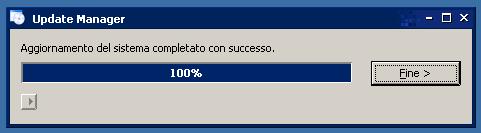
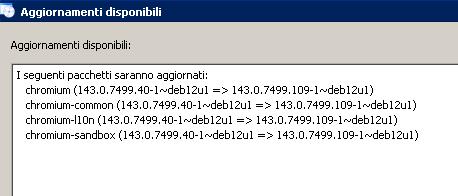
I'm proud to inform you that my Q4OS Aquarius Trinity i686 just automatically provided me with the Chromium update via Update Manager.
What can I say, fantastic!
I'm attaching snippets of the sequence

Last edited by nirick (2025-12-14 02:51)
Q4OS 6.6-deb13u1 (Andromeda) Trinity Desktop (XPQ4 Windows7)
Offline
#16 2025-12-15 02:20
- schip
- Member
- Registered: 2025-12-10
- Posts: 14
Re: Install CD 32bit Aquarius Trinity
ha..sounds like your finding pleasant surprises within Q4os, as am I, nirick.
Offline
#17 2025-12-21 22:40
- nirick
- Member
- From: Italy
- Registered: 2025-11-23
- Posts: 24
Re: Install CD 32bit Aquarius Trinity
Good evening everyone,
After applying some system settings, choosing a desktop, and installing the firewall, I was working on installing antimalware on my Q4OS Aquarius 32-bit.
After some research, I discovered that the most widely used open-source Linux software is ClamAV, but unfortunately, I see that for Debian 32-bit, it's stuck at version 1.3.1 from April 2024.
Do you think it makes sense to still install the latest version available from 20 months ago, or is it better to stick with just the firewall and system updates?
Thanks in advance, see you soon!
Q4OS 6.6-deb13u1 (Andromeda) Trinity Desktop (XPQ4 Windows7)
Offline
#18 2025-12-22 15:38
- q4osteam
- Q4OS Team
- Registered: 2015-12-06
- Posts: 6,442
- Website
Re: Install CD 32bit Aquarius Trinity
Do you think it makes sense to still install the latest version available from 20 months ago, or is it better to stick with just the firewall and system updates?
We don't think it makes much sense to install antivirus on a Debian based Linux distro. You will be safe with firewall and system updates.
Offline
#19 2026-01-25 09:08
- nirick
- Member
- From: Italy
- Registered: 2025-11-23
- Posts: 24
Re: Install CD 32bit Aquarius Trinity
Good morning everyone,
I just discovered that the 6.1.0-42 kernel, downloaded during the last terminal update, doesn't allow booting the 32-bit system, just like it did with the 64-bit Aquarius. At that point, I had to remove the new kernel and revert to 6.1.0-41-686-pae.
My question is whether the current kernel is the last one that will work on this 2009 laptop, or whether I have any hope that future kernels might still work.
Thanks in advance, see you soon!
Q4OS 6.6-deb13u1 (Andromeda) Trinity Desktop (XPQ4 Windows7)
Offline
#20 2026-01-25 09:52
- q4osteam
- Q4OS Team
- Registered: 2015-12-06
- Posts: 6,442
- Website
Re: Install CD 32bit Aquarius Trinity
I just discovered that the 6.1.0-42 kernel, downloaded during the last terminal update, doesn't allow booting the 32-bit system ...
How did you discover that ? Please provide more detailed info. Q4OS Aquarius 32bit with 6.1.0-42-686 kernel and the latest upgrade boots and works fine here.
Offline
#21 2026-01-25 20:40
- nirick
- Member
- From: Italy
- Registered: 2025-11-23
- Posts: 24
Re: Install CD 32bit Aquarius Trinity
nirick wrote:I just discovered that the 6.1.0-42 kernel, downloaded during the last terminal update, doesn't allow booting the 32-bit system ...
How did you discover that ? Please provide more detailed info. Q4OS Aquarius 32bit with 6.1.0-42-686 kernel and the latest upgrade boots and works fine here.
Hi,
I discovered this by accident after updating via the terminal:
1 - sudo apt update
2 - sudo apt upgrade
3 - sudo apt full-upgrade
4 - PC reboot
When restarting, the PC behaved like it did with Aquarius 64-bit, meaning there was a dash in the top left corner and the system wouldn't boot.
At that point, I forced a shutdown with the PC's power button and restarted it. Then, in the grub menu, via the Q4OS advanced options, I saw that there were three kernels listed, but I remembered there were only two before the update.
I then selected the second-to-last kernel in the list, 6.1.0-41, and the PC then booted without problems as usual.
I then removed the new kernel 6.1.0-42 from the terminal and updated grub.
Q4OS 6.6-deb13u1 (Andromeda) Trinity Desktop (XPQ4 Windows7)
Offline
#22 2026-01-25 20:44
- q4osteam
- Q4OS Team
- Registered: 2015-12-06
- Posts: 6,442
- Website
Re: Install CD 32bit Aquarius Trinity
What is the output of command:
$ uname -a
Offline
#23 2026-01-25 20:51
- nirick
- Member
- From: Italy
- Registered: 2025-11-23
- Posts: 24
Re: Install CD 32bit Aquarius Trinity
Linux q4os-desktop 6.1.0-41-686-pae #1 SMP PREEMPT_DYNAMIC Debian 6.1.158-1 (2025-11-09) i686 GNU/Linux
Q4OS 6.6-deb13u1 (Andromeda) Trinity Desktop (XPQ4 Windows7)
Offline
#24 2026-03-31 23:39
- nirick
- Member
- From: Italy
- Registered: 2025-11-23
- Posts: 24
Re: Install CD 32bit Aquarius Trinity
Great news! here's the new response to the uname -a command:
Linux q4os-desktop 6.1.0-44-686-pae #1 SMP PREEMPT_DYNAMIC Debian 6.1.164-1 (2026-03-09) i686 GNU/Linux
Q4OS 6.6-deb13u1 (Andromeda) Trinity Desktop (XPQ4 Windows7)
Offline
#25 2026-04-01 09:07
- q4osteam
- Q4OS Team
- Registered: 2015-12-06
- Posts: 6,442
- Website
Re: Install CD 32bit Aquarius Trinity
Great, it seems the OP issue has been fixed. Thanks for letting us know
Offline
Pages: 1
- Registered users online in this topic: 0, guests: 1