You are not logged in.
- Topics: Active | Unanswered
#1 2025-09-13 18:54
- DricC
- Member
- Registered: 2023-11-20
- Posts: 23
Andromeda: Grub version error at startup: Minimal BASH-like line
This is the error I get at startup and I cannot enter Q4OS unless I manually select "Q4OS Andromeda" as startup in the BIOS, every time I start my pc:
GNU GRUB version 2.12-9

Minimal BASH-like line editing is supported.
For the first word, TAB lists possible command completions.
Anywhere else TAB lists possible device or file completions.
To enable less(1)-like paging, "set pager=1".

grub> _
How shall I setup my BIOS please?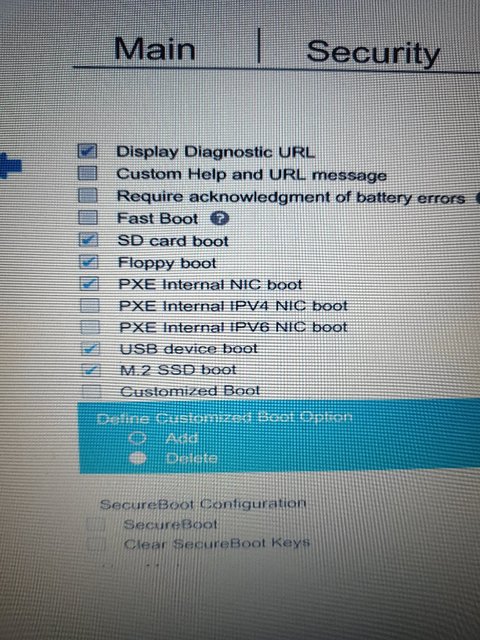
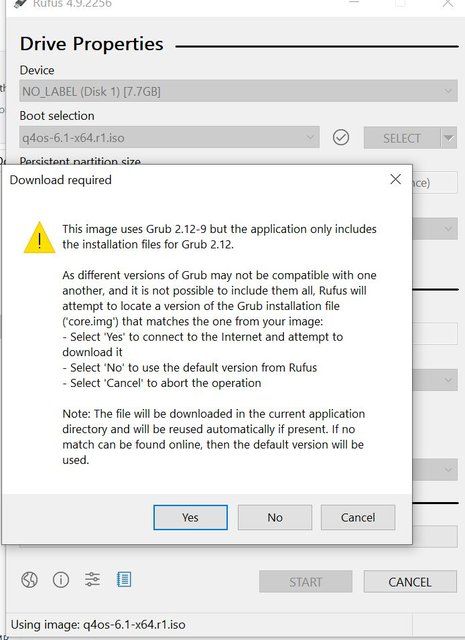
Note that I made the ISO image with Q4OS-imager for Windows, after trying unsuccessfully with Rufus because I got this message that I didn't understand but could be related to the above:
Edit: Another thing you should know is that, at the partitioning screen of the installation process, I was asked to select storage device and had two choices: LITEON-32S9-HP - 29.82 GiB (/dev/sda) or HGST HTS 65 GiB (/dev/sdb).
I chose LITEON-32S9-HP - 29.82 GiB (/dev/sda).
Edit2: I can startup Q4OS when I go to my BIOS and select "Q4OS_Andromeda" as boot option instead of "M.2 SSD Drive (UEFI)
Last edited by DricC (2025-09-13 19:39)
Offline
#2 2025-09-13 19:51
- q4osteam
- Q4OS Team

- Registered: 2015-12-06
- Posts: 6,386
- Website
Re: Andromeda: Grub version error at startup: Minimal BASH-like line
Thanks for creating a separate topic, we will check it and post back a bit later.
Offline
#3 2025-09-15 17:08
- DricC
- Member
- Registered: 2023-11-20
- Posts: 23
Re: Andromeda: Grub version error at startup: Minimal BASH-like line
ok, perfect
Offline
#4 2025-09-16 20:04
- DricC
- Member
- Registered: 2023-11-20
- Posts: 23
Re: Andromeda: Grub version error at startup: Minimal BASH-like line
So it's something difficult to solve?
Offline
#5 2025-09-16 21:04
- q4osteam
- Q4OS Team
- Registered: 2015-12-06
- Posts: 6,386
- Website
Re: Andromeda: Grub version error at startup: Minimal BASH-like line
I can startup Q4OS when I go to my BIOS and select "Q4OS_Andromeda" as boot option instead of "M.2 SSD Drive (UEFI)
You only need to setup the "Q4OS_Andromeda" boot entry as default. We don't know how to do it on your specific hardware, it varies by manufacturer. Try to browse Bios options to find where to set the default boot option.
Offline
#6 2025-11-21 18:41
- jt76e43467
- Member
- Registered: 2025-08-13
- Posts: 2
Re: Andromeda: Grub version error at startup: Minimal BASH-like line
I got the same grub message as DricC and I was able to ultimately stop it from appearing by reinstalling grub-efi-amd64. This is to share my experience, in case it is helpful. I have Q4OS 6.3.1-deb13u1 (Andromeda) Plasma 6.3.6 x11 with LUKS encryption installed on HP EliteDesk 800 G4 SFF bios QO1 Ver. 02.25.00 09/27/2023. Single OS boot (no other OS installed). Q4OS had been in use for the last couple of weeks, without any problem booting up each day. The trouble started after I temporarily removed the Q4OS system disk and booted with another old system disk (Debian KDE) that had been previously installed in the pc (because I wanted to export settings from a vorta borg app). After I removed the old drive, reinserted the Q4OS system disk, and tried to boot the system, I got the message with the grub prompt. My HP bios does not have a customized boot option, but the bios boot menu did allow me to boot to file on my drive at \EFI\Q4OS_Andromeda\shimx64.efi (I actually rebooted many times trying to sort the problem out, and sometimes I selected shimx64.efi and other times grubx64.efi--both worked). (Note that while holding down Esc button when starting my pc would get me to the boot menu, I learned that typing "exit" at the grub prompt also did.) When Q4OS booted up, I used synaptic package manager, searched for grub-efi-amd64 and marked it for re-installation. I was then able to reboot directly into Q4OS (after entering my decryption password of course as I have LUKS).
Offline
- Registered users online in this topic: 0, guests: 1