You are not logged in.
- Topics: Active | Unanswered
#26 2025-10-07 08:21
- itsoulos
- Member
- Registered: 2020-12-19
- Posts: 94
Re: Install problems in Dell precision with Nvidia
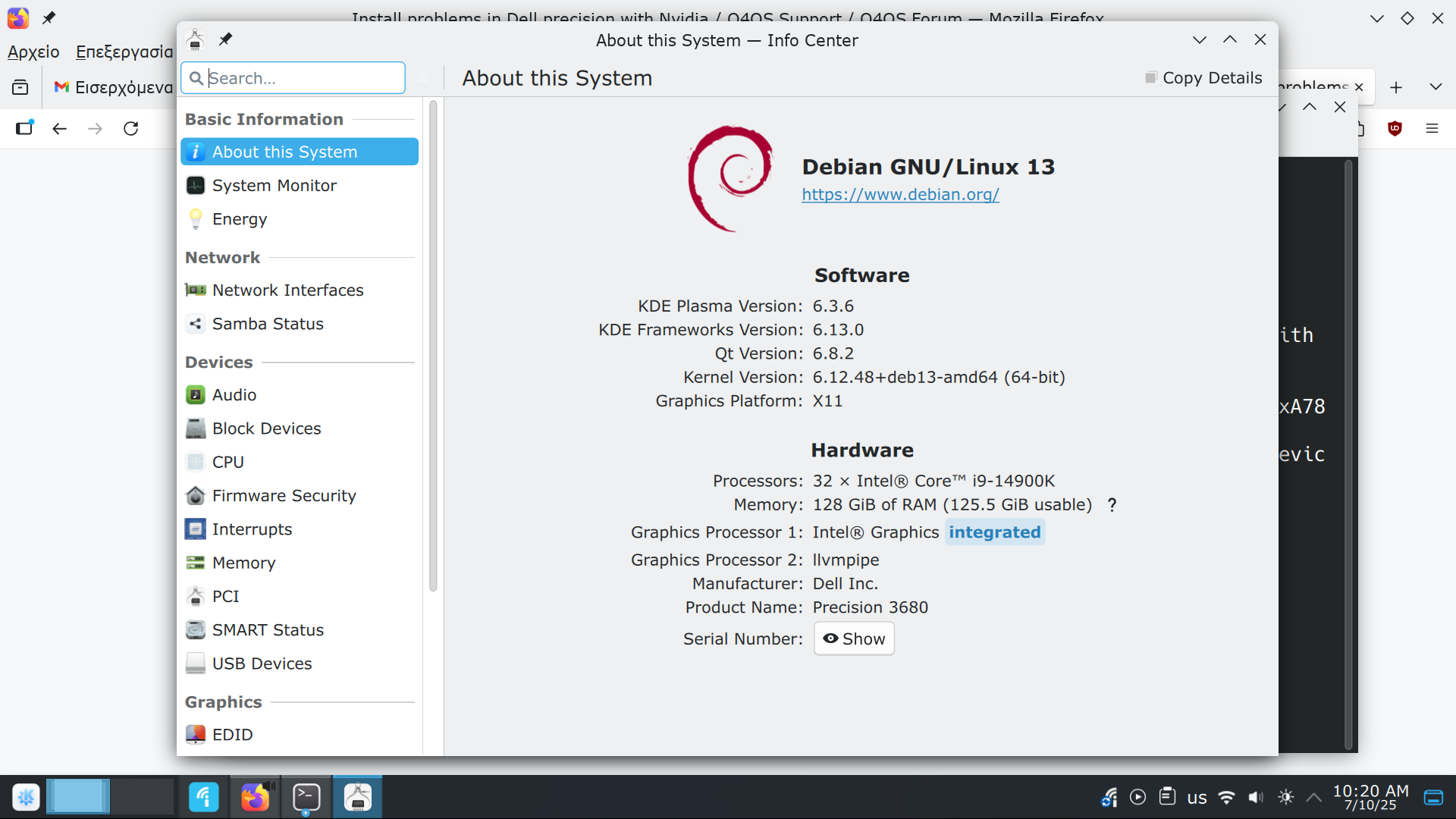
Update: Even though I have installed the nvidia driver in the kde system info appears only the integrated graphics card
See the image in the URL
Offline
#27 2025-10-07 08:34
- q4osteam
- Q4OS Team

- Registered: 2015-12-06
- Posts: 6,381
- Website
Re: Install problems in Dell precision with Nvidia
What is the output of command
$ inxi -G
?
Offline
#28 2025-10-07 08:37
- itsoulos
- Member
- Registered: 2020-12-19
- Posts: 94
Re: Install problems in Dell precision with Nvidia
What is the output of command
$ inxi -G
?
Graphics:
Device-1: Intel Raptor Lake-S GT1 [UHD Graphics 770] driver: i915 v: kernel
Device-2: NVIDIA AD107GL [RTX 2000 / 2000E Ada Generation] driver: nvidia
v: 550.163.01
Device-3: Microsoft LifeCam HD-3000 driver: snd-usb-audio,uvcvideo
type: USB
Display: x11 server: X.Org v: 21.1.16 with: Xwayland v: 24.1.6 driver: X:
loaded: modesetting,nvidia unloaded: fbdev,nouveau,vesa dri: iris
gpu: i915,nvidia resolution: 1920x1080~60Hz
API: EGL v: 1.5 drivers: iris,kms_swrast,nvidia,swrast
platforms: gbm,x11,surfaceless,device
API: OpenGL v: 4.6.0 compat-v: 4.5 vendor: nvidia mesa v: 550.163.01
renderer: NVIDIA RTX 2000 Ada Generation/PCIe/SSE2
API: Vulkan v: 1.4.309 drivers: intel,llvmpipe surfaces: xcb,xlib
Info: Tools: api: clinfo, eglinfo, glxinfo, vulkaninfo
de: kscreen-console,kscreen-doctor gpu: nvidia-settings,nvidia-smi
wl: wayland-info x11: xdriinfo, xdpyinfo, xprop, xrandr
Offline
#29 2025-10-07 08:45
- q4osteam
- Q4OS Team
- Registered: 2015-12-06
- Posts: 6,381
- Website
Re: Install problems in Dell precision with Nvidia
loaded: modesetting,nvidiaunloaded: fbdev,nouveau,vesaKDE info center seems to be incorrect.
Offline
#30 2025-10-07 08:48
- itsoulos
- Member
- Registered: 2020-12-19
- Posts: 94
Re: Install problems in Dell precision with Nvidia
loaded: modesetting,nvidiaunloaded: fbdev,nouveau,vesaKDE info center seems to be incorrect.
How can I determine what driver is being used ? Is there any other command?
Offline
#31 2025-10-07 08:50
- q4osteam
- Q4OS Team
- Registered: 2015-12-06
- Posts: 6,381
- Website
Re: Install problems in Dell precision with Nvidia
Try to run "nvidia-settings" from the main menu, if it sees your NVidia card the driver is in use.
Offline
#32 2025-10-07 08:58
- itsoulos
- Member
- Registered: 2020-12-19
- Posts: 94
Re: Install problems in Dell precision with Nvidia
Try to run "nvidia-settings" from the main menu, if it sees your NVidia card the driver is in use.
Yes, the nvidia-settings is loaded and I think that is in use. Thank you very much. Although, the minor glitches with the mouse clicks remain and I think that is probably a KDE 6 problem or a compositor problem. I will have a look later. Thank you again.
Offline
#33 2025-10-07 09:08
- q4osteam
- Q4OS Team
- Registered: 2015-12-06
- Posts: 6,381
- Website
Re: Install problems in Dell precision with Nvidia
... minor glitches with the mouse clicks ...
We can't reproduce this issue. First, you should run "htop" in terminal and check if your system is overloaded for some reason. We would also try another mouse. If the issue persists, it would be better to open another topic.
Offline
#34 2025-10-23 20:04
- itsoulos
- Member
- Registered: 2020-12-19
- Posts: 94
Re: Install problems in Dell precision with Nvidia
itsoulos wrote:... minor glitches with the mouse clicks ...
We can't reproduce this issue. First, you should run "htop" in terminal and check if your system is overloaded for some reason. We would also try another mouse. If the issue persists, it would be better to open another topic.
I have many messages in dmesg as shown in the following paste link
is there any problem ?
Offline
#35 2025-10-24 10:13
- q4osteam
- Q4OS Team
- Registered: 2015-12-06
- Posts: 6,381
- Website
Re: Install problems in Dell precision with Nvidia
Yes, it looks like you are experiencing the Debian bug https://bugs-devel.debian.org/cgi-bin/b … ug=1107887 . Unfortunately we have no fix or workaround at the moment. You could try to install updated driver directly from Nvidia resources, read:
https://www.reddit.com/r/debian/comment … tdown_and/
https://developer.nvidia.com/cuda-downl … ion=Debian
Offline
#36 2025-10-24 10:52
- itsoulos
- Member
- Registered: 2020-12-19
- Posts: 94
Re: Install problems in Dell precision with Nvidia
Yes, it looks like you are experiencing the Debian bug https://bugs-devel.debian.org/cgi-bin/b … ug=1107887 . Unfortunately we have no fix or workaround at the moment. You could try to install updated driver directly from Nvidia resources, read:
https://www.reddit.com/r/debian/comment … tdown_and/
https://developer.nvidia.com/cuda-downl … ion=Debian
Hence, should I use the following commands?
sudo apt install linux-headers-amd64 build-essential dkms
sudo apt install nvidia-driver
sudo dkms autoinstall
sudo update-initramfs -u -k all
Offline
#37 2025-10-24 10:55
- q4osteam
- Q4OS Team
- Registered: 2015-12-06
- Posts: 6,381
- Website
Re: Install problems in Dell precision with Nvidia
We are not sure if this will solve the problem, but you can try it.
Offline
#38 2025-10-24 10:56
- itsoulos
- Member
- Registered: 2020-12-19
- Posts: 94
Re: Install problems in Dell precision with Nvidia
We are not sure if this will solve the problem, but you can try it.
Also, I have found the following github
https://github.com/devleonardoamaral/de … -installer
that offers a full automatic installation
I will use it later and I will report the results
Offline
#39 2025-10-24 11:01
- q4osteam
- Q4OS Team
- Registered: 2015-12-06
- Posts: 6,381
- Website
Re: Install problems in Dell precision with Nvidia
That looks nice. Reporting the result would be appreciated, thanks 
Offline
#40 2025-10-24 16:04
- itsoulos
- Member
- Registered: 2020-12-19
- Posts: 94
Re: Install problems in Dell precision with Nvidia
That looks nice. Reporting the result would be appreciated, thanks
Here are the steps for anyone has the same problems
1) wget https://developer.download.nvidia.com/c … -1_all.deb
2) sudo dpkg -i cuda-keyring_1.1-1_all.deb
3) sudo apt-get update
4) sudo apt install cuda-drivers
Also, I had to remove the free drivers of nvidia before the previous steps
Thank you very much again
Offline
- Registered users online in this topic: 0, guests: 1