You are not logged in.
- Topics: Active | Unanswered
Pages: 1
#1 2025-09-22 23:31
- Q1derous
- Member
- Registered: 2025-03-01
- Posts: 36
YT-DLP Issues [SOLVED]
Hi All,
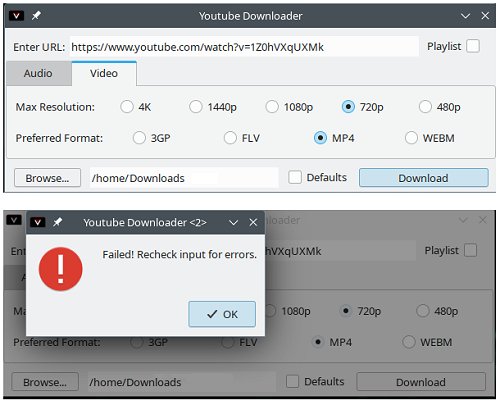
Having issues not being able to download videos.
Eg. - short video re/ latest Q4 like this - https://www.youtube.com/watch?v=1Z0hVXqUXMk
(see 1st attached screenshot. Sorry ... 2nd screenshot: YTDL-1, they got reversed when submitting.)
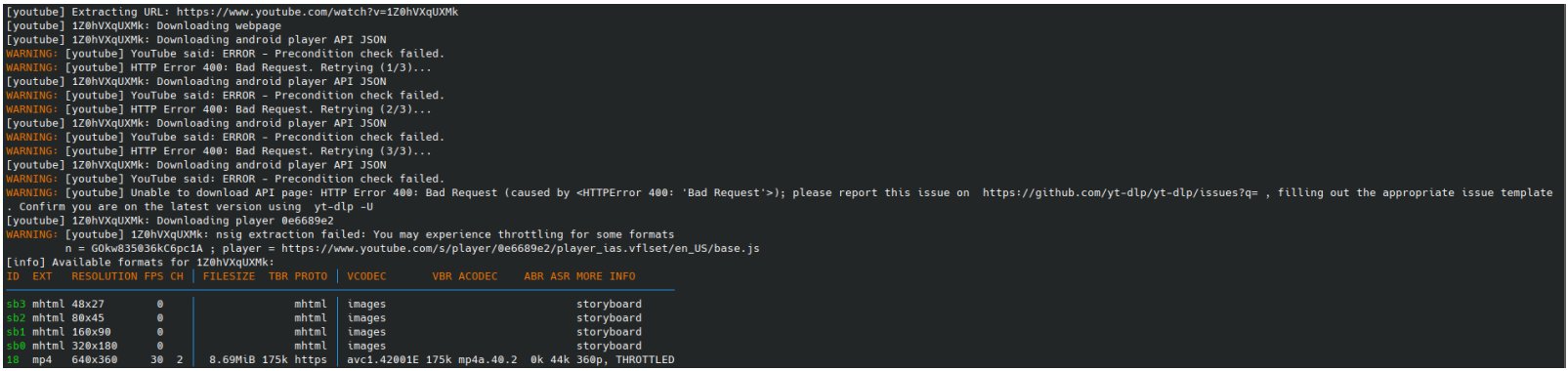
So, next tried using the terminal with yt-dlp:
yt-dlp -F https://www.youtube.com/watch?v=1Z0hVXqUXMk
Which gives this:
(see 2nd attached screenshot. Nope ... 1st screenshot: YTDL-2)
[youtube] Extracting URL: https://www.youtube.com/watch?v=1Z0hVXqUXMk
[youtube] 1Z0hVXqUXMk: Downloading webpage
[youtube] 1Z0hVXqUXMk: Downloading android player API JSON
WARNING: [youtube] YouTube said: ERROR - Precondition check failed.
WARNING: [youtube] HTTP Error 400: Bad Request. Retrying (1/3)...
[youtube] 1Z0hVXqUXMk: Downloading android player API JSON
WARNING: [youtube] YouTube said: ERROR - Precondition check failed.
WARNING: [youtube] HTTP Error 400: Bad Request. Retrying (2/3)...
[youtube] 1Z0hVXqUXMk: Downloading android player API JSON
WARNING: [youtube] YouTube said: ERROR - Precondition check failed.
WARNING: [youtube] HTTP Error 400: Bad Request. Retrying (3/3)...
[youtube] 1Z0hVXqUXMk: Downloading android player API JSON
WARNING: [youtube] YouTube said: ERROR - Precondition check failed.
WARNING: [youtube] Unable to download API page: HTTP Error 400: Bad Request (caused by <HTTPError 400: 'Bad Request'>); please report this issue on https://github.com/yt-dlp/yt-dlp/issues?q= , filling out the appropriate issue template
. Confirm you are on the latest version using yt-dlp -U
[youtube] 1Z0hVXqUXMk: Downloading player 0e6689e2
WARNING: [youtube] 1Z0hVXqUXMk: nsig extraction failed: You may experience throttling for some formats
n = GOkw835036kC6pc1A ; player = https://www.youtube.com/s/player/0e6689 … US/base.js
[info] Available formats for 1Z0hVXqUXMk:
ID EXT RESOLUTION FPS CH │ FILESIZE TBR PROTO │ VCODEC VBR ACODEC ABR ASR MORE INFO
──────────────────────────────────────────────────────────────────────────────────────────────────────
sb3 mhtml 48x27 0 │ mhtml │ images storyboard
sb2 mhtml 80x45 0 │ mhtml │ images storyboard
sb1 mhtml 160x90 0 │ mhtml │ images storyboard
sb0 mhtml 320x180 0 │ mhtml │ images storyboard
18 mp4 640x360 30 2 │ 8.69MiB 175k https │ avc1.42001E 175k mp4a.40.2 0k 44k 360p, THROTTLED
Tried it anyway for ID 18 mp4:
> yt-dlp -f 18 https://www.youtube.com/watch?v=1Z0hVXqUXMk
[youtube] Extracting URL: https://www.youtube.com/watch?v=1Z0hVXqUXMk
[youtube] 1Z0hVXqUXMk: Downloading webpage
[youtube] 1Z0hVXqUXMk: Downloading android player API JSON
WARNING: [youtube] YouTube said: ERROR - Precondition check failed.
WARNING: [youtube] HTTP Error 400: Bad Request. Retrying (1/3)...
[youtube] 1Z0hVXqUXMk: Downloading android player API JSON
WARNING: [youtube] YouTube said: ERROR - Precondition check failed.
WARNING: [youtube] HTTP Error 400: Bad Request. Retrying (2/3)...
[youtube] 1Z0hVXqUXMk: Downloading android player API JSON
WARNING: [youtube] YouTube said: ERROR - Precondition check failed.
WARNING: [youtube] HTTP Error 400: Bad Request. Retrying (3/3)...
[youtube] 1Z0hVXqUXMk: Downloading android player API JSON
WARNING: [youtube] YouTube said: ERROR - Precondition check failed.
WARNING: [youtube] Unable to download API page: HTTP Error 400: Bad Request (caused by <HTTPError 400: 'Bad Request'>); please report this issue on https://github.com/yt-dlp/yt-dlp/issues?q= , filling out the appropriate issue template
. Confirm you are on the latest version using yt-dlp -U
[youtube] 1Z0hVXqUXMk: Downloading player 0e6689e2
WARNING: [youtube] 1Z0hVXqUXMk: nsig extraction failed: You may experience throttling for some formats
n = AWzsQdsodVbMteGEI ; player = https://www.youtube.com/s/player/0e6689 … US/base.js
[info] 1Z0hVXqUXMk: Downloading 1 format(s): 18
ERROR: unable to download video data: HTTP Error 403: Forbidden
Not happening. So, checked for updates:
> yt-dlp -U
Available version: stable@2025.09.05, Current version: stable@2023.03.04
ERROR: As yt-dlp has been installed via apt, you should use that to update. If you're on a stable release, also check backports.
Okay, ran "sudo apt update" and then tried to upgrade it with “sudo apt upgrade yt-dlp” and got this:
Reading package lists... Done
Building dependency tree... Done
Reading state information... Done
yt-dlp is already the newest version (2023.03.04-1).
yt-dlp set to manually installed.
Calculating upgrade... Done
The following packages will be upgraded:
q4os-swcentre-data
1 upgraded, 0 newly installed, 0 to remove and 0 not upgraded.
Need to get 90.4 kB of archives.
After this operation, 0 B of additional disk space will be used.
Do you want to continue? [Y/n]: N
Checked in Synaptic Pkg Mngr, it shows these 2 installed:
- youtubedl-gui, installed version: 3.0.2, latest version: 3.0.2
- yt-dlp, installed version: 2023.03.04-1, latest version: 2023.03.04-1
Checked Github, it shows the latest version as 2025.09.05
Confused now. Should I autoremove and reinstall? Is there any point if it's just going to install the 2023 version?
Why is it not working, what should I try next??
(Note - also installed and tried using KGet from Discover Software Center and it doesn't work either)
Last edited by Q1derous (2025-09-23 17:22)
Offline
#2 2025-09-23 00:12
- hchiper
- Member

- From: Belgium
- Registered: 2020-07-28
- Posts: 829
Re: YT-DLP Issues [SOLVED]
I don't know how you installed yt-dlp. Uninstall it if you can (sudo apt --purge autoremove yt-dlp).
Visit https://github.com/yt-dlp/yt-dlp/releases/ and download `yt-dlp_linux`, browse to the directory where you saved it and make it executable.
Then use it to download your video. It works perfectly.
The problem is that youtube undergoes modifications from time to time and yt-dlp needs to be updated accordingly.
Q4OS machine: Samsung R519 - Pentium T4200 2.0 GHz - 4 GB RAM - 500 GB SSD
Offline
#3 2025-09-23 07:53
- Q1derous
- Member
- Registered: 2025-03-01
- Posts: 36
Re: YT-DLP Issues [SOLVED]
Thanks for the quick reply.
I think I had originally installed it with "sudo apt install yt-dlp" in the terminal.
Update: did the purge / removal you noted, it got rid of the Gui and these other packages as well:
> sudo apt --purge autoremove yt-dlp
Reading package lists... Done
Building dependency tree... Done
Reading state information... Done
The following packages will be REMOVED:
libxdo3* linux-image-6.1.0-32-amd64* linux-image-6.1.0-33-amd64* linux-image-6.1.0-34-amd64* linux-image-6.1.0-35-amd64*
linux-image-6.1.0-37-amd64* python3-pycryptodome* python3-pyxattr* python3-websockets* rtmpdump* xdotool*
youtube-dl* youtubedl-gui* yt-dlp*
0 upgraded, 0 newly installed, 14 to remove and 1 not upgraded.
After this operation, 2,058 MB disk space will be freed.
Do you want to continue? [Y/n] y
(Reading database ... )
Removing xdotool (1:3.20160805.1-5) ...
Removing libxdo3:amd64 (1:3.20160805.1-5) ...
Removing linux-image-6.1.0-32-amd64 (6.1.129-1) ...
/etc/kernel/postrm.d/initramfs-tools:
update-initramfs: Deleting /boot/initrd.img-6.1.0-32-amd64
/etc/kernel/postrm.d/zz-update-grub:
Generating grub configuration file ...
Found linux image: /boot/vmlinuz-6.1.0-39-amd64
Found initrd image: /boot/initrd.img-6.1.0-39-amd64
Found linux image: /boot/vmlinuz-6.1.0-38-amd64
Found initrd image: /boot/initrd.img-6.1.0-38-amd64
Found linux image: /boot/vmlinuz-6.1.0-37-amd64
Found initrd image: /boot/initrd.img-6.1.0-37-amd64
Found linux image: /boot/vmlinuz-6.1.0-35-amd64
Found initrd image: /boot/initrd.img-6.1.0-35-amd64
Found linux image: /boot/vmlinuz-6.1.0-34-amd64
Found initrd image: /boot/initrd.img-6.1.0-34-amd64
Found linux image: /boot/vmlinuz-6.1.0-33-amd64
Found initrd image: /boot/initrd.img-6.1.0-33-amd64
Found linux image: /boot/vmlinuz-6.1.0-27-amd64
Found initrd image: /boot/initrd.img-6.1.0-27-amd64
ETC ...
ETC ...
Warning: os-prober will be executed to detect other bootable partitions.
Its output will be used to detect bootable binaries on them and create new boot entries.
done
Removing youtubedl-gui (3.0-2) ...
Removing youtube-dl (2021.12.17-2) ...
Removing yt-dlp (2023.03.04-1) ...
Removing python3-pycryptodome (3.11.0+dfsg1-4) ...
Removing python3-pyxattr:amd64 (0.8.1-1) ...
Removing python3-websockets (10.4-1) ...
Removing rtmpdump (2.4+20151223.gitfa8646d.1-2+b2) ...
Processing triggers for desktop-file-utils (0.26-1) ...
Processing triggers for hicolor-icon-theme (0.17-2) ...
Processing triggers for libc-bin (2.36-9+deb12u13) ...
Processing triggers for man-db (2.11.2-2) ...
Processing triggers for mailcap (3.70+nmu1) ...
Processing triggers for bamfdaemon (0.5.6+repack-1) ...
Rebuilding /usr/share/applications/bamf-2.index...
(Reading database ... )
Purging configuration files for linux-image-6.1.0-34-amd64 (6.1.135-1) ...
Purging configuration files for linux-image-6.1.0-33-amd64 (6.1.133-1) ...
Purging configuration files for linux-image-6.1.0-32-amd64 (6.1.129-1) ...
Purging configuration files for linux-image-6.1.0-37-amd64 (6.1.140-1) ...
Purging configuration files for linux-image-6.1.0-35-amd64 (6.1.137-1) ...
Downloaded yt-dlp_linux from GitHub to the /home/user/Downloads folder.
Went into the file's Properties > Permissions and checked On “Is executable”.
Then opened a Terminal in that folder and tried: yt-dlp_linux -f [video url].
That returned the following:
bash: yt-dlp_linux: command not found
Tried it with sudo which spit this back:
sudo: yt-dlp_linux: command not found
Should I rename it to just yt-dlp?
Should it stay in the /Downloads folder, or be moved to something like the /opt folder?
Don't have the YT-DLP gui now which just leaves the option of using the CLI ... so, when you say “use it to download a video” ... mmm, how exactly?
Can I reinstall the gui and use that? Discover SC shows Youtube Downloader gui (v.3.0.2) available to be installed again.
Do the python dependencies need to be reinstalled as well?
Sorry, still newish to working with some Linux methods & concepts.
Last edited by Q1derous (2025-09-23 07:56)
Offline
#4 2025-09-23 13:31
- hchiper
- Member
- From: Belgium
- Registered: 2020-07-28
- Posts: 829
Re: YT-DLP Issues [SOLVED]
Try
./yt-dlp_linux <url>Explanation: if you simply enter the command `yt-dlp_linux` the system will search for that command in the directories specified in %PATH (type echo $PATH if you want). If the executable is not found in the path, there is an error. To specify the executable is in the working directory (symbolized by a `./`) and is to be found there, you need to specify it: ./yt-dlp_linux.
No need to rename.
Q4OS machine: Samsung R519 - Pentium T4200 2.0 GHz - 4 GB RAM - 500 GB SSD
Offline
#5 2025-09-23 17:21
- Q1derous
- Member
- Registered: 2025-03-01
- Posts: 36
Re: YT-DLP Issues [SOLVED]
And it works! Well imagine that.
I thought that opening a terminal in the downloads directory and calling on it would do the trick, but apparently it needed something more literal.
Like it when it's a simple solution.
Guess now I'll have to make some Belgian Waffles for breakfast!
Thanks hchiper, much appreciated. 
Offline
#6 2025-09-23 17:38
- hchiper
- Member
- From: Belgium
- Registered: 2020-07-28
- Posts: 829
Re: YT-DLP Issues [SOLVED]
Guess now I'll have to make some Belgian Waffles for breakfast!
It's the least you can do!
More seriously, you can also move the executable to a directory listed in $PATH; the most appropriate I think would be /usr/local/bin if it is listed:
$ sudo mv yt-dlp_linux /usr/local/bin     # mv is for "move"
$ sudo chmod +x /usr/local/bin/yt-dlp_linux     # to be sure it is still executable after moving.
Then no more needed to type `./` in front of the command and it will work from any working directory for all users.
Q4OS machine: Samsung R519 - Pentium T4200 2.0 GHz - 4 GB RAM - 500 GB SSD
Offline
#7 2025-09-23 18:19
- Q1derous
- Member
- Registered: 2025-03-01
- Posts: 36
Re: YT-DLP Issues [SOLVED]
Okay, tried that, moved to /usr/local/bin, confirmed it's still executable, and got this when testing a download:
[youtube] Pvuv2sn5fDQ: Downloading webpage
[youtube] Pvuv2sn5fDQ: Downloading tv simply player API JSON
[youtube] Pvuv2sn5fDQ: Downloading tv client config
[youtube] Pvuv2sn5fDQ: Downloading tv player API JSON
[download] Sleeping 1.00 seconds as required by the site...
[download] Unable to open file: [Errno 13] Permission denied:
ERROR: unable to open for writing: [Errno 13] Permission denied
Tried it with both yt-dlp_linux and ./yt-dlp_linux and got same error result.
Offline
#8 2025-09-23 18:33
- q4osteam
- Q4OS Team

- Registered: 2015-12-06
- Posts: 6,317
- Website
Re: YT-DLP Issues [SOLVED]
[download] Unable to open file: [Errno 13] Permission denied:
ERROR: unable to open for writing: [Errno 13] Permission denied
That means you have no write permissions in this directory. Try run the yt-dlp_linux binary from within your $HOME directory.
$ cd $HOME
$ /usr/local/bin/yt-dlp_linux
Did you also try "Video downloader" from Q4OS software center ? If so, you need to update it to the latest version:
$ flatpak update
and try the download once again. It works just fine in Q4OS-6 Andromeda.
Offline
#9 2025-09-23 20:09
- Q1derous
- Member
- Registered: 2025-03-01
- Posts: 36
Re: YT-DLP Issues [SOLVED]
Oh “that” (under “home”) /usr/local/bin directory.
I had put it in the root “/usr/local/bin”.
(So not being a typical install, this method - download and launch - is more like a Windoh's portable app, right?)
Switched to the folder under $HOME. Had to make Dophin “Show Hidden Files”
It doesn't have a “/usr/local/bin” directory. It does have the “.local” subdirectory, but not bin, so created that and moved yt-dlp_linux to there and tested.
Tried to cd to that, but even just going to “local”, it says
bash: cd: local: No such file or directory
At this point, it works where it is, so think I'll just leave it there and be happy with that.
Re/ Video downloader, I'd try it if it was a standalone, but otherwise I don't use Flatpaks, Snaps, etc.
If I use Discover to install Youtube Downloader, or Synaptic to install youtubedl-gui (v 3.0.2 - and its 8 dependencies), will that reference and use the yt-dlp_linux and work, or might that mess things up somehow? Or just not work since this isn't an "installed" version?
Last edited by Q1derous (2025-09-23 20:10)
Offline
#10 2025-09-23 20:19
- hchiper
- Member
- From: Belgium
- Registered: 2020-07-28
- Posts: 829
Re: YT-DLP Issues [SOLVED]
Did you check /usr/local/bin is listed in $PATH?
Once you have moved the executable to /usr/local/bin (which is not a sub-directory of $HOME); type simply
cd $HOME/<one of your existing sub-directory where you want to save your downloads> # you have permission to save files there
yt-dlp_linux <url of video>
Q4OS machine: Samsung R519 - Pentium T4200 2.0 GHz - 4 GB RAM - 500 GB SSD
Offline
#11 2025-09-23 20:25
- q4osteam
- Q4OS Team
- Registered: 2015-12-06
- Posts: 6,317
- Website
Re: YT-DLP Issues [SOLVED]
You don't need to move yt-dlp_linux binary under $HOME, keep it in "/usr/local/bin"
You don't need to to make Dophin “Show Hidden Files”
You only need to launch terminal and run commands:
$ cd $HOME
$ /usr/local/bin/yt-dlp_linux -F https://www.youtube.com/watch?v=1Z0hVXqUXMk
That should work.
If I use Discover to install Youtube Downloader, or Synaptic to install youtubedl-gui (v 3.0.2 - and its 8 dependencies), will that reference and use the yt-dlp_linux and work, or might that mess things up somehow? Or just not work since this isn't an "installed" version?
The Debian version of YT downloader has bugs and doesn't work well because it is not up to date. So we don't recommend using it.
I don't use Flatpaks, Snaps ...
Well,it's a legitimate preference, although flatpak version should work fine.
Offline
#12 2025-09-23 20:25
- q4osteam
- Q4OS Team
- Registered: 2015-12-06
- Posts: 6,317
- Website
Re: YT-DLP Issues [SOLVED]
@hchiper
+1
Offline
#13 2025-09-23 21:25
- Q1derous
- Member
- Registered: 2025-03-01
- Posts: 36
Re: YT-DLP Issues [SOLVED]
Okay, now I see what you're each referring to. Was getting confused with the different folders and path to use.
Tested and all working properly again.
Going to have to add some real Canadian maple syrup to those Belgian waffles.
Re/ “The Debian version of YT downloader has bugs and doesn't work well because it is not up to date. So we don't recommend using it.”
Thanks Q4T, good to know. Always better to avoid wasted time and unnecessary hassles.
Offline
#14 2025-09-23 21:29
- hchiper
- Member
- From: Belgium
- Registered: 2020-07-28
- Posts: 829
Re: YT-DLP Issues [SOLVED]
Going to have to add some real Canadian maple syrup to those Belgian waffles.
+1
Q4OS machine: Samsung R519 - Pentium T4200 2.0 GHz - 4 GB RAM - 500 GB SSD
Offline
Pages: 1
- Registered users online in this topic: 0, guests: 1