You are not logged in.
- Topics: Active | Unanswered
#1 2025-09-18 14:13
- IanScuffling
- Member
- Registered: 2025-09-18
- Posts: 2
Installed TDE post-install, but don't see the option to use it
I installed Q4OS with KDE yesterday (on an old Surface Pro 3, if that matters). This morning, I used the Desktop Profiler to add TDE (while preserving the software already installed). However, when I rebooted, I did not see the option to use TDE at login. How do I get to this desktop?
I'm using 6.1 Andromeda.
BTW, I'm impressed with Q4OS. I've spent several days distro hopping to find the right software for this Surface, and so far Q4OS seems great.
Offline
#2 2025-09-18 14:15
- q4osteam
- Q4OS Team

- Registered: 2015-12-06
- Posts: 6,107
- Website
Re: Installed TDE post-install, but don't see the option to use it
Welcome to the forum 
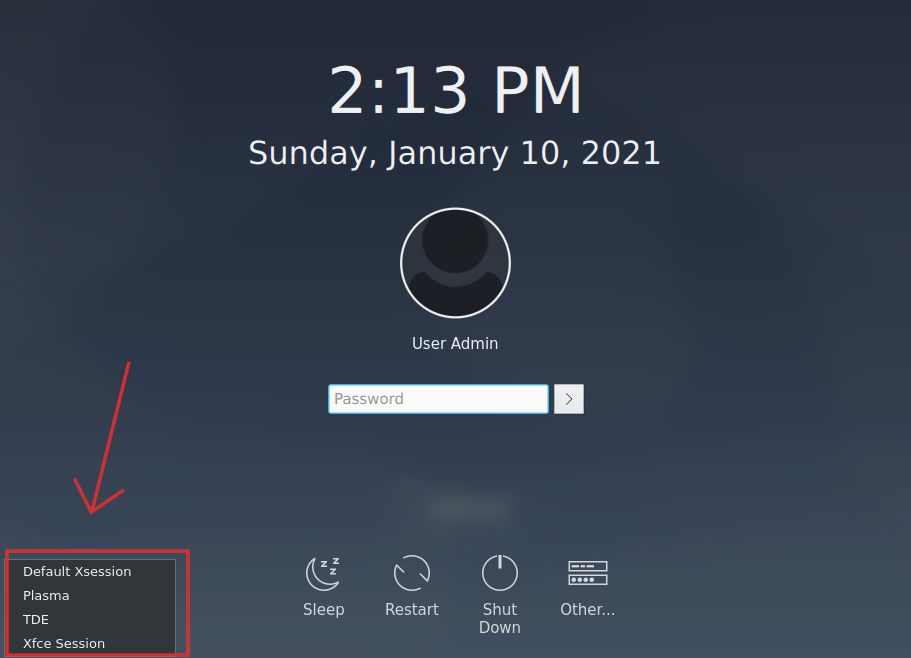
Pick "TDE session" on the login screen bottom left, see https://www.q4os.org/images_doc/dqa015/image13.png
Offline
#3 2025-09-18 15:00
- IanScuffling
- Member
- Registered: 2025-09-18
- Posts: 2
Re: Installed TDE post-install, but don't see the option to use it
Thank you for the quick and very helpful response! On my login screen, the text on the bottom just read KDE Plasma, but when I tapped on it I got the TDE option.
This is kind of fun! I think TDE is probably all I need for this old hardware!
Offline
#4 2025-09-19 08:35
- Guptill71
- Member
- Registered: 2025-09-16
- Posts: 4
Re: Installed TDE post-install, but don't see the option to use it
It might be necessary to check if the TDE session is properly installed and registered with the display manager. Sometimes a reboot alone doesn’t update the session list.
Offline