You are not logged in.
- Topics: Active | Unanswered
Pages: 1
#1 2025-08-12 13:26
- Armbroke
- Member
- Registered: 2025-07-10
- Posts: 78
Help with Arduino basics
Hi Arduino users !
I have recently installed q4os, and is now trying to reestablish what I did on w10, one thing being Arduino.
Please give me a hand with two main obstacles; first a practical route to access Arduino itself, all I've managed is a link in Dolphin which
then opens Arduino itself. Should be an icon on the desktop, right ? An installation error ?
The other thing is connection; I can define a board (Avr boards Nano) and a Port, /dev/ttyUSB0 comes up.
Then, when I try to upload, it compiles, but says "avrdude: ser_open(): can't open device "/dev/ttyUSB0": Permission denied
For example a usb memory is connected immediately, so is this a case of missing drivers ?
Peter
Offline
#2 2025-08-12 22:46
- theasmitkid
- Member
- From: NCT of Delhi
- Registered: 2025-01-26
- Posts: 357
Re: Help with Arduino basics
I've always used Arduino legacy(i don't like the latest version..) on my laptop, never actually in win10 but only in Q4OS
Installation went like
Download arduino-1.8.19-linux64.tar.xz
Extract, and enter folder
Open terminal
Run
sudo ./install.shReboot
Next up, it's as easy as starting the ide, settings port and board and clicking the upload button 
It's been well over 6 months since I last used Arduino ide so.. i don't really remember doing anything else to get it working
If you're using the latest/new Arduino ide then try adding your user to required groups and removing modemmanager by running,
sudo apt-get remove modemmanager -y
sudo groupadd plugdev
sudo groupadd dialout
sudo usermod -a -G tty $USER
sudo usermod -a -G dialout $USER
sudo usermod -a -G uucp $USER
sudo usermod -a -G plugdev $USER
Followed up by a reboot, you should be now able to upload your code to your avrboards, if the issue persists, try using Arduino legacy
Coding & Robotics Enthusiast | Windows 7 x86 @ n2600 · 2GB · 320GB HDD (No graphics acceleration available in linux)
Offline
#3 2025-08-13 06:36
- Armbroke
- Member
- Registered: 2025-07-10
- Posts: 78
Re: Help with Arduino basics
Hello, and thanks for responding!
Will try this out asap.
(Not sure about time difference, but here in Sweden it's early morning now)
Would probably feel familiar using that earlier version too...
I guess you haven't had any issues with USB ports when connecting the arduino boards then ?
Regards
Peter
Offline
#4 2025-08-13 09:08
- theasmitkid
- Member
- From: NCT of Delhi
- Registered: 2025-01-26
- Posts: 357
Re: Help with Arduino basics
Hello, and thanks for responding!
Will try this out asap.
(Not sure about time difference, but here in Sweden it's early morning now)
oh i replied at 3 in the morning so definitely some time difference
Would probably feel familiar using that earlier version too...
I guess you haven't had any issues with USB ports when connecting the arduino boards then ?
Not with connecting to Arduino, only issue I've had is i damaged one of the two usb a ports.. sucks 
Coding & Robotics Enthusiast | Windows 7 x86 @ n2600 · 2GB · 320GB HDD (No graphics acceleration available in linux)
Offline
#5 2025-08-13 09:47
- hchiper
- Member

- From: Belgium
- Registered: 2020-07-28
- Posts: 837
Re: Help with Arduino basics
first a practical route to access Arduino itself, all I've managed is a link in Dolphin which
then opens Arduino itself. Should be an icon on the desktop, right ? An installation error ?
Why and how did you create your link in Dolphin? What is its target? What do you expect to happen with it?
You'll have access to your Arduino board only using Arduino IDE. With my Uno it uses /dev/ttyACM0, which is created automatically when I connect it, and deleted automatically when I disconnect it.
Don't expect an installer to create an icon on the desktop; instead it may create an entry in the applications launcher. But this does not happen when unzipping a zip archive or an AppImage.
So the question is: how exactly did you install your Arduino IDE? Could be useful to know which version.
The other thing is connection; I can define a board (Avr boards Nano) and a Port, /dev/ttyUSB0 comes up.
Then, when I try to upload, it compiles, but says "avrdude: ser_open(): can't open device "/dev/ttyUSB0": Permission denied
For example a usb memory is connected immediately, so is this a case of missing drivers ?
Like an USB printer, an Arduino board is not an USB memory, don't expect they behave the same way.
You must consider the possibility of a hardware issue (USB connector, USB cable, Arduino board). Change one of them at a time and see what happens.
Try also to open a Terminal and to launch `ls /dev/ttyUSB*` to see if such devices even exist; what is the output?
Note that this is the 5th thread where you post nearly the same questions about Arduino, with answers spread around (I'm not sure you have seen all of them).
Q4OS machine: Samsung R519 - Pentium T4200 2.0 GHz - 4 GB RAM - 500 GB SSD
Offline
#6 2025-08-13 17:11
- Armbroke
- Member
- Registered: 2025-07-10
- Posts: 78
Re: Help with Arduino basics
Why ? (Lots of them)
The short answer is because I can not pinpoint the error here, or even if it's my mistake, the instructions, or some version problem maybe.
The bottom line is simply that I can't install Arduino on my system, and would very much like to find a solution.
Have tried the instructions in this post, for legacy and modern, but the system simply doesn't follow protocol. That goes for Arduino's own
download instructions too. This should point to a typing error or something like that, but several attempts have failed.
On the other hand, there are obviously members here that do run Arduino, so it should be possible.
Strange anyway....
Peter
Offline
#7 2025-08-13 19:52
- hchiper
- Member
- From: Belgium
- Registered: 2020-07-28
- Posts: 837
Re: Help with Arduino basics
Please realize that I don't know anything more about your system than what you say, and this is really very nebulous, not to say contradictory (on one side you say you couldn't install Arduino IDE, on the other side you say that "/dev/ttyUSB0 comes up" --- in Arduino IDE, I presume, where else?)
I asked two specific questions and you didn't answer them.
Regarding the installation, do you mean you don't know how to install or do you mean the installation failed and, in this case, "how exactly did you try to install your Arduino IDE, and what error message did you get, if any?
Please give detailed, precise and extensive answers (as if you directed me to do exactly the same things you did).
Q4OS machine: Samsung R519 - Pentium T4200 2.0 GHz - 4 GB RAM - 500 GB SSD
Offline
#8 2025-08-13 21:23
- theasmitkid
- Member
- From: NCT of Delhi
- Registered: 2025-01-26
- Posts: 357
Re: Help with Arduino basics
Maybe try asking on Arduino forum..
I found a post with similar issue and they fixed it by using snap's Arduino.. maybe try that?
Coding & Robotics Enthusiast | Windows 7 x86 @ n2600 · 2GB · 320GB HDD (No graphics acceleration available in linux)
Offline
#9 2025-08-13 22:32
- Armbroke
- Member
- Registered: 2025-07-10
- Posts: 78
Re: Help with Arduino basics
hchiper,
sorry for my outburst, guess I was frustraded over being so close but not getting there.
(on top of that I just wrote a fairly long answer only to discover I wasn't logged in anymore so my answer was gone....)
My first installation attempt was downloading "arduino-ide_2.3.6_Lknux_64bit.AppImage". Clicking on that, and confirming "run", starts Arduino, and I can enter a sketch, for now an example sketch. I can then choose Arduino AVR Boards, Nano here. With a board connected the Port shows up as /dev/:ttyUSB0.
Then the problem: it compiles, but says "avrdude:ser_open(): can't open device "/dev/ttyUSB0": Permission denied
So, that's what really needs a solution. My other Carlsson for help was about "real" installations, which never worked for me.
Another thing of course is some kind of desktop icon.
Appreciate thoughts on this, I am slowly learning.....
Peter
Offline
#10 2025-08-13 22:48
- Armbroke
- Member
- Registered: 2025-07-10
- Posts: 78
Re: Help with Arduino basics
"My other Carlsson" ?? Should be "call" if I remember right.
Offline
#11 2025-08-14 05:22
- hchiper
- Member
- From: Belgium
- Registered: 2020-07-28
- Posts: 837
Re: Help with Arduino basics
OK, thanks.
I downloaded version 2.3.6 too. Instead of the .appimage I choose the .zip which I decompressed. I launched the executable (double click on the file `arduino-ide` shown in Dolphin). It started some automatic downloads and I got this window.
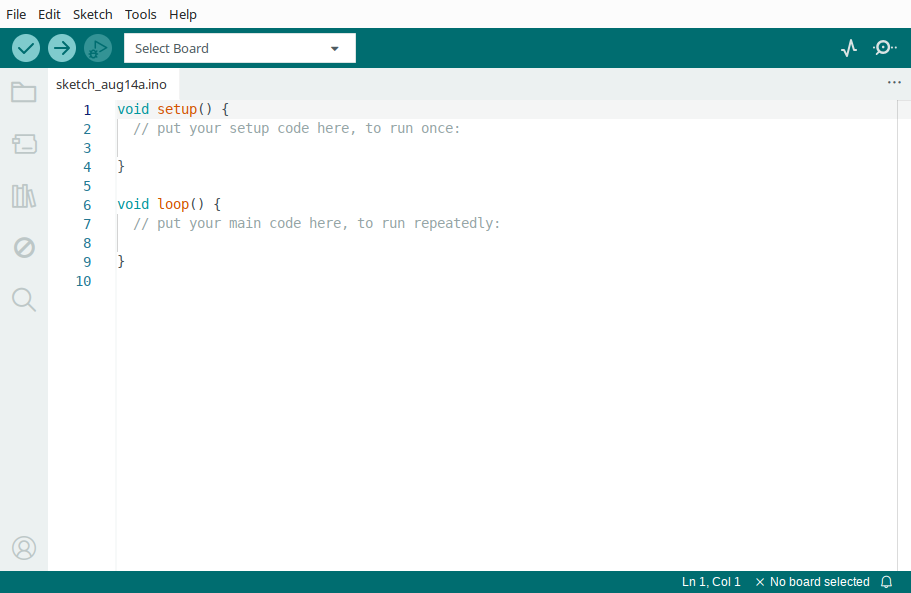
Then I connected my Arduino Uno and to have it recognized, I did NOT use the Tools menu, but I selected it directly in the drop-down menu in the toolbar at the right of the tree circular buttons.
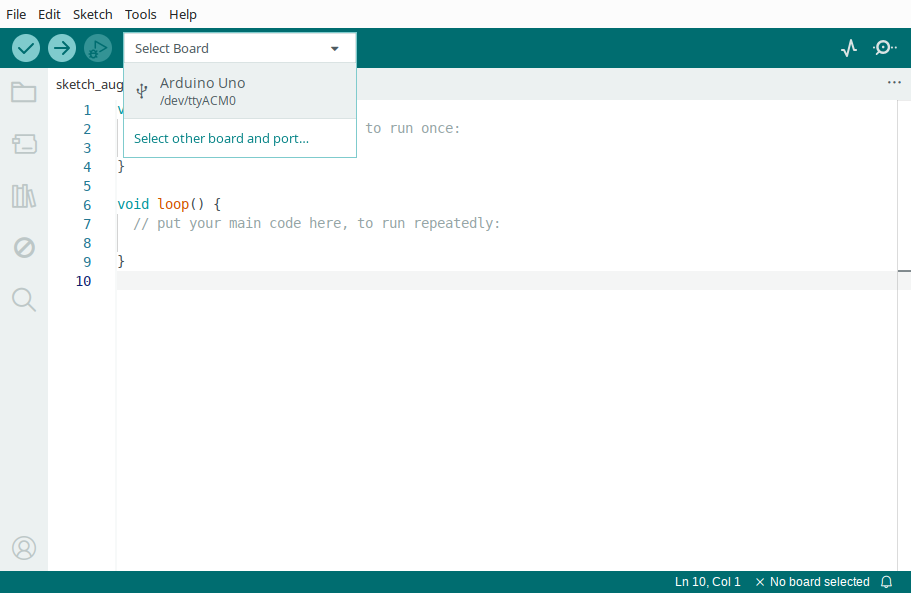
As you can see on this screenshot, it is connected on the port /dev/ttyACM0 (instead of /dev/ttyUSB0 that you have mentioned). I can compile and upload without any error message.
What could make the difference with your setup is that I had previously installed the Arduino IDE from the repositories, which is version 1.8.13 for Q4OS 4.
My suggestion is that you forget the appimage and try to install Arduino IDE from the repositories too:
open a terminal or Konsole (open application launcher and type "terminal" or "Konsole" in the search bar)
it should look like a command line
at the "$" prompt, type "sudo apt install arduino"
type your password when requested (type carefully: it is not displayed) and hit enter
once installed, the "$" prompt will be visible again
then either type "arduino" and hit enter, or look in the application launcher for the Arduino app
check it is NOT version 2.3.6, but an older one (the one available in the repositories)
connect your Arduino Nano and look under the Tools menu what board and port are recognized: still /dev/ttyUSB0 or /dev/ttyACM0?)
try to upload a sketch and see if the error happens again
Following the case:
if everything goes well, close the Arduino app, run version 2.3.6 (appimage) again, and see what happens
if the error persists, try what theasmitkid advised in post #2
theasmitkid also suggested a link in post #8
if the error persists anyway, we must consider a hardware failure -> see the 2nd part of my post #5 (try even another computer with another OS)
Last edited by hchiper (2025-08-14 07:37)
Q4OS machine: Samsung R519 - Pentium T4200 2.0 GHz - 4 GB RAM - 500 GB SSD
Offline
#12 2025-08-14 07:25
- Armbroke
- Member
- Registered: 2025-07-10
- Posts: 78
Re: Help with Arduino basics
Ok, will check this out. Very thorough, thanks.
Peter
Offline
#13 2025-08-14 09:23
- q4osteam
- Q4OS Team

- Registered: 2015-12-06
- Posts: 6,430
- Website
Re: Help with Arduino basics
@hchiper
+1
Offline
#14 2025-08-14 10:51
- hchiper
- Member
- From: Belgium
- Registered: 2020-07-28
- Posts: 837
Re: Help with Arduino basics
In addition, having theasmitkid's post in mind, I'm also curious to know the output of a number of commands.
If possible, once before installation of arduino and once after.
First, connect your Nano with the USB cable (mandatory for the first command).
Then open a Terminal / Konsole, type these commands (respect the lower- and upper-case) and give their output
$ ls -l /dev/tty[AU]*
$ cat /etc/passwd | grep home
$ cat /etc/group | grep dialout
$ whoami
$ groups
Last edited by hchiper (2025-08-14 11:07)
Q4OS machine: Samsung R519 - Pentium T4200 2.0 GHz - 4 GB RAM - 500 GB SSD
Offline
#15 2025-08-14 17:06
- Armbroke
- Member
- Registered: 2025-07-10
- Posts: 78
Re: Help with Arduino basics
hchiper
ls -1 /dev/tty[AU* results in /dev/ttyUSBO
whoami returns peter
groups return peter adm dialout cdrom floppa sidor audio dip video plugget users netdev
bluetooth lpadmin scanner systemd-journal
The other two, with "cat" I couldn't test, my keyboard lacks the " | " character.(but not my tablet as you can see)
After installing 1.8.19:
ls etc. returns can't reach it, file or catalogue doesn't exist
whoami same as before
groups same as before
Hope this tell you something
Peter
Offline
#16 2025-08-14 18:14
- hchiper
- Member
- From: Belgium
- Registered: 2020-07-28
- Posts: 837
Re: Help with Arduino basics
Please run the first 3 commands (for the first one you typed the digit 1 instead of the lower case L and you forgot the right square bracket ; to be sure you can also copy/paste these commands, also a workaround to the missing vertical bar).
Check also if /dev/ttyUSB0 is still present when your Nano board is disconnected.
And you say nothing of what happens now with Arduino IDE (installed from repositories and appimage)... yet this is the main concern.
Edit:
One more thing (from what I read on various forums): are you using a real USB data cable (not a simple power cable) and is it fully plugged in at both ends? Do you use the USB cable you received with your Nano (provided you received one)?
Last edited by hchiper (2025-08-14 19:01)
Q4OS machine: Samsung R519 - Pentium T4200 2.0 GHz - 4 GB RAM - 500 GB SSD
Offline
#17 2025-08-14 20:23
- Armbroke
- Member
- Registered: 2025-07-10
- Posts: 78
Re: Help with Arduino basics
actually I tested also after login; "after installing 1.8.19" But yes, I misread the font, will redo that. And possibly find that missing character to copy.
The cable, and my two nano boards, were working fine on W10, using the same computer. I have also tried different usb ports.
The "permission denied" statement sounds like it's not like missing hardware ? Just a thought.
Peter
Offline
#18 2025-08-15 07:38
- hchiper
- Member
- From: Belgium
- Registered: 2020-07-28
- Posts: 837
Re: Help with Arduino basics
The cable, and my two nano boards, were working fine on W10, using the same computer. I have also tried different usb ports.
Can you boot W10 again and test if you're able to upload a sketch successfully?
This would exclude a hardware issue.
Try also to boot from a live image, then install arduino (sudo apt install arduino) [this will install it only in memory, not on your SSD or your USB stick] and test again to upload a sketch. Doing so would bypass any possible configuration issue on your real Q4OS installation.
Last edited by hchiper (2025-08-15 07:47)
Q4OS machine: Samsung R519 - Pentium T4200 2.0 GHz - 4 GB RAM - 500 GB SSD
Offline
#19 2025-08-15 16:25
- Armbroke
- Member
- Registered: 2025-07-10
- Posts: 78
Re: Help with Arduino basics
Sorry about delay, I ran into login problems too.
Opening W10 would require changing my ssd:s, I am running q4os on it's own ssd, but do have w10 on another ssd, that should have
Arduino up and usable. Could probably just swap connections.
Really qurious about all this, and will test that too, but have to say I am going away for a few dags, so unsure about available time.
Will come back with progress when possible.
Peter
Offline
#20 2025-08-17 15:46
- Armbroke
- Member
- Registered: 2025-07-10
- Posts: 78
Re: Help with Arduino basics
Hello hchiper,
Coming back with progress,
I finally got around to buying a new cable, and guess what, it works !
So far just example sketches, with some changes, but no error messages, and the little
load LED blinks away as it should.
Now I just need to find and transfer my old sketches from W10.
Really appreciate your efforts trying to solve this problem, should have tried a new cable earlier I guess.
Regards
Peter
Offline
#21 2025-08-17 18:43
- theasmitkid
- Member
- From: NCT of Delhi
- Registered: 2025-01-26
- Posts: 357
Re: Help with Arduino basics
I finally got around to buying a new cable, and guess what, it works !
I've spent questionable amount of time trying to troubleshoot arduinos in school, then the fix was as easy as replacing the cable from the pile of 100s..
must be broken d+ or d- traces, but then the cable should not work in win10 too
Well, glad it's working for you now,
Happy tinkering
Coding & Robotics Enthusiast | Windows 7 x86 @ n2600 · 2GB · 320GB HDD (No graphics acceleration available in linux)
Offline
#22 2025-08-17 19:50
- Armbroke
- Member
- Registered: 2025-07-10
- Posts: 78
Re: Help with Arduino basics
Thanks, great to get going again. Now copying sketches from my earlier w10 environment.
Really helpful forum this !
Peter
Offline
#23 2025-08-17 20:18
- hchiper
- Member
- From: Belgium
- Registered: 2020-07-28
- Posts: 837
Re: Help with Arduino basics
Glad the problem is solved.
Q4OS machine: Samsung R519 - Pentium T4200 2.0 GHz - 4 GB RAM - 500 GB SSD
Offline
Pages: 1
- Registered users online in this topic: 0, guests: 1