You are not logged in.
- Topics: Active | Unanswered
#1 2025-08-04 13:02
- theasmitkid
- Member
- From: NCT of Delhi
- Registered: 2025-01-26
- Posts: 357
TDE: Keyboard Binding for Window Tiling
Xakar v5-rc1 — Native C X11 Manipulation Daemon
Fifth-generation tiling daemon — rewritten in optimized C with direct Xlib/Xinerama calls.
Formerly named Tiler, now renamed to Xakar, a shard of the SetuZuna Project.
Hosted on Codeberg for transparency and longevity.
Mirrored to GitHub, for non codeberg users. Star the project to show appreciation!
---
What’s New in v5
Pure C implementation — replaces the Python daemon from v3.x
Renamed — project is now Xakar, part of the SetuZuna Project, replacing the old “Tiler” name
Codeberg hosting — full source, history, and releases now available
Massive memory savings — runs at ~1.3 MB RSS vs ~15 MB in Python versions
Direct Xlib/Xinerama — zero dependencies beyond `libX11` and `libXinerama`
No more tiler.sh — direct FIFO control, shell wrapper removed as unneeded (per @seb3773's rec)
Multi-monitor smart tiling
Detects the monitor of the active window
Moves windows across monitors with preserved geometry or preserved size
Neighbor monitor detection (left/right/up/down aware)
New commands:
preserve_geom <dir> → Move to another monitor, keep window position & size if possible
preserve_size <dir> → Move to another monitor, preserve size, reapply tiling mode
wm_fullscreen → Toggle WM-managed fullscreen (uses _NET_WM_STATE_FULLSCREEN)
One-step setup — installer builds, installs, configures autostart and binds keys in one go
Autostart support — installs `.desktop` files into TDE’s autostart folder
What’s New in v4
Improved Setup — can now automatically uninstall xakar completely
Performance
Xakar v4 is tiny (~1.3 MB resident memory) and nearly instant in response time.
Startup latency is effectively 0 ms compared to Python’s noticeable interpreter spin-up.
Compared to ~15 MB for v3’s Python daemon, this is over 10× lighter with even faster tiling.
Installation
Install build dependencies:
sudo apt update
sudo apt install -y build-essential libx11-dev libxinerama-dev
Clone and build:
git clone https://codeberg.org/Setuzuna/Xakar.git
cd Xakar
make
Install system-wide:
make installUninstall cleanly
make uninstallStep 2: Set fallback shortcut via Control Panel
Open Control Panel
Go to Regional & Accessibility
Click on Keyboard Shortcuts
Save your current scheme as DEFAULT (for backup)
Find Popup Launch Menu
Click the button next to Custom
In Primary Shortcut, click Clear, then enter a new key combination
(e.g. Win+Ctrl+Z)Click Apply, then OK
Default Keybindings (via KHotKeys)
Installed automatically by `config.py`.
Win+Up → `up` (top half / quarter)
Win+Down → `down` (bottom half / quarter)
Win+Left → `left` (left half / quarter)
Win+Right → `right` (right half / quarter)
Win+Return → `center` (3/4 centered)
Win+Space → `fullscreen` (fill monitor)
Win+Shift+Space → `wm_fullscreen` (toggle WM fullscreen)
Win+Alt+[Arrows] → `preserve_geom` move to neighbor monitor
Win+Ctrl+[Arrows] → `preserve_size` move to neighbor monitor
---
Example: Multi-monitor workflow
Win+Left → Snap active window to left half of current monitor
Press again → Push to the right half of neighbor monitor
Win+Alt+Right → Move window to right monitor, preserving geometry
Win+Ctrl+Right → Move window to right monitor, preserving size
---
Looking Back
For history/reference, older versions have been moved to Codeberg:
---
Troubleshooting
Nothing happens? Ensure `libx11-dev` and `libxinerama-dev` were installed before build.
Socket not found? Run `xakard` manually to start the daemon.
Errors? Run in a terminal to see stderr/debug output.
Feedback and Questions
Let me know if you're trying to extend this, or want to contribute ideas for next versions. Do whatever you like with this script — just include my name as the original author :3
Last edited by theasmitkid (2025-12-18 15:08)
Coding & Robotics Enthusiast | Windows 7 x86 @ n2600 · 2GB · 320GB HDD (No graphics acceleration available in linux)
Offline
#2 2025-08-04 22:23
- theasmitkid
- Member
- From: NCT of Delhi
- Registered: 2025-01-26
- Posts: 357
Re: TDE: Keyboard Binding for Window Tiling
Tiler v2 Released — FIFO Socket + Daemon Mode + Smarter Tiling
A new major version of Tiler is now out!
This version is a complete rewrite in Python 3, bringing faster execution, more consistent behavior, and better desktop integration. It's ideal for Trinity (TDE) or any X11-based desktop that doesn't use a dynamic tiling window manager.
What's New in v2
Runs as a background daemon — A lightweight tiler service (`tilerd`) now listens for commands via a local socket (`~/.tiler.sock`). This makes it instant with no launch overhead on each keypress.
Simplified commands via echo or script — Send commands like `left`, `right`, `fullscreen` directly into the daemon via a shell script, pipe, or shortcut.
No more manual theme math — Tiler v2 auto-detects your window border and titlebar overhead using `xwininfo`, removing the need for `--border-x` or `--titlebar` flags.
Smarter tiling logic — Quarter tiling (up/down) now adapts to screen size, and `center` places the window in a 3/4 layout, centered and balanced.
Rewritten in Python 3 — Much easier to maintain, extend, and understand for users who want to hack it.
---
Compatibility with v1
If you were using the original `tiler.sh` (xdotool-based), this version is 100% script-compatible — just drop in the new version of `tiler.sh`, and it will talk to the new daemon seamlessly. No need to update your shortcuts!
Tested Window Managers
Based on manual testing by the author, here’s where Tiler v2 works well (or doesn’t):
Works Perfectly
twin (Trinity)
jwm
lwm
fluxbox
openbox
blackbox
Tiling broken for only unmanaged windows (e.g., Chromium)
xfwm4 — positions slightly small
fvwm — positions too oversized
Not Supported / Doesn't Work
9wm
twm
wm2
miwm
vtwm
w9wm
amiwm
icewm
pekwm
ratpoison
windowlab
If you test other WMs or want to help improve support for the ones above, please post your findings!
Troubleshooting
Script does nothing? Make sure the daemon (`tilerd`) is running
No movement? Check that `xwininfo` is installed
Socket not found? Run `~/bin/tilerd &` manually, or add it to TDE Autostart
Feedback
As always, post any issues, feature requests, or feedback in this thread. I wrote this for my own workflow in TDE but would love to improve it based on what others need.
– theasmitkid
Last edited by theasmitkid (2025-08-15 20:20)
Coding & Robotics Enthusiast | Windows 7 x86 @ n2600 · 2GB · 320GB HDD (No graphics acceleration available in linux)
Offline
#3 2025-08-12 13:18
- seb3773
- Member

- From: France
- Registered: 2023-11-01
- Posts: 285
Re: TDE: Keyboard Binding for Window Tiling
This is very good ! Maybe some suggestions:
- I think the daemon can be coded in C for less ram usage and better performance, instead of python (although about the performances it won't be really measurable I must admit)
- For the client, I think there is no real need for a script, we can put this in bashrc:
tiler() { echo "$1" > "$HOME/.tiler.sock"; }
and call it with "bash tiler <command>", or simply "tiler <command>" if you're already in shell
It will do the trick  (don't forget to do source ~/.bashrc if you want to test without restarting)
Very good work you did , indeed !
Last edited by seb3773 (2025-08-12 13:43)
Debian & Q4OS (TDE!!), low-level C, ASM (z80/68k/x86/ARM64), embedded systems, CPU architectures (RISC-V, binary formats, assembly), retro-computing, metal music, guitar and sci-fi.
Offline
#4 2025-08-12 13:34
- seb3773
- Member
- From: France
- Registered: 2023-11-01
- Posts: 285
Re: TDE: Keyboard Binding for Window Tiling
I have quickly code the equivalent of the python script in pure c, in attached file "tilerd.c"
It can be compiled like this:
gcc -O2 -Wall -std=c11 -Wl,-z,norelro -fstrict-aliasing -flto -ffunction-sections -fdata-sections -fno-asynchronous-unwind-tables -fno-unwind-tables -fomit-frame-pointer -fvisibility=hidden -fmerge-all-constants -fuse-ld=gold -Wl,--gc-sections,--build-id=none,--as-needed,--strip-all,--compress-debug-sections=zlib -s -o tilerd tilerd.c
(most of the gcc options used are to obtain a much smaller binary)
In addition, to obtain an even smaller binary, you can do this too, once compiled (need sstrip to be installed)
strip --strip-all ./tilerd && sstrip ./tilerd
You will get a ~8,8 kb binary, and the ram usage in execution is ~ 1.4 Mb.
I have attached too the compiled binary for x64.
The python script is, of course, easier to maintain (and maybe more 'universal' as you don't need to compile it first), but if you want I can code something more "modular" with more explicit functions to help maintenance/improvements. And maybe we can get rid of xwininfo dependency at least, and some system calls to xdotool (I need to do some research, maybe using xlib will be a good solution)
And maybe you can make it an installable package (.deb) ? I think we can detect TDE too and create the shortcuts automatically 
Last edited by seb3773 (2025-08-12 13:40)
Debian & Q4OS (TDE!!), low-level C, ASM (z80/68k/x86/ARM64), embedded systems, CPU architectures (RISC-V, binary formats, assembly), retro-computing, metal music, guitar and sci-fi.
Offline
#5 2025-08-12 22:12
- theasmitkid
- Member
- From: NCT of Delhi
- Registered: 2025-01-26
- Posts: 357
Re: TDE: Keyboard Binding for Window Tiling
Thankyou for your suggestions @seb3773 !
- I think the daemon can be coded in C for less ram usage and better performance, instead of python (although about the performances it won't be really measurable I must admit)
Yes, this is a nice idea but as you already mentioned, it won't lead to a particularly noticable performance improvement, also
The python script is, of course, easier to maintain (and maybe more 'universal' as you don't need to compile it first), but if you want I can code something more "modular" with more explicit functions to help maintenance/improvements.
The main idea if to make it easier to maintain, easier to integrate with other programs and make it universal. I have written a c++ based code which rely on x11, and later rewrote it in c which lead to performance improvements, but to be honest I really wanted to rewrite it in python.. but python-xlib lacks a lot of features and i don't really understand how to work with shared objects. I have worked with python and c/c++ (plus a hint of java) in all of my coding life and i just prefer python most of the time (and it has been getting even better with every version)
- For the client, I think there is no real need for a script, we can put this in bashrc:
tiler() { echo "$1" > "$HOME/.tiler.sock"; }
and call it with "bash tiler <command>", or simply "tiler <command>" if you're already in shell
It will do the trick
Very good work you did , indeed !
about this, I am quite new to linux in itself and i really couldn't get bashrc stuff to work properly.. thankyou for your guidance though! I made the script because it just felt easier to me, I'll look into future improvements :3
As for this,
And maybe we can get rid of xwininfo dependency at least, and some system calls to xdotool
I did try to work without using xwininfo (look at tiler v1) and it was hugely complicated to setup, and might not always be possible for the user to find their wm's configuration..
Also using xwininfo allows getting proper overhead sizes without having to explicitly mention what window manager user is using (and it turned out to be faster this way), which allowed my code to work on various window managers and not only twin
The wm in which tiler is not working is due only because they do not properly return values from the command xdotool getactivewindow, I know there must be a workaround for this but tiler is mainly for TDE.. if it works on other wm, okay, let it be :3
The logic i use with xwininfo is also way faster than anything else I've tried and it allows working with unmanaged windows (like chromium) without having to write extra code.
And maybe you can make it an installable package (.deb) ?
I think we can detect TDE too and create the shortcuts automatically
Both is very much possible and I will try to implement them after i first learn how debian packaging even work (imjustakid), detection of TDE and autocreation of shortcuts is something i have done before so it wont be hard to implement
Once again, thankyou for your feedback and acknowledgement! :3
Bonus: currently working on a tkinter based notification daemon which complies with the latest freedesktop spec, it's already working better than kdbusnotifications-trinity but gotta make it as featureful as kde's and xfce4's notification daemon (dbus depends on gobject, i don't like gobject, tried implementing with dbus-next and dbus-fast, ended up not working with other apps because they still use the deprecated python3-dbus and suck.. so still using python3-dbus until they remove it from existence, still most of the stuff is based on pure tkinter/python, which means no gtk and it's stupid segfaults) 
Coding & Robotics Enthusiast | Windows 7 x86 @ n2600 · 2GB · 320GB HDD (No graphics acceleration available in linux)
Offline
#6 2025-08-12 22:39
- seb3773
- Member
- From: France
- Registered: 2023-11-01
- Posts: 285
Re: TDE: Keyboard Binding for Window Tiling
Once again, thankyou for your feedback and acknowledgement! :3
you're welcome ! I'm a regular user of TDE, so I really appreciate everything adding usefull features to it like you did !
currently working on a tkinter based notification daemon which complies with the latest freedesktop spec, it's already working better than kdbusnotifications-trinity but gotta make it as featureful as kde's and xfce4's notification daemon (dbus depends on gobject, i don't like gobject, tried implementing with dbus-next and dbus-fast, ended up not working with other apps because they still use the deprecated python3-dbus and suck.. so still using python3-dbus until they remove it from existence, still most of the stuff is based on pure tkinter/python, which means no gtk and it's stupid segfaults)
About this, I'm working (when I have some free times, so it's not already completly finished) on a windows10 like sidebar which is a notification daemon too In fact it's very similar to the windows10 sidebar, even in functionnalities, but much much more customisable. It's coded in c, and there are gtk3 & gtk2 version. I need to polish some things, but the notification part is already ok
You can check it here if you want: https://github.com/seb3773/qsidebar
There's even a kicker applet dedicated to this , only for TDE, but if you compile without it, it should work on any x11 compatible desktop. (not tested on anything else than q4os TDE, but I think it *should* work )
No installer yet, because like I said I need to polish some things, but I'm already using it everyday and it works flawlessly (I only need to correct some bugs about the extend mode for dual screen)
I plan to "release" it in this forum soon, it will be included too in my windows10 theme pack for q4os TDE (which I intend to completly rewrite for easier and more customisable installation, but it's another story ...)
So, if I can help you about the notification part for your project, don't hesitate to ask
By the way, I'm working too on a new Battery/power manager for TDE (probably compatible with every other linux distribution, but I didn't try, I'm focused on Trinity): I don't like powertop, and I find TLP too much based on shell scripts (which is not necessary a bad thing, but I prefer C binary, especially in this case) . I was using xfce4-power manager (which is NOT a real power manager by the way, it's more a "battery monitor", and I find it extremely bloated for what it does), but I'm not using it anymore, as I prefer my tool, and it leads to much better autonomy than anything else I tried. Will release it soon too, stay tuned ^^
Last edited by seb3773 (2025-08-12 22:45)
Debian & Q4OS (TDE!!), low-level C, ASM (z80/68k/x86/ARM64), embedded systems, CPU architectures (RISC-V, binary formats, assembly), retro-computing, metal music, guitar and sci-fi.
Offline
#7 2025-08-12 22:56
- theasmitkid
- Member
- From: NCT of Delhi
- Registered: 2025-01-26
- Posts: 357
Re: TDE: Keyboard Binding for Window Tiling
Im working on the same thing pretty much a windows-like sidebar but hella more customisable and featureful, it'd be completely modular and is to be written in pure python/tkinter
Kicker applets.. yeah I thought of it, wondering how I can even setup tqt and make applets work along with tkinter/python (oh i love tkinter)
No installer, wrote as a plugin to blueman to reduce memory usage, so wrote it gtk (i regret my life and i hate the python bindings, recently ported to tkinter and it's so much faster and better)
I tried the q4osXpack but it was "too bloated" for me, I felt like.. it slowed my entire laptop down and dark theme wasn't implemented properly back then,
As for batter manager, I too use my own battery "monitor" which is, yes, yet another blueman plugin/systray icon.. i can easily rewrite it in pure tkinter already but I'm too lazy ig
As for notifications, I think most stuff work out pretty well but if i needed some help I'd love to get help from you (you were inactive for so long i thought for stopped using tde)
I do need help with something tho, lemme open my script
Okay so how do I get the currently active theme without using gobject and resolve icon path?
Currently i use this approach but I'm not really sure if it's gonna work out well since, well I'm on TDE and not gtk (using gtk settings file to find out the current theme name)
import os

class IconThemeResolver:
    def __init__(self):
        self._ICON_CACHE = {}

        home = os.path.expanduser("~")
        xdg_data_home = os.environ.get("XDG_DATA_HOME", os.path.join(home, ".local", "share"))
        dirs = []
        dirs.append(os.path.join(xdg_data_home, "icons"))
        xdg_data_dirs = os.environ.get("XDG_DATA_DIRS", "/usr/local/share:/usr/share").split(":")
        for d in xdg_data_dirs:
            dirs.append(os.path.join(d, "icons"))
        # classic fallback path
        dirs.append("/usr/share/pixmaps")
        # deduplicate while keeping order
        seen = set()
        out = []
        for d in dirs:
            if d not in seen:
                seen.add(d)
                out.append(d)
        self.icon_dirs = out

        themes = []
        try:
            # GTK3 settings file (most common)
            cfgpath = os.path.expanduser("~/.config/gtk-3.0/settings.ini")
            if os.path.exists(cfgpath):
                import configparser
                cfg = configparser.ConfigParser()
                cfg.read(cfgpath)
                if "Settings" in cfg and "gtk-icon-theme-name" in cfg["Settings"]:
                    t = cfg["Settings"]["gtk-icon-theme-name"].strip()
                    if t:
                        themes.append(t)
        except Exception:
            pass

        # Add common fallback
        if "hicolor" not in themes:
            themes.append("hicolor")
        self.preferred_themes = themes

        self.possible_subdirs = [
            "scalable/apps", "scalable/status", "scalable/actions", "scalable",
            "48x48/apps", "48x48/status", "48x48/actions",
            "32x32/apps", "32x32/status", "32x32/actions",
            "24x24/apps", "24x24/status", "24x24/actions",
            "22x22/apps", "22x22/status",
            "16x16/apps", "16x16/status",
            "symbolic/status", "symbolic/apps",
            "",  # theme root
        ]


    def _resolve_icon_in_theme_dirs(self, icon_name, themes):
        """
        Search icon_dirs for icon_name in the listed themes + subdirs and return first path or None.
        """
        exts = ["svg", "png", "xpm", "ico", "svgz"]
        # Try name as-is and also '-symbolic' variant which some themes provide
        names_to_try = [icon_name]
        if not icon_name.endswith("-symbolic"):
            names_to_try.append(f"{icon_name}-symbolic")

        for theme in themes:
            for base in self.icon_dirs:
                if not base:
                    continue
                theme_root = os.path.join(base, theme)
                for sub in self.possible_subdirs:
                    for name in names_to_try:
                        for ext in exts:
                            candidate = os.path.join(theme_root, sub, f"{name}.{ext}") if sub else os.path.join(theme_root, f"{name}.{ext}")
                            if os.path.exists(candidate):
                                return candidate
        return None


    def _shallow_search_icon_dirs(self, icon_name, max_walk=3):
        """
        As a last resort, perform a limited depth walk in icon_dirs looking for a matching filename.
        This is more expensive; keep it shallow.
        """
        exts = ["svg", "png", "xpm", "ico", "svgz"]
        names_to_try = [f"{icon_name}.{e}" for e in exts] + [f"{icon_name}-symbolic.{e}" for e in exts]
        for base in self.icon_dirs:
            if not os.path.isdir(base):
                continue
            for root, dirs, files in os.walk(base):
                depth = root[len(base):].count(os.sep)
                if depth > max_walk:
                    dirs[:] = []
                    continue
                for fname in names_to_try:
                    if fname in files:
                        return os.path.join(root, fname)
        return None


    def resolve_icon_path(self, icon_name):
        """
        Resolve an icon name to a filesystem path using XDG icon directories and (if available)
        the active GTK icon theme from ~/.config/gtk-3.0/settings.ini.
        Returns absolute path or None.
        """
        if not icon_name:
            return None

        # cache
        if icon_name in self._ICON_CACHE:
            return self._ICON_CACHE[icon_name]

        # if looks like absolute path or file://, return if exists
        if icon_name.startswith("file://"):
            p = icon_name[7:]
            p = os.path.expanduser(p)
            if os.path.exists(p):
                self._ICON_CACHE[icon_name] = p
                return p
        if os.path.isabs(icon_name) and os.path.exists(icon_name):
            self._ICON_CACHE[icon_name] = icon_name
            return icon_name

        # first try preferred themes
        result = self._resolve_icon_in_theme_dirs(icon_name, self.preferred_themes)
        if result:
            self._ICON_CACHE[icon_name] = result
            return result

        # next, try all theme folders that exist under icon_dirs (discover themes)
        # We'll list subdirectories of each icon_dir and try them in order.
        discovered_themes = []
        for d in self.icon_dirs:
            try:
                if os.path.isdir(d):
                    for entry in sorted(os.listdir(d)):
                        # skip non-directories and hidden names
                        full = os.path.join(d, entry)
                        if os.path.isdir(full) and not entry.startswith("."):
                            discovered_themes.append(entry)
            except Exception:
                pass

        # Deduplicate, but keep preferred themes first
        themes_to_try = self.preferred_themes + [t for t in discovered_themes if t not in self.preferred_themes]
        result = self._resolve_icon_in_theme_dirs(icon_name, themes_to_try)
        if result:
            self._ICON_CACHE[icon_name] = result
            return result

        # Next, try /usr/share/pixmaps (some icons live there without theme)
        for d in ("/usr/share/pixmaps",):
            if os.path.isdir(d):
                for ext in ("svg","png","xpm","ico"):
                    p = os.path.join(d, f"{icon_name}.{ext}")
                    if os.path.exists(p):
                        self._ICON_CACHE[icon_name] = p
                        return p

        # Last resort: shallow search of icon_dirs
        result = self._shallow_search_icon_dirs(icon_name, max_walk=3)
        if result:
            self._ICON_CACHE[icon_name] = result
            return result

        # nothing found
        self._ICON_CACHE[icon_name] = None
        return None
Last edited by theasmitkid (2025-08-12 23:04)
Coding & Robotics Enthusiast | Windows 7 x86 @ n2600 · 2GB · 320GB HDD (No graphics acceleration available in linux)
Offline
#8 2025-08-12 23:09
- seb3773
- Member
- From: France
- Registered: 2023-11-01
- Posts: 285
Re: TDE: Keyboard Binding for Window Tiling
(you were inactive for so long i thought for stopped using tde)
Understandable yes, I never stopped using q4os TDE, I'm just struggling with free time , so my posts tends to be "rare" I must admit. But I made some work for my favourite desktop environment in the meantime, and I will dedicate some times these days to finish it all and give it to the community, if it can be usefull for anyone.
About the q4osXpack, yes, it has some flaws, especially dark mode like you said, but it shouldn't affect performance in any way, it's just a theme (and a very light one by the way). Maybe you tried some of the "performance" stuff, which is working well in my system, but maybe not so much with other configuration, I don't know... This is a part that I will remove anyway, as I think the pack must only do theming, and nothing else.
if i needed some help I'd love to get help from you
You're welcome, if I can help you, I will
Debian & Q4OS (TDE!!), low-level C, ASM (z80/68k/x86/ARM64), embedded systems, CPU architectures (RISC-V, binary formats, assembly), retro-computing, metal music, guitar and sci-fi.
Offline
#9 2025-08-12 23:20
- theasmitkid
- Member
- From: NCT of Delhi
- Registered: 2025-01-26
- Posts: 357
Re: TDE: Keyboard Binding for Window Tiling
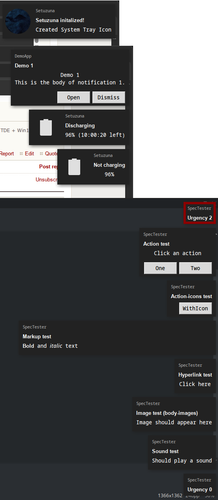
here's a quick preview to my notifications, yes i got a long way to go but i guess its good for starters.. they animated too.. replacement works well too, gotta do grouping.. hyperlink too.. do not distrub mode, adaptive positioning Expandable notif.. kde, xfce4 specific features have to be reimplement too,so far
| Feature / Capability | Implemented |
| -------------------- | ----------- |
| actions              | Yes         |
| body                 | Yes         |
| body-markup          | Yes         |
| body-images          | Yes         |
| body-hyperlinks      | No          |
| icon-static          | Yes         |
| icon-multi           | No          |
| action-icons         | WIP         |
| persistence          | No          |
| sound                | Yes         |
| desktop-entry hint   | No          |
https://iili.io/FZ4cqyG.md.png
Last edited by theasmitkid (2025-08-16 12:11)
Coding & Robotics Enthusiast | Windows 7 x86 @ n2600 · 2GB · 320GB HDD (No graphics acceleration available in linux)
Offline
#10 2025-08-12 23:26
- seb3773
- Member
- From: France
- Registered: 2023-11-01
- Posts: 285
Re: TDE: Keyboard Binding for Window Tiling
Okay so how do I get the currently active theme without using gobject and resolve icon path?
if it's only designed for TDE, the simplest way to find the icons in use for the theme is to look in
$HOME/.trinity/share/config/kdeglobals file, for example if you do in the shell:
cat $HOME/.trinity/share/config/kdeglobals | grep Theme
This should give you the icon theme in use.
or we can look into this file too:
$HOME/.gtkrc-q4os
cat $HOME/.gtkrc-q4os | grep gtk-theme-name=
cat $HOME/.gtkrc-q4os | grep gtk-icon-theme-name=
This will do the trick. But I'm not sure I answered correctly, do you prefer an "other" way to find the theme and icons associated with ?
For what I saw, tools like fastfetch for example are looking in gtk settings files to find this information. But I can search another way if it's not exactly what you want ?
Debian & Q4OS (TDE!!), low-level C, ASM (z80/68k/x86/ARM64), embedded systems, CPU architectures (RISC-V, binary formats, assembly), retro-computing, metal music, guitar and sci-fi.
Offline
#11 2025-08-12 23:29
- seb3773
- Member
- From: France
- Registered: 2023-11-01
- Posts: 285
Re: TDE: Keyboard Binding for Window Tiling
here's a quick preview to my notifications, yes i got a long way to go but i guess its good for starters.. they animated too.. replacement works well too, gotta do grouping.. hyperlink too.. so far
| Feature / Capability | Implemented |
| -------------------- | ----------- |
| actions              | Yes         |
| body                 | Yes         |
| body-markup          | Yes         |
| body-images          | Yes         |
| body-hyperlinks      | No          |
| icon-static          | Yes         |
| icon-multi           | No          |
| action-icons         | WIP         |
| persistence          | No          |
| sound                | Yes         |
| desktop-entry hint   | No          |
Good work ! Can't wait to try it
Debian & Q4OS (TDE!!), low-level C, ASM (z80/68k/x86/ARM64), embedded systems, CPU architectures (RISC-V, binary formats, assembly), retro-computing, metal music, guitar and sci-fi.
Offline
#12 2025-08-12 23:33
- theasmitkid
- Member
- From: NCT of Delhi
- Registered: 2025-01-26
- Posts: 357
Re: TDE: Keyboard Binding for Window Tiling
theasmitkid wrote:Okay so how do I get the currently active theme without using gobject and resolve icon path?
if it's only designed for TDE, the simplest way to find the icons in use for the theme is to look in
$HOME/.trinity/share/config/kdeglobals file, for example if you do in the shell:cat $HOME/.trinity/share/config/kdeglobals | grep Theme
This should give you the icon theme in use.or we can look into this file too:
$HOME/.gtkrc-q4os
cat $HOME/.gtkrc-q4os | grep gtk-theme-name=
cat $HOME/.gtkrc-q4os | grep gtk-icon-theme-name=This will do the trick. But I'm not sure I answered correctly, do you prefer an "other" way to find the theme and icons associated with ?
For what I saw, tools like fastfetch for example are looking in gtk settings files to find this information. But I can search another way if it's not exactly what you want ?
Oh thanks!! I was checking in .configtde and .config that's why I couldn't find them!
To resolve icon path, i believe my current approach is the best one?
Last edited by theasmitkid (2025-08-12 23:37)
Coding & Robotics Enthusiast | Windows 7 x86 @ n2600 · 2GB · 320GB HDD (No graphics acceleration available in linux)
Offline
#13 2025-08-12 23:42
- seb3773
- Member
- From: France
- Registered: 2023-11-01
- Posts: 285
Re: TDE: Keyboard Binding for Window Tiling
To resolve icon path, i believe my current approach is the best one?
I'm not sure, as icon themes can be differents between tqt3/gtk2/gtk3/gtk4, it depends if you only want the icons used by TDE (in kdeglobals), or if you want to retrieve all icons paths used by gtk (2/3/4 versions are independants and can use differents icons paths; it's the same path for everything on my system because I tuned it like that, but maybe not for everyone); in this case I think you have no other way but examine the differents config files
Last edited by seb3773 (2025-08-12 23:44)
Debian & Q4OS (TDE!!), low-level C, ASM (z80/68k/x86/ARM64), embedded systems, CPU architectures (RISC-V, binary formats, assembly), retro-computing, metal music, guitar and sci-fi.
Offline
#14 2025-08-12 23:45
- theasmitkid
- Member
- From: NCT of Delhi
- Registered: 2025-01-26
- Posts: 357
Re: TDE: Keyboard Binding for Window Tiling
theasmitkid wrote:Once again, thankyou for your feedback and acknowledgement! :3
you're welcome ! I'm a regular user of TDE, so I really appreciate everything adding usefull features to it like you did !
I love TDE too! So yeah I'll keep on contributing :3
Another idea for optimization is to cache the xwininfo output and save the overhead data, ancestor and process IDs and if they exist in cache then use like xdotool to simplify the get geom function, nevertheless I feel like xwininfo is pretty important here
Yet another idea is to integrate tiler into a gui wrapper which would allow snapping n quick tiling like win11 (never used it except at school), so this is another reason i wanna use python
Coding & Robotics Enthusiast | Windows 7 x86 @ n2600 · 2GB · 320GB HDD (No graphics acceleration available in linux)
Offline
#15 2025-08-12 23:50
- theasmitkid
- Member
- From: NCT of Delhi
- Registered: 2025-01-26
- Posts: 357
Re: TDE: Keyboard Binding for Window Tiling
theasmitkid wrote:To resolve icon path, i believe my current approach is the best one?
I'm not sure, as icon themes can be differents between tqt3/gtk2/gtk3/gtk4, it depends if you only want the icons used by TDE (in kdeglobals), or if you want to retrieve all icons paths used by gtk (2/3/4 versions are independants and can use differents icons paths; it's the same path for everything on my system because I tuned it like that, but maybe not for everyone); in this case I think you have no other way but examine the differents config files
Makes sense.. is there a way to find out whether notification has been sent from a gtk2/3/4 or qt5/6/tqt app? I don't think there's a hint for that.. looking at kdbusnotifications-trinity source code from Trinity's repo, they also rely on gtk
What approach do you use to handle this issue? using gtk.getcurrenttheme won't give the theme used by qt apps i think
Last edited by theasmitkid (2025-08-12 23:52)
Coding & Robotics Enthusiast | Windows 7 x86 @ n2600 · 2GB · 320GB HDD (No graphics acceleration available in linux)
Offline
#16 2025-08-12 23:50
- seb3773
- Member
- From: France
- Registered: 2023-11-01
- Posts: 285
Re: TDE: Keyboard Binding for Window Tiling
Yet another idea is to integrate tiler into a gui wrapper which would allow snapping n quick tiling like win11 (never used it except at school), so this is another reason i wanna use python
Yes, totally understandable. Python is a good choice, I'm rather a c "guy", it's my primary language for coding, that's why I suggested c (and by the way, I'm "old", well 50 this year and like you may know, it's difficult to learn new tricks for an old monkey like me, I can read and code in python, but I'm not as good and as fast as I can be in c coding) but I understand you made this choice for very good reasons.
Debian & Q4OS (TDE!!), low-level C, ASM (z80/68k/x86/ARM64), embedded systems, CPU architectures (RISC-V, binary formats, assembly), retro-computing, metal music, guitar and sci-fi.
Offline
#17 2025-08-12 23:56
- theasmitkid
- Member
- From: NCT of Delhi
- Registered: 2025-01-26
- Posts: 357
Re: TDE: Keyboard Binding for Window Tiling
Yes, totally understandable. Python is a good choice, I'm rather a c "guy", it's my primary language for coding, that's why I suggested c (and by the way, I'm "old", well 50 this year
Im more of a python guy, it's my primary language, i use c/c++/java/kotlin/c#/lua when I absolutely can not use python (and by the way you're not that old, and it's never too late to learn new things :3 I'm 16 so I'd say I'm the one too young here, I just like coding n robotics so I just do it.. quite a lot, but I've got a healthy life outside my coding life so everything's good )
Last edited by theasmitkid (2025-08-12 23:57)
Coding & Robotics Enthusiast | Windows 7 x86 @ n2600 · 2GB · 320GB HDD (No graphics acceleration available in linux)
Offline
#18 2025-08-12 23:57
- seb3773
- Member
- From: France
- Registered: 2023-11-01
- Posts: 285
Re: TDE: Keyboard Binding for Window Tiling
is there a way to find out whether notification has been sent from a gtk2/3/4 or qt5/6/tqt app? I don't think there's a hint for that.. looking at kdbusnotifications-trinity source code from Trinity's repo, they also rely on gtk
What approach do you use to handle this issue? using gtk.getcurrenttheme won't give the theme used by qt apps i think
If you rely on libnotify like I do, I'm afraid there is no way to find out the toolkit or framework used to send the notifications, nor standard field in the notification spec or libnotify API that indicates this...
Maybe we can do some heuristics by inspecting the app_name or app_icon fields set by the application when sending a notification, but I'm afraid this will be a bit complex
Last edited by seb3773 (2025-08-13 00:02)
Debian & Q4OS (TDE!!), low-level C, ASM (z80/68k/x86/ARM64), embedded systems, CPU architectures (RISC-V, binary formats, assembly), retro-computing, metal music, guitar and sci-fi.
Offline
#19 2025-08-13 00:00
- seb3773
- Member
- From: France
- Registered: 2023-11-01
- Posts: 285
Re: TDE: Keyboard Binding for Window Tiling
I just like coding n robotics so I just do it.. quite a lot, but I've got a healthy life outside my coding life so everything's good
Yeah, me too, it's very important
By the way I'm impressed by your work at only 16
At your age, I was just learning basic language on a C64 :-p , so the amount of languages you can understand and use is impressive to me
Debian & Q4OS (TDE!!), low-level C, ASM (z80/68k/x86/ARM64), embedded systems, CPU architectures (RISC-V, binary formats, assembly), retro-computing, metal music, guitar and sci-fi.
Offline
#20 2025-08-13 00:01
- theasmitkid
- Member
- From: NCT of Delhi
- Registered: 2025-01-26
- Posts: 357
Re: TDE: Keyboard Binding for Window Tiling
theasmitkid wrote:is there a way to find out whether notification has been sent from a gtk2/3/4 or qt5/6/tqt app? I don't think there's a hint for that.. looking at kdbusnotifications-trinity source code from Trinity's repo, they also rely on gtk
What approach do you use to handle this issue? using gtk.getcurrenttheme won't give the theme used by qt apps i think
If you rely on libnotify like I do, I'm afraid there is no way to find out whether notification has been sent from, nor standard field in the notification spec or libnotify API that indicates the toolkit or framework used to send the notification...
Maybe we can do some heuristics by inspecting the app_name or app_icon fields set by the application when sending a notification, but I'm afraid this will be a bit complex
I currently do rely on libnotify but would probably write my notification sender later, but still 3rd party apps might be using libnotify so.. i think it won't work out
Maybe best way is to just use your distro's desktop environment's icon theme (waterleaf-dark/tde in our case) and fallback to gtk/qt when not found.. maybe add a settings window which helps user choose which icon theme to use
Coding & Robotics Enthusiast | Windows 7 x86 @ n2600 · 2GB · 320GB HDD (No graphics acceleration available in linux)
Offline
#21 2025-08-13 00:05
- seb3773
- Member
- From: France
- Registered: 2023-11-01
- Posts: 285
Re: TDE: Keyboard Binding for Window Tiling
I currently do rely on libnotify but would probably write my notification sender later, but still 3rd party apps might be using libnotify so.. i think it won't work out
Yes, libnotify is a "standard" I think, so if you want your app to be sort of "universal" you have no other good choices. Every app using notifications I tried are relying on libnotify.
Maybe best way is to just use your distro's desktop environment's icon theme (waterleaf-dark/tde in our case) and fallback to gtk/qt when not found.. maybe add a settings window which helps user choose which icon theme to use
Yes, seems to be the best compromise to me too. For qsidebar, I'm using icon sent by the notifier if any, else I'm using a generic icon.
Last edited by seb3773 (2025-08-13 00:07)
Debian & Q4OS (TDE!!), low-level C, ASM (z80/68k/x86/ARM64), embedded systems, CPU architectures (RISC-V, binary formats, assembly), retro-computing, metal music, guitar and sci-fi.
Offline
#22 2025-08-13 00:07
- theasmitkid
- Member
- From: NCT of Delhi
- Registered: 2025-01-26
- Posts: 357
Re: TDE: Keyboard Binding for Window Tiling
theasmitkid wrote:I just like coding n robotics so I just do it.. quite a lot, but I've got a healthy life outside my coding life so everything's good
Yeah, me too, it's very important
By the way I'm impressed by your work at only 16
At your age, I was just learning basic language on a C64 :-p , so the amount of languages you can understand and use is impressive to me
Oh i learnt coding about 9~10 years ago, it was just scatch.mit.edu on an Intel atom hp mini pc (4301tu) tho, won some awards, learnt html/js/css and python.. then learnt c/c++/java/gdscipt/lua and ai/ml with python during COVID, then got myself into a new school, learnt robotics & ai/ml, more completions (see my signature)
hehe coding been a part of my life since forever :3
Thankyou btw~ :3
Last edited by theasmitkid (2025-08-13 00:09)
Coding & Robotics Enthusiast | Windows 7 x86 @ n2600 · 2GB · 320GB HDD (No graphics acceleration available in linux)
Offline
#23 2025-08-13 00:16
- seb3773
- Member
- From: France
- Registered: 2023-11-01
- Posts: 285
Re: TDE: Keyboard Binding for Window Tiling
This is great, really, and very promising for the future We need real coders I think, I don't believe in IA vibe coding or sh** like that. Everything I saw that was coded by an "IA" is bad, badly optimized, non-sense, ... and the worse is that people who are using it don't understand what they do...
So people like you are very important in my opinion.
One more thing, maybe this conversation must continue in development section now ? Because we are talking more about development than "tips and tutorials" at this point
Debian & Q4OS (TDE!!), low-level C, ASM (z80/68k/x86/ARM64), embedded systems, CPU architectures (RISC-V, binary formats, assembly), retro-computing, metal music, guitar and sci-fi.
Offline
#24 2025-08-13 00:19
- theasmitkid
- Member
- From: NCT of Delhi
- Registered: 2025-01-26
- Posts: 357
Re: TDE: Keyboard Binding for Window Tiling
This is great, really, and very promising for the future
So people like you are very important in my opinion.
Yeah agreed, I've got a couple self proclaimed pro coders classmates who just use AI for the simplest of assignments.. feels weird to be in between or such people
One more thing, maybe this conversation must continue in development section now ? Because we are talking more about development than "tips and tutorials" at this point
agreed, let's continue on https://www.q4os.org/forum/viewtopic.php?id=5577
Last edited by theasmitkid (2025-12-18 12:42)
Coding & Robotics Enthusiast | Windows 7 x86 @ n2600 · 2GB · 320GB HDD (No graphics acceleration available in linux)
Offline
#25 2025-08-13 04:02
- crosscourt
- Banned
- Registered: 2017-05-07
- Posts: 2,706
Re: TDE: Keyboard Binding for Window Tiling
Click on report and send a message to the devs about what you want moved.
Offline
- Registered users online in this topic: 0, guests: 1