You are not logged in.
- Topics: Active | Unanswered
#1 2026-02-06 18:05
- bin
- Member

- From: U.K.
- Registered: 2016-01-28
- Posts: 1,608
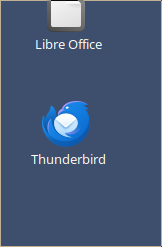
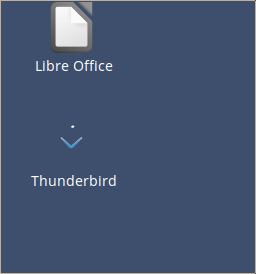
Thunderbird icon almost vanishes when scaling set to monitor default
Very odd this.
Monitor runs at 102 dpi with 1.06 scaling by default.
When using this setting the Thunderbird Desktop icon all but vanishes.
If I revert to basic 96 dpi with 1.00 scaling it appears.
Other desktop icons are not affected.
Icon in menu is ok
If I use Add to Desktop from the menu the new one is still corrupted.
Altering the font, spacing, test width do not make any difference
Last edited by bin (2026-02-06 18:05)
Offline
#2 2026-02-06 18:34
- q4osteam
- Q4OS Team

- Registered: 2015-12-06
- Posts: 6,425
- Website
Re: Thunderbird icon almost vanishes when scaling set to monitor default
Yes, this is a known issue related to the Trinity image rendering engine. As far as we know, only the Thunderbird icon is affected, although other some icons may fail as well. We will add this issue to our bug list, even though it is a Trinity native bug.
Offline
#3 2026-02-07 12:39
- bin
- Member
- From: U.K.
- Registered: 2016-01-28
- Posts: 1,608
Re: Thunderbird icon almost vanishes when scaling set to monitor default
Workaround is to edit the Desktop entry and point directly to an icon in /usr/share/thunderbird/chrome/icons/default e.g. /usr/share/thunderbird/chrome/icons/default/default48.png

Offline
#4 2026-10-10 08:56
- HerrAbisZ
- Member

- From: noch Wien
- Registered: 2023-10-26
- Posts: 38
- Website
Re: Thunderbird icon almost vanishes when scaling set to monitor default
Sorry. I can`t find this
but
1,06 Skalierung
1,09 is also ok
BITTE helft einander! Mehr auf meinem Blog http://herrabisz.wordpress.com/ http://www.youtube.com/user/HerrAbisZ2 + 3
Offline
- Registered users online in this topic: 0, guests: 1