You are not logged in.
- Topics: Active | Unanswered
Pages: 1
#1 2025-10-25 20:05
- pzeta59
- Member
- Registered: 2025-02-18
- Posts: 4
Error installing Q4OS 6.2
Hi, this is the first I post to the forum.
I tryed to install Q4OS 6.2 Plasma on an existing partition of my PC (HP Z220 workstation 240 GB SSD, 16 GB RAM) and I get an error in the installer. On this SSD I have 4 partition: 2 for Windows 10, a partition with working Q4OS 5.8 and another partition where I installed some time ago Q4OS 6.1.
I first tryed to substitute a partition, then, after the error, I format the partition and tryed again to install, but with the same error.
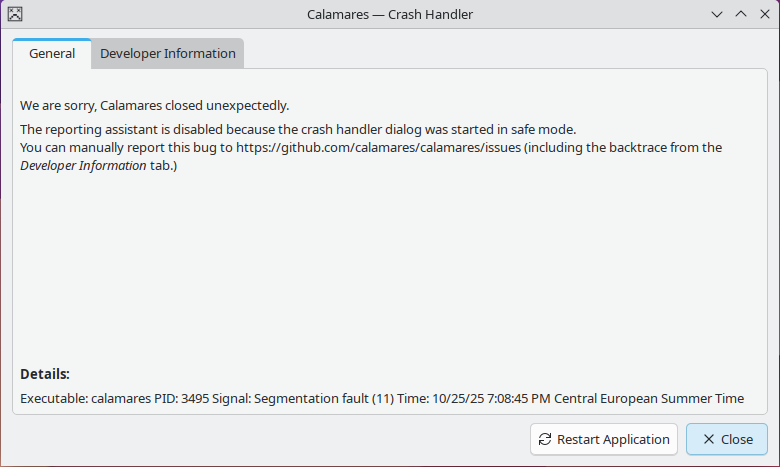
This is the information a get from calamares:
Application: Calamares (calamares), signal: Segmentation fault
[KCrash Handler]
#7 0x00007f075fa18388 in QStandardItem::child(int, int) const () from /lib/x86_64-linux-gnu/libQt6Gui.so.6
#8 0x00007f075fa22819 in QStandardItemModel::flags(QModelIndex const&) const () from /lib/x86_64-linux-gnu/libQt6Gui.so.6
#9 0x00007f07612a2659 in QAbstractItemView::currentChanged(QModelIndex const&, QModelIndex const&) () from /lib/x86_64-linux-gnu/libQt6Widgets.so.6
#10 0x00007f07612e3b33 in QListView::currentChanged(QModelIndex const&, QModelIndex const&) () from /lib/x86_64-linux-gnu/libQt6Widgets.so.6
#11 0x00007f075f194e57 in QObject::event(QEvent*) () from /lib/x86_64-linux-gnu/libQt6Core.so.6
#12 0x00007f07610b4d46 in QFrame::event(QEvent*) () from /lib/x86_64-linux-gnu/libQt6Widgets.so.6
#13 0x00007f0760fcb9b5 in QApplicationPrivate::notify_helper(QObject*, QEvent*) () from /lib/x86_64-linux-gnu/libQt6Widgets.so.6
#14 0x00007f075f1555b0 in QCoreApplication::notifyInternal2(QObject*, QEvent*) () from /lib/x86_64-linux-gnu/libQt6Core.so.6
#15 0x00007f075f156117 in QCoreApplicationPrivate::sendPostedEvents(QObject*, int, QThreadData*) () from /lib/x86_64-linux-gnu/libQt6Core.so.6
#16 0x00007f075f367a17 in ?? () from /lib/x86_64-linux-gnu/libQt6Core.so.6
#17 0x00007f075d995385 in ?? () from /lib/x86_64-linux-gnu/libglib-2.0.so.0
#18 0x00007f075d9975b7 in ?? () from /lib/x86_64-linux-gnu/libglib-2.0.so.0
#19 0x00007f075d997d20 in g_main_context_iteration () from /lib/x86_64-linux-gnu/libglib-2.0.so.0
#20 0x00007f075f365323 in QEventDispatcherGlib::processEvents(QFlags<QEventLoop::ProcessEventsFlag>) () from /lib/x86_64-linux-gnu/libQt6Core.so.6
#21 0x00007f075f157893 in QEventLoop::exec(QFlags<QEventLoop::ProcessEventsFlag>) () from /lib/x86_64-linux-gnu/libQt6Core.so.6
#22 0x00007f075f15918a in QCoreApplication::exec() () from /lib/x86_64-linux-gnu/libQt6Core.so.6
#23 0x0000557b40874098 in main ()
[Inferior 1 (process 3495) detached]
I have also a screenshot but don't know how to attach to the post.
Thanks
Offline
#2 2025-10-26 16:26
- q4osteam
- Q4OS Team

- Registered: 2015-12-06
- Posts: 6,381
- Website
Re: Error installing Q4OS 6.2
I first tryed to substitute a partition, then, after the error, I format the partition and tryed again to install, but with the same error.
Are you trying to replace a partition ?
Please run:
$ lsblk
$ sudo blkid
and post back the output.
I have also a screenshot but don't know how to attach to the post.
Your account has been promoted, so you are now able to attach files up to 300kB in size.
Offline
#3 2025-10-26 21:07
- pzeta59
- Member
- Registered: 2025-02-18
- Posts: 4
Re: Error installing Q4OS 6.2
adminq@debian:~$ lsblk
NAME MAJ:MIN RM SIZE RO TYPE MOUNTPOINTS
loop0 7:0 0 1.6G 1 loop /run/live/rootfs/filesystem.squashfs
sda 8:0 0 931.5G 0 disk
├─sda1 8:1 0 16M 0 part
└─sda2 8:2 0 931.5G 0 part
sdb 8:16 0 223.6G 0 disk
├─sdb1 8:17 0 3G 0 part
├─sdb2 8:18 0 120G 0 part
├─sdb3 8:19 0 60G 0 part
└─sdb4 8:20 0 40.6G 0 part
sdc 8:32 0 931.5G 0 disk
└─sdc1 8:33 0 931.5G 0 part
sdd 8:48 0 465.8G 0 disk
└─sdd1 8:49 0 465.8G 0 part
sde 8:64 1 28.8G 0 disk
├─sde1 8:65 1 28.8G 0 part
└─sde2 8:66 1 32M 0 part
sdf 8:80 0 465.8G 0 disk
└─sdf1 8:81 0 465.8G 0 part
adminq@debian:~$ sudo blkid
/dev/loop0: BLOCK_SIZE="1048576" TYPE="squashfs"
/dev/dm-1: LABEL="Ventoy-32GB" UUID="4E21-0000" BLOCK_SIZE="512" TYPE="exfat"
/dev/sdf1: LABEL="Seagate Expansion Drive" BLOCK_SIZE="512" UUID="78A071E4A071A8F0" TYPE="ntfs" PARTUUID="5a62b084-01"
/dev/sdd1: LABEL="DATI-500GB" BLOCK_SIZE="512" UUID="9492BD1D92BD04B0" TYPE="ntfs" PARTUUID="282c282b-01"
/dev/sdb4: UUID="03e48717-1eec-4cad-94ef-1c4b8f66abac" BLOCK_SIZE="4096" TYPE="ext4" PARTUUID="12d82935-04"
/dev/sdb2: LABEL="WINX" BLOCK_SIZE="512" UUID="C86E71976E717F4E" TYPE="ntfs" PARTUUID="12d82935-02"
/dev/sdb3: LABEL="Q4OS-Plasma" UUID="59081dcd-cf91-4f25-a55d-a6859ec47596" BLOCK_SIZE="4096" TYPE="ext4" PARTUUID="12d82935-03"
/dev/sdb1: LABEL="System-reserviert" BLOCK_SIZE="512" UUID="FC866F54866F0E88" TYPE="ntfs" PARTUUID="12d82935-01"
/dev/dm-0: BLOCK_SIZE="2048" UUID="2025-10-21-10-07-35-00" LABEL="Q4OS 6 Andromeda" TYPE="iso9660" PTUUID="2dda9c47" PTTYPE="dos"
/dev/sde1: LABEL="Ventoy-32GB" UUID="4E21-0000" BLOCK_SIZE="512" TYPE="exfat" PARTUUID="e0efb9fd-01"
/dev/sdc1: LABEL="DATI" BLOCK_SIZE="512" UUID="AEDCD029DCCFEA23" TYPE="ntfs" PARTUUID="f3f6cb54-01"
/dev/sda2: LABEL="DATI-1TB" BLOCK_SIZE="512" UUID="5220ACAC20AC990D" TYPE="ntfs" PARTLABEL="Basic data partition" PARTUUID="7af46cf0-ad9b-460c-8cd6-d10418aebe34"
/dev/sda1: PARTLABEL="Microsoft reserved partition" PARTUUID="b5248cdb-71c2-46c5-b69c-c2655d3b5083"
Offline
#4 2025-10-26 21:33
- q4osteam
- Q4OS Team
- Registered: 2015-12-06
- Posts: 6,381
- Website
Re: Error installing Q4OS 6.2
Are you trying to replace a partition ? Which one ?
Offline
#5 2025-10-26 22:07
- pzeta59
- Member
- Registered: 2025-02-18
- Posts: 4
Re: Error installing Q4OS 6.2
Yes, i tryed to replace sdb4 partition.
In this partition I installed in september Q4OS 6.1.

Last edited by pzeta59 (2025-10-27 08:39)
Offline
#6 2025-10-27 13:38
- hchiper
- Member

- From: Belgium
- Registered: 2020-07-28
- Posts: 835
Re: Error installing Q4OS 6.2
Since Calamares crashed, I would suggest to check first your install media (USB stick).
Please refer to the short description here.
Q4OS machine: Samsung R519 - Pentium T4200 2.0 GHz - 4 GB RAM - 500 GB SSD
Offline
#7 2025-10-27 21:02
- pzeta59
- Member
- Registered: 2025-02-18
- Posts: 4
Re: Error installing Q4OS 6.2
I create a new install media on a different USB stick using Rufus and the problem was solved.
I think it wasn't a USB stick problem, but the fact that this USB stick was created using Ventoy, with other ISO files on it.
Offline
Pages: 1
- Registered users online in this topic: 0, guests: 1