You are not logged in.
- Topics: Active | Unanswered
#51 2016-09-08 20:26
- rafaelramos
- Member

- From: Brazil
- Registered: 2016-07-19
- Posts: 146
Re: Show us your desktop
I'm probably going to get a lot of hate for this, but Q4OS running Debian made to look like Win XP
I like! 
The look of XP is one of the coolest and classics that exist!
Offline
#52 2016-09-08 20:52
- ThisGuy1996
- Member
- Registered: 2016-02-02
- Posts: 176
Re: Show us your desktop
I know right! I feel that XP was the last good Windows OS Microsoft created.
Offline
#53 2016-10-14 13:51
- bin
- Member

- From: U.K.
- Registered: 2016-01-28
- Posts: 1,610
Re: Show us your desktop
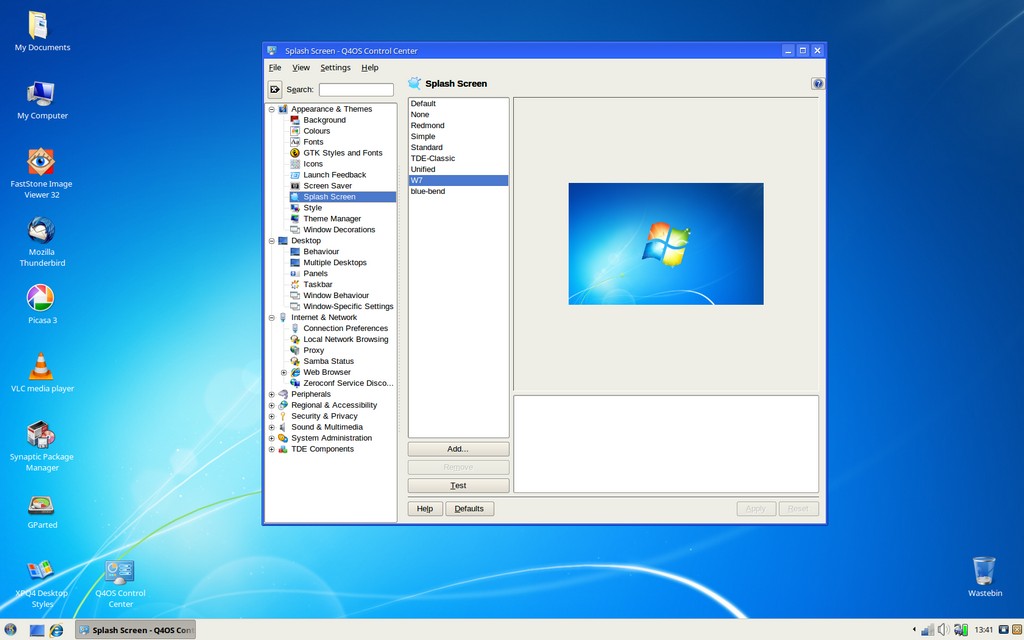
Started up on a projector this morning and someone said "I see you've finally upgraded to Windows 10 then.........."
Me prefer W7ish look - wallpaper fixed from loginscreen through splash screen to desktop wallpaper
Noto Sans UI plus Liberation Sans for applications
Last edited by bin (2016-10-14 13:56)
Offline
#54 2016-10-14 17:53
- Dai_trying
- Member

- From: UK
- Registered: 2015-12-14
- Posts: 2,994
Re: Show us your desktop
My standard response would have been
The box said install windows 10 or better, so I installed Q4OS

Offline
#55 2016-10-15 03:12
- ghostdawg
- Member

- From: USA
- Registered: 2016-09-19
- Posts: 69
Re: Show us your desktop
My Openbox WM with tint2, Sakura terminal & Dreamchess...
Dell Optiplex 760 - Quad Core | 4gb | 250gb | Mageia 5, Salix 14.2, Q4OS
Lenovo Thinkpad T420 | 4gb | 120gb | Mageia 5, Debian Testing
Offline
#56 2016-11-14 18:02
- Senas Komunistas
- Member

- From: Lithuania
- Registered: 2016-04-17
- Posts: 52
Re: Show us your desktop
My desktop. Simple and beautiful. I think, Q4OS 1.8, Orion, is the best release
Offline
#57 2016-11-19 19:06
- MC
- Member

- Registered: 2015-12-23
- Posts: 182
Re: Show us your desktop
Just a couple of backgrounds to share. I originally made them for Q4OS Scorpion, then realized Scorpion will be stable in the future.
Q4OS 1.8
1920x1200 widescreen
1280x1024 fullscreen
Q4OS 2 Scorpion - Testing
1920x1200 widescreen
1280x1024 fullscreen
Q4OS running Xfce
Offline
#58 2016-11-20 18:32
- MC
- Member
- Registered: 2015-12-23
- Posts: 182
Re: Show us your desktop
One more to share.
1920x1200 16:10 widescreen
1920x1080 16:9 widescreen
1280x1024 5:4 fullscreen
Q4OS running Xfce
Offline
#59 2016-11-21 06:46
- DavidB
- Member

- From: Saskatchewan, Canada
- Registered: 2015-12-06
- Posts: 180
- Website
Re: Show us your desktop
Very nice, MC!
Current setup: Acer Aspire One D257 / Q4OS Centaurus / TDE / SeaMonkey 2.53.8.1
Offline
#60 2016-11-21 09:41
- Dai_trying
- Member
- From: UK
- Registered: 2015-12-14
- Posts: 2,994
Re: Show us your desktop
Yes, Very nice MC, I already use one of your other designs as my regular wallpaper (blueprint) on my dev machines, and now will use your Scorpion wallpaper on my test boxes, thanks for sharing.
Offline
#61 2016-11-21 19:22
- MC
- Member
- Registered: 2015-12-23
- Posts: 182
Re: Show us your desktop
@DavidB & Dia_trying: Thanks for the feedback!
Here's another I made today.
1920x1080 (one size fits all)

Here's how it looks on my 1280x1024 TDE


Also, my Q4 Xfce with the previous wallpaper I posted

Q4OS running Xfce
Offline
#62 2016-12-27 17:17
- MC
- Member
- Registered: 2015-12-23
- Posts: 182
Re: Show us your desktop
In an attempt to "retire" my old CrunchBang Waldorf, I dual-booted and created a "look-alike" with Q4OS, using Xfce instead of OpenBox. The only visual difference is the CPU meter in the bottom left corner, Q4OS-ORION instead of CRUNCHBANG. (Each letter changes color as CPU usage gets higher.)
Hey, why not? Q4OS strives to be a 2000/XP/7 "look-alike".

Q4OS running Xfce
Offline
#63 2017-01-02 13:33
- Senas Komunistas
- Member
- From: Lithuania
- Registered: 2016-04-17
- Posts: 52
Re: Show us your desktop
Q4OS 1.8, Orion. I used Windows XP Luna theme...

Offline
#64 2017-01-02 14:07
- bin
- Member
- From: U.K.
- Registered: 2016-01-28
- Posts: 1,610
Re: Show us your desktop
If it helps, you can get rid of the shadow text for the desktop icons.
Rt click Desktop>Configure Desktop>Advanced Options>Uncheck Enable Shadow.
You can also play with the values in Width for Icon Text - I set mine at 120
Good to see another fan of MC - it's been my all time favourite program since I first used it back in 1998.
Last edited by bin (2017-01-02 14:15)
Offline
#65 2017-01-03 12:50
- Senas Komunistas
- Member
- From: Lithuania
- Registered: 2016-04-17
- Posts: 52
Re: Show us your desktop
If it helps, you can get rid of the shadow text for the desktop icons.
Rt click Desktop>Configure Desktop>Advanced Options>Uncheck Enable Shadow.
You can also play with the values in Width for Icon Text - I set mine at 120Good to see another fan of MC - it's been my all time favourite program since I first used it back in 1998.
Thank you.
Here another Q4OS 1.8, Orion screenshot. Windows 7 theme 
Offline
#66 2017-01-05 18:03
- MC
- Member
- Registered: 2015-12-23
- Posts: 182
Re: Show us your desktop
A new Scorpion wallpaper.
1920x1200 16:10 Widescreen
1920x1080 16:9 Widescreen
1280x1024 5:4 Fullscreen
Here's my current DT with this wallpaper:

Last edited by MC (2017-01-05 18:26)
Q4OS running Xfce
Offline
#67 2017-01-24 15:24
- tlmiller76
- Member
- From: AZ, USA
- Registered: 2016-11-29
- Posts: 503
Re: Show us your desktop
I've updated my desktop since I've been (re)learning trinity and had gotten used to KDE5. Now with modified system icons in the bourbon menu. Yes, I'm a fan of the Lotus Esprit V-8. I actually wanted to get one not long ago but couldn't find a yellow stick shift one for sale anywhere in the US.

Q4OS Trinity machine - HP Probook 445 G11. AMD Ryzen 7 7735U, 16GB DDR5, 512GB m.2 NVMe SSD, Radeon RX780M, MediaTek MT7922 (AMD RX616) Wifi 6E + BT 5.2, 14" WUXGA 400-nit LCD.
Offline
#68 2017-02-09 09:25
- MC
- Member
- Registered: 2015-12-23
- Posts: 182
Re: Show us your desktop
1920x1080 Logo - left
1920x1080 Logo - right
1280x1024 Logo - left
1280x1024 Logo - right
Q4OS running Xfce
Offline
#69 2017-02-25 15:15
- Dai_trying
- Member
- From: UK
- Registered: 2015-12-14
- Posts: 2,994
Re: Show us your desktop
@MC
Would it be possible to get a copy of the scorpion from your new scorpion wallpaper with a transparent background to overlay on my existing wallpaper (using gimp) I think it looks AWESOME!
EDIT:
Not to worry @MC, I grabbed it in gimp, but thanks for providing it!
Here is my new background, it helps to know I'm in scorpion and my orion desktop is blueprint without the scorpion.

Last edited by Dai_trying (2017-02-25 17:26)
Offline
#70 2017-02-26 06:29
- MC
- Member
- Registered: 2015-12-23
- Posts: 182
Re: Show us your desktop
Hi Dia. Glad you like it.
Just in case you want it again, here ya go. Just right-click on it to download. It has a clear background.

Feel free to add it to any wallpaper you like.
Cheers!
MC
Q4OS running Xfce
Offline
#71 2017-02-26 11:21
- Dai_trying
- Member
- From: UK
- Registered: 2015-12-14
- Posts: 2,994
Re: Show us your desktop
Thanks MC, I will make good use of it
Offline
#72 2017-03-06 04:10
- MC
- Member
- Registered: 2015-12-23
- Posts: 182
Re: Show us your desktop
My latest desktop with the scorpion logo debossed into the "computer case".

Q4OS running Xfce
Offline
#73 2017-03-08 19:36
- MC
- Member
- Registered: 2015-12-23
- Posts: 182
Re: Show us your desktop
Just a few more wallpapers to share.
They are all 1920x1200 - One size fits all.


Last edited by MC (2017-03-08 20:00)
Q4OS running Xfce
Offline
#74 2017-03-08 20:15
- Dai_trying
- Member
- From: UK
- Registered: 2015-12-14
- Posts: 2,994
Re: Show us your desktop
Another selection of fine wallpapers MC, Thanks for sharing
Offline
#75 2017-03-09 13:20
- q4osteam
- Q4OS Team

- Registered: 2015-12-06
- Posts: 6,440
- Website
Re: Show us your desktop
@MC
Thank you for that cool wallpapers. We have added some of your wallpapers to the Scorpion testing, so they will be available for all Scorpion users.
Offline
- Registered users online in this topic: 0, guests: 1